
VEED Alternatives In 2026: Top 5 Tools You Must Try Today!
Exploring VEED alternatives in 2026
Video editing has come a long way, folks. Remember struggling with Adobe Premiere Pro tutorials? With advancements in AI, forget YouTube tutorials, most edits can be achieved with one click.
VEED started out as a video editor for the newbie. During the pandemic, when everyone got crazy about video, they added AI features. Its automatic subtitles, text to video and even AI avatar got everyone buzzing.
Although some users find VEED’s pricing a tad too high, while others crave features that VEED just doesn't offer. This may be why some of you are looking for VEED alternatives.
So yes if you’re here for a Veed.io alternative app, we’ve got you covered. We evaluate tools that have emerged in the AI video space, all claiming to make video editing a breeze.
The ideal tool for you depends on your specific needs, budget, and whether you prefer your video editor to do backflips or just stick a somersault landing. That’s why we’ve combined 5 Veed.io alternative apps, comparing features, price and reviews to help you make the most informed decision.
Ready to see if these Veed.io alternative apps are worth the hype? Let's find out.
Skip for top 5 VEED alternatives.
⚡ TL;DR — the quick verdict
- Best for captions + full design: Typito — auto-captions and stylish templates inside a complete video editor.
- Best all-round AI editor: VEED. Best for long→short repurposing: OpusClip.
- Best free mobile editor: CapCut. Fastest just-subtitles tool: Zubtitle.
- All five have a free plan; the right pick depends on whether you want captions only or captions plus a full editor.
What’s the best VEED alternative?
The best VEED alternative depends on your goal. Typito is the top pick for stylish auto-captions inside a full video editor; OpusClip for turning long videos into TikToks, Reels and Shorts in one click; CapCut for free mobile editing; and Zubtitle for fast subtitles — and all four have a free plan.
Why VEED alternatives matter in 2026
It's 2026, short-form content is king, everyone's a video editor and new apps for video are popping up daily, claiming to be the one stop shop. Feeling overwhelmed? We get it. One day you're knee-deep in Premiere Pro, the next there's a tool to add stylish caption templates to your videos in one click. Looking at you, Typito– more on this later.
The truth is that the AI video space is really worth looking at in 2026. Especially for marketing and content creation. Some of these tools can save you hours, but there are many out there just trying to hop on the AI buzzword bandwagon. They're either not useful, pretending to be something they're not, or are just poorly executed proof-of-concepts.
While VEED has been a faithful companion, many users are now looking for Veed alternatives that offer better value, more features, or cater to specific use cases like short-form video editing for social media.

Think of it this way: VEED is like that one-size-fits-all t-shirt. Sure, it covers the basics, but wouldn't you rather have a tailored suit that makes you look like a million bucks? That's where VEED alternatives come in.
Each alternative caters to different user needs, whether you're a social media influencer, a small business owner, or a marketing professional.
So yes, Veed alternatives matter if you want to make the most of AI and want a tailor made tool, perfect for your use case that also fits your budget.
How to choose the right VEED alternative
Choosing the right Veed.io alternative is like picking the perfect avocado - it requires careful consideration and a bit of intuition. Here are some factors to keep in mind.
- Ease of use: Is the interface more intuitive for your specific use case? Sometimes if you need an app for editing an Instagram Reel you may require an interface that is programmed to do this instead of a more comprehensive tool that can do everything.
- Pricing: Will it cost you an arm and a leg, or just a finger? Prepare a budget, think of how much you would Ideally like to spend for your video needs so you can commit to a tool that you know you can afford.
- Captioning accuracy: Can it understand your accent in the first pass? Captions are very important these days with attention spans reducing and more people preferring to watch video without sound.
- Watermark free trial: Does the free version come with a watermark free trial so it can really count as free? Sometimes free trial options are too restrictive and can keep you from getting a feel of the tool before you make a decision. Choose a tool that lets you download your edited video for free to start, without the watermark. So you can assess the quality and make a better decision.
- Export options: Can you share your masterpiece fast and in high quality. Does it take too long to export? Some of these apps have limits based on the number of minutes your exports take. Choosing an app that can export your videos quickly and in high quality can save you on time and money.
Remember, the best tool for you is the one that fits your specific needs like a glove. So, take these factors into account, and don't be afraid to try out a few options before committing. After all, you wouldn't marry someone after the first date, would you?
| Feature | Typito | VEED | OpusClip | CapCut | Zubtitle |
|---|---|---|---|---|---|
| AI auto-captions | ✓ | ✓ | ✓ | ✓ | ✓ |
| Stylish caption templates | ✓ | ✓ | ✓ | ✓ | ✓ |
| Full video editor | ✓ | ✓ | ✗ | ✓ | ✗ |
| Free plan | ✓ | ✓ | ✓ | ✓ | ✓ |
| Paid from (billed monthly) | $18 | $24 | $15 | $10 | $19 |
| Best for | Captions + full design | All-round AI editing | Long video → shorts | Mobile edits & filters | Fast subtitles |
At-a-glance comparison. Lowest paid tier, monthly billing (annual plans are cheaper). Prices verified Jul 2026 — check each tool for the latest.
5 best VEED alternatives in 2026
Now, let's dive into the crème de la crème of VEED alternatives. We've scoured the internet, tested countless tools, and may have developed carpal tunnel syndrome in the process - all to bring you this comprehensive list. So, without further ado, let's meet the contenders!
1. Typito
Typito is the all-rounder VEED wishes it was. It's an online video editor with AI auto-captions built right in — add accurate, stylish captions to your videos in one click, then design the rest of the video (text, music, brand kit) in the very same place. No jumping between a captioning app and an editor.

Where VEED spreads across many features, Typito keeps captioning front-and-centre: auto-generated captions in the 9:16 aspect ratio, dressed up with on-trend animated templates that actually stop the scroll — but backed by a complete editor when you need more.
And styling them is a click, right in Typito’s editor:
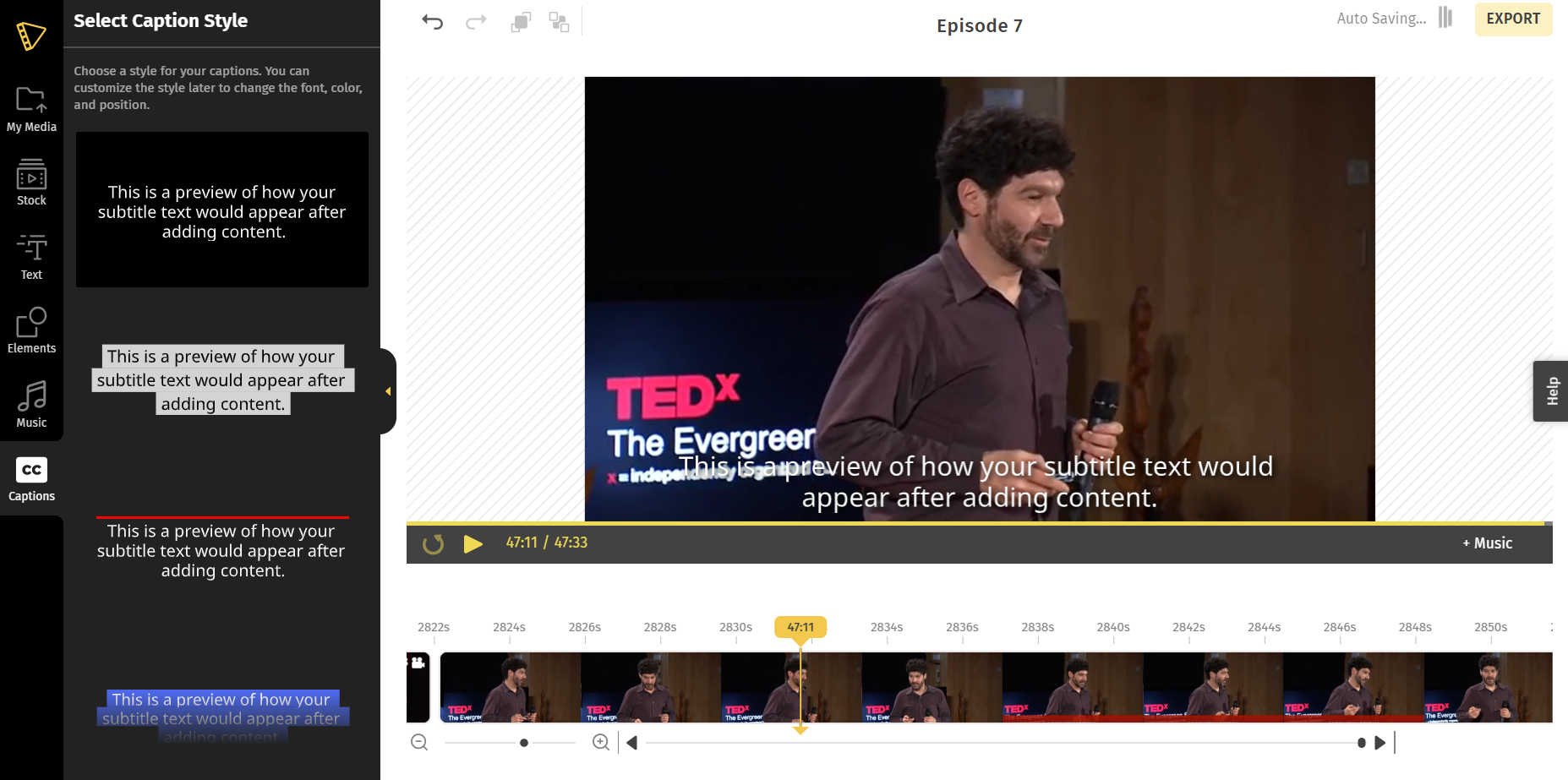
Unlike a caption-only tool, Typito's auto-captions are far from boring — and they sit inside a full editor, so the same project can go from raw clip to captioned, branded, music-backed video without another app.
On pricing, Typito keeps it simple: a free plan to get started, with the Solo plan (from $15/month, billed annually) unlocking auto-captions, watermark-free exports and more.
| VEED | Typito | |
|---|---|---|
| Features | Auto-captioning, auto resize, caption customisation (AI tools, avatars, translation in higher plans) | Auto-captioning + stylish caption templates, inside a full video editor (text, music, transitions, brand kit) |
| Pricing | Free plan, paid from $12/month | Free plan; Solo from $15/month (auto-captions), Pro from $29/month |
| Best For | Beginner-friendly video editing | Stylish captions + full video design in one tool |
Pros
- Auto-captions plus stylish, animated caption templates
- A full video editor around your captions (text, music, brand kit)
- Built for social formats (9:16, 1:1, 16:9)
- Free plan to start; simple paid tiers
Cons
- More than a pure captioning app — a slight learning curve if you only want captions
- Web-based, so you'll need an internet connection
If you want stylish captions and the tools to finish the whole video in one place, Typito is the strongest pick here.
So if you're looking for a Veed.io alternative to add eye-catching captions and design the whole video without breaking a sweat, Typito is it.
Curious to see it in action?
New to captions? Step-by-step guides: add subtitles to a video, auto-generate subtitles, and add captions to Instagram Reels.
2. OpusClip
Opus Clip is like the AI-powered fairy godmother of video editing. Wave your mouse, and voila! Your long form YouTube video is transformed into a short form, social-ready masterpiece.
In comparison to VEED the major difference is that OpusClip is an interface programmed for the video resizing feature so if you were looking at VEED for turning your long form video into short form clips, then OpusClip is definitely a good VEED alternative.
VEED also has an AI feature called VEED Clips that essentially does the same thing as Opus clip but this feature is only available in the pro level of the paid version. The VEED Pro plans start at $29 for annual billing or $55 if billed monthly.
| VEED | Opus Clip | |
|---|---|---|
| Features | Auto-captioning, auto resize, caption customisation, (other cool features like AI tools, avatars and translation are available in the pro plan) | AI-powered video edits, auto-captions |
| Pricing | Free plan, Paid starts at $12/month | Free plan, Paid at $19/month |
| Reviews | 4.5/5 (893+ reviews on G2) | 4.7/5 (106 reviews on G2) |
| Best For | All-round video editing | Turning long form youtube links to social media ready short form videos with AI. |
Pros
- Decent AI.
- Auto repurpose long form content to short form with clips.
- Editing options available.
Cons
- Limited/ basic preset templates for captions
- Slower processing- 6 minutes initial processing, 3 minutes for basic changes to take effect. (this will increase if you want to make more elaborate edits on the output)
- Complicated interface, cluttered workspace.
- Auto captioning lacks accuracy
Pricing
Here are the OpusClip pricing plans
Reviews
Here's are some interesting things OpusClip users have to say.
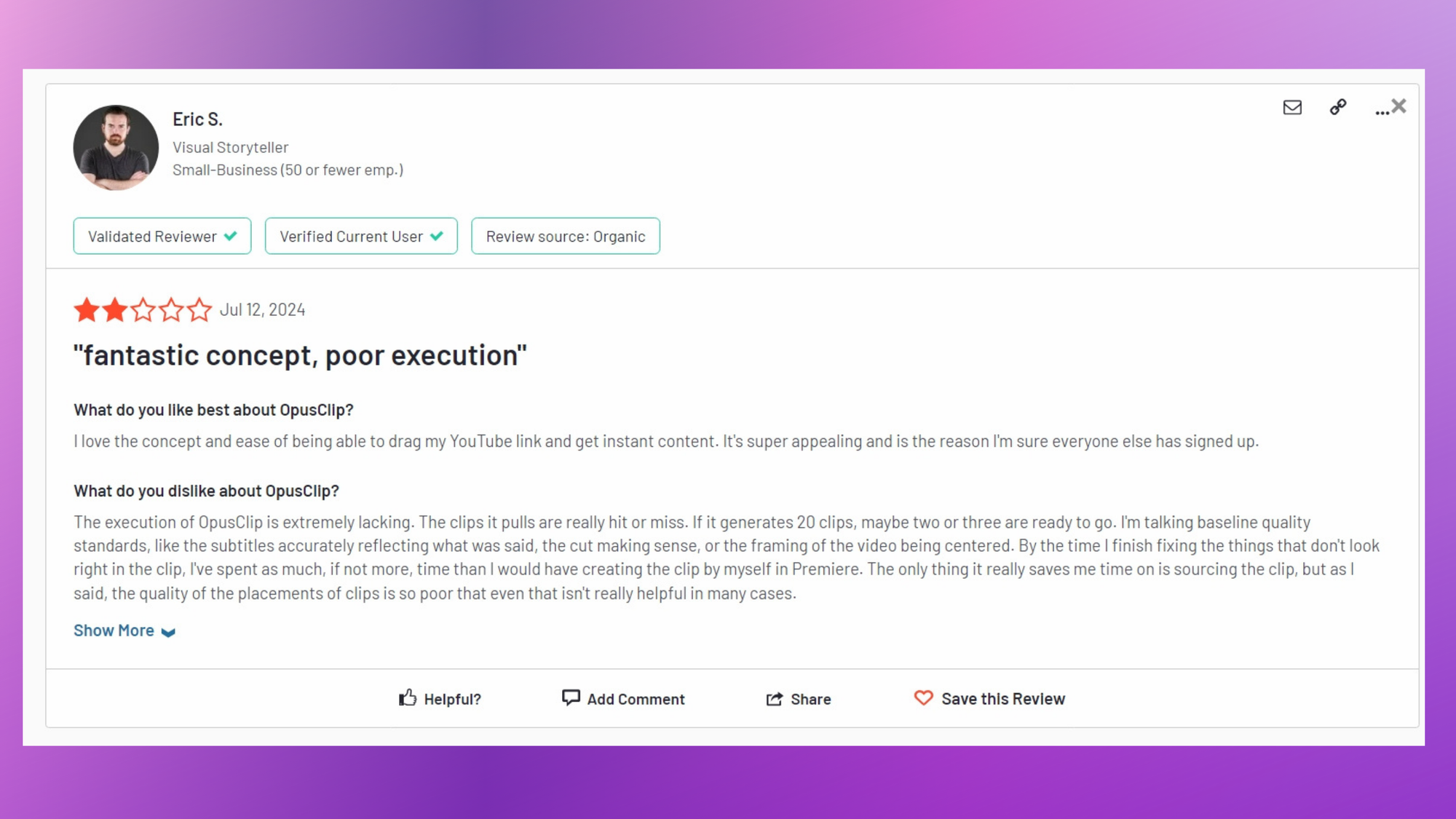
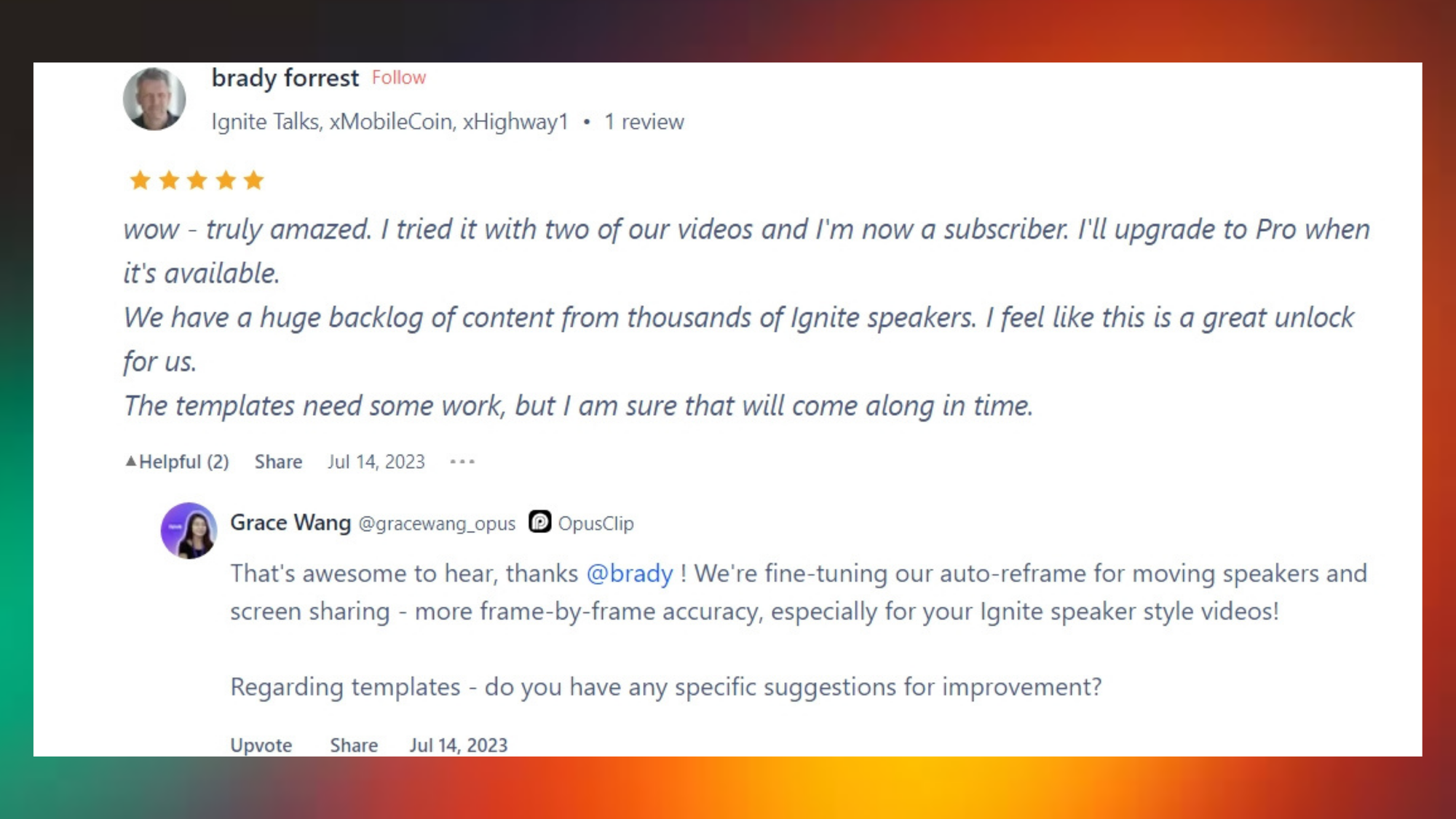
Opus Clip is perfect for those who want their videos to look professionally edited without actually learning how to edit. And the resize capabilities make it a good VEED alternative if you don’t want to pay for the VEED pro plan.
The cool part is that OpusClip is coming up with a ClipAnything where it’s not just YouTube content but you can turn any video clip into social media ready short form content using AI.
3. Submagic
Submagic is an AI editor, apt for editing short form, 9:16 videos. It offers various options to edit your auto-captions, including color, position, transcriptions and it even has translation and b-roll features.
It differs from VEED because it is more specific to short form content, including Captions styles used by popular creators like Mr Beast and Alex Homazi.
This is handy if you’re looking for a video editor to make viral content for your TikToks, Instagram Reels and YouTube Shorts.
| VEED | Submagic | |
|---|---|---|
| Features | Auto-captioning, auto resize, caption customisation, (other cool features like AI tools, avatars and translation are available in the pro plan) | Auto-captioning, exports, multiple languages |
| Pricing | Free plan, Paid starts at $12/month | Free plan, Paid a $12/month |
| Reviews | 4.5/5 (893+ reviews on G2) | 4.7/5 (291 reviews on Trustpilot) |
| Best For | Beginner-friendly video editing | Efficient captioning for short-form content |
Pros
- Significantly reduces video editing time, especially for captions
- User-friendly interface, suitable for non-tech-savvy users
- Responsive and helpful customer support
- Rich features including auto-captions, templates, b-rolls, and effects
- Offers custom styles and emojis
Cons
- Limited text customization options
- B-roll integration could be more user-friendly
- Occasional caption alignment and timing issues
- Export challenges, including lag and multi-video limitations
- Complex account management section
- Some users desire more flexible pricing based on usage
Pricing
If you’re looking for a short form editor. Check out submagic, who knows, it might be the right Veed.io alternative for you.
4 . CapCut
Capcut is popularly known as the TikTok video editor app. That's because It’s owned by Byte Dance. The same company that owns TikTok.
CapCut, like VEED, is a user-friendly video editor popular among social media content creators. While VEED shines with its AI features, CapCut stands out for its comprehensive toolset and versatility.
Both aim to simplify video creation, but CapCut's extensive feature range might appeal more to those seeking a one-stop editing solution without the AI focus of VEED.
| VEED | CapCut | |
|---|---|---|
| Features | Auto-captioning, auto resize, caption customisation, (other cool features like AI tools, avatars and translation are available in the pro plan) | Advanced editing tools, subtitles, filters |
| Pricing | Free plan, Paid starts at $12/month | Free plan, Paid pro pan starts at $7.49/month |
| Reviews | 4.5/5 (893+ reviews on G2) | 4.9/5 (1000+ reviews) |
| Best For | Beginner-friendly video editing | All in one video editor |
Pros
- Rich feature set for diverse editing needs
- Intuitive interface suitable for both beginners and pros
- Produces high-quality, professional-looking videos
- Frequent updates with new features
- Extensive free functionality
Cons
- Feature abundance may overwhelm novices
- Can be resource-heavy on some devices
- Free version includes watermarks on exports
- May experience occasional glitches, especially with complex projects
- More limited export options compared to pro desktop software
Pricing
Check out the pricing model
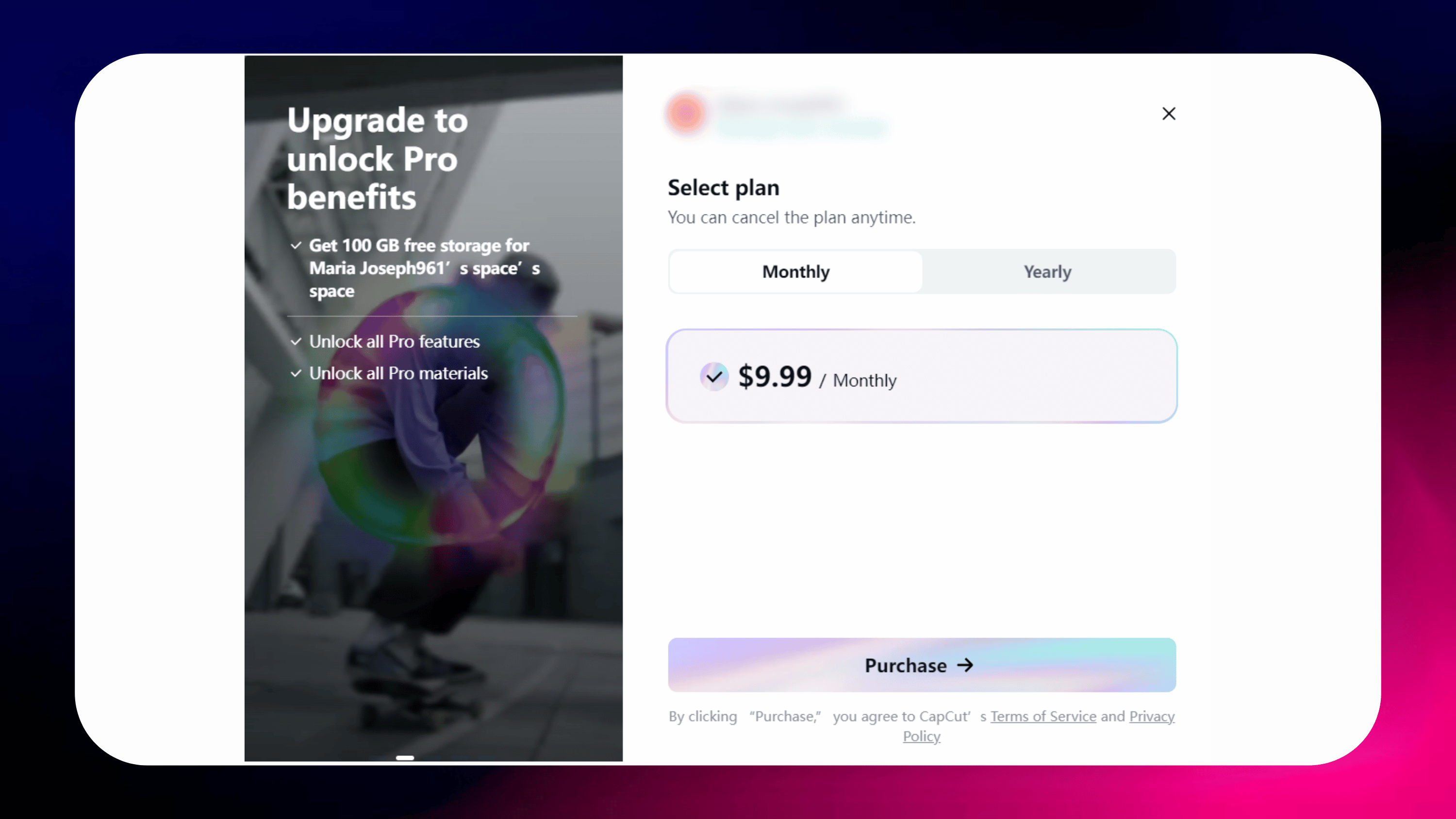
The best part about CapCut is that it is free to use to start without much restriction but it may have a watermark that you have to get pro to remove.
5. Zubtitle
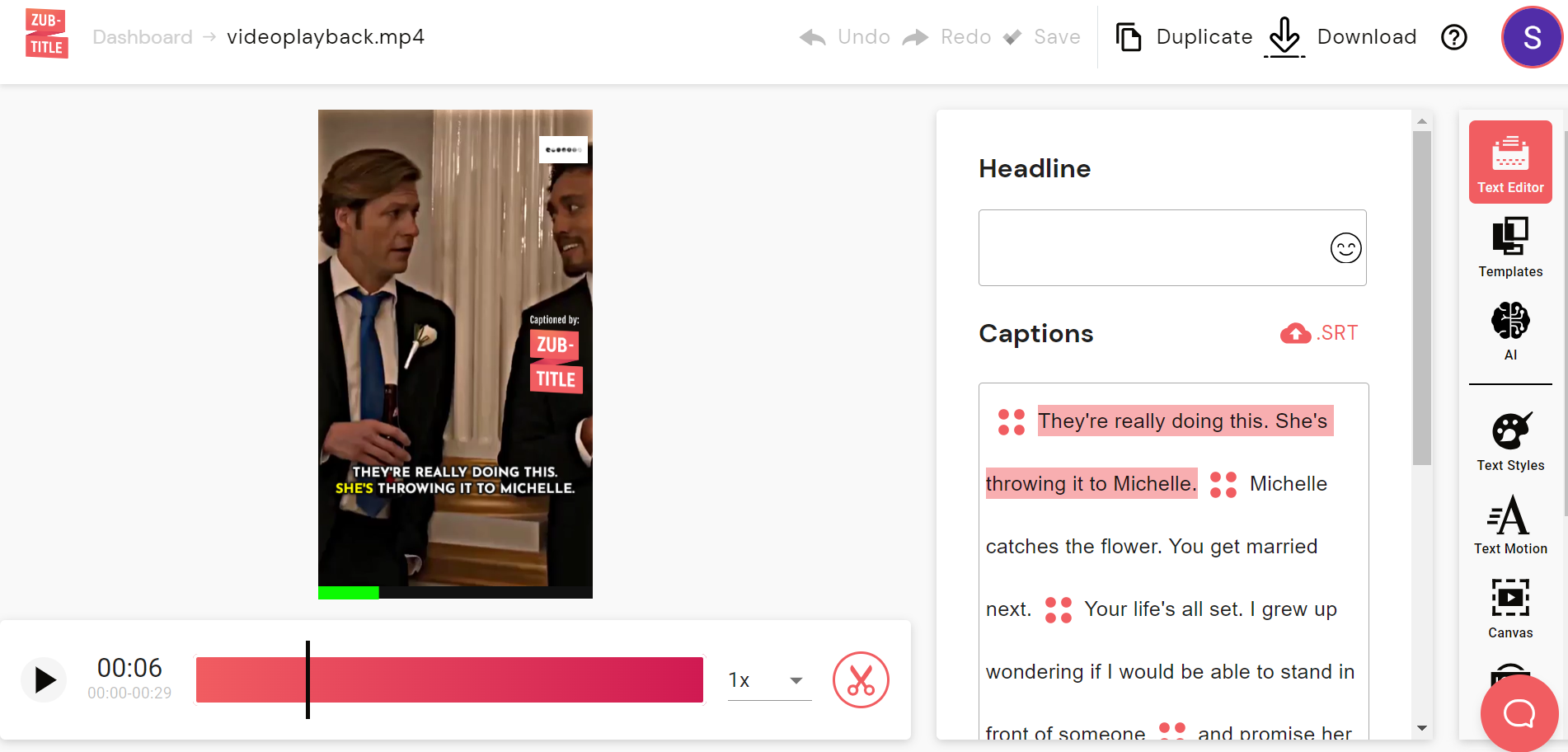
Meet Zubtitle. A user-friendly captioning tool that automatically adds subtitles to videos, optimized for social media engagement.
It includes social media-friendly features like eye-catching headlines, and basic video trimming capabilities, making it a go-to solution for content creators looking to enhance their video accessibility and reach.
Now, how does it stack up against VEED? Well, VEED's like the Swiss Army knife of video editing – it does a bit of everything with its AI tricks.
Zubtitle? It's laser-focused on making your captions pop. If you're all about that caption life and want to rule social media, Zubtitle's your go-to.
| VEED | Zubtitle | |
|---|---|---|
| Features | Auto-captioning, auto resize, caption customisation, (other cool features like AI tools, avatars and translation are available in the pro plan) | Auto captioning, catchy headlines, Social media optimisation. |
| Pricing | Free plan, Paid starts at $12/month | Free plan, Paid starts at $16/month |
| Reviews | 4.5/5 (893+ reviews on G2) | 4.5/5 (3 reviews on G2) |
| Best For | Beginner-friendly video editing | Social media videos |
Pros
- Extremely user-friendly for adding captions.
- Quickly optimizes videos with headlines and clear subtitles.
- Boosts video reach and engagement with captions.
Cons
- Limited options for color and caption customization.
- Basic trimming features, lacking advanced editing tools.
- May not offer enough customization for some users.
Pricing
Here's the pricing plan for Zubtitle
We do think that for captioning, Typito takes the cake for its stylish templates and full-editor flexibility. But if you’re looking for a Veed.io alternative for basic editing for social media with auto captions then give Zubtitle a try.
FAQs
Q: Is VEED or CapCut better?
It depends on your workflow. CapCut is best for free mobile editing and trending effects; VEED for browser-based editing with AI tools. For stylish auto-captions specifically, a caption-first editor like Typito often beats both.
Q: Which is better, Descript or VEED?
Descript wins for podcast and transcript-heavy editing (you edit video by editing text); VEED for social-first video with subtitles and TikTok/Instagram export. For caption styling and animated templates, Typito is the more design-focused pick.
Q: What is the best free alternative to VEED.io?
While "best" is subjective, Typito offers a compelling free plan with auto-captioning features, making it a strong contender for the title of best free VEED alternative.
Q: Is VEED free?
VEED offers a free plan with limited features, but it's more advanced functionalities like the AI tools including AI avatars, translation, clips etc. Require a paid subscription.
Q: Are there any fully free video editors with auto-captioning?
Yes, several options like Typito, Submagic, Capcut and Zubtitle offer free plans with auto-captioning features. However, keep in mind that free trials of the mentioned tools may add a watermark on their free tier.
Q: What is the best alternative for adding captions to Instagram Reels?
Typito is a tool that will help you add stylish captions to your Reels the quickest compared to other tools as it is optimized for captions and the 9:16 aspect ratio which is perfect for Reels.
Q: Do VEED alternatives support TikTok and YouTube Shorts?
Yes, many VEED alternatives like Typito,Submagic, and Zubtitle are designed with short-form content in mind, making them ideal for platforms like TikTok and YouTube Shorts.
Wrapping up
And there you have it, folks - a whirlwind tour of the best VEED alternatives in 2026. From the user-friendly simplicity of Typito to the catchy headlines of Zubtitle, there's a tool out there for every type of content creator.
Remember, choosing the right video editing tool is like finding the perfect pair of jeans - it might take some trial and error, but when you find "the one," it's magic. Consider your needs, your budget, and your patience for learning new software. And don't be afraid to mix and match - who says you can't use CapCut for trimming and filters and Typito to throw on some cool captions to your edited video? No one!
At the end of the day, the best tool is the one that helps you bring your creative vision to life. So go forth, experiment, and may your videos always be trending!
Remember to make your video creation workflows for social videos quicker and add captions with Typito.