Open Instagram right now and search "just listed" in real estate.
What you will find is page after page of near-identical captions: property specs, an emoji or two, and a vague "DM for more info." Every listing sounds like every other listing. Most earn a dozen likes from colleagues and zero DMs from buyers.
Now look at the posts pulling 200 saves and forty comments. The captions are structured differently. Not longer, not more creative, just built differently. There is a specific reason some listing posts stop the scroll and others disappear, and it has nothing to do with the size of the agent's following.
This article breaks down that structure and gives you four copy-paste caption templates built specifically for listing videos, each matched to a specific objective, plus a five-minute process you can apply to every post. No copywriting background required. Just a repeatable system.
In this article:
- Why Do Some Real Estate Captions Get More Engagement Than Others?
- How to Write a Real Estate Caption Hook That Stops Scrolling
- One Listing, Four Caption Angles
- 4 Real Estate Caption Templates for Different Listing Goals
- Which Real Estate Caption Template Should You Use.
- Real Estate Caption Examples: Weak vs High-Engagement Versions
- Real Estate Caption Examples by Platform
- How to Write a Real Estate Caption in 5 Minutes
- Frequently Asked Questions
Why Do Some Real Estate Captions Get More Engagement Than Others?
Generic social media advice assumes you are building a personal brand or selling a product category. Realtor captions have a different job. You are marketing a specific, time-sensitive asset to a local audience across multiple platforms, and each platform treats your caption text differently.
How Instagram Truncates Real Estate Captions
On Instagram, your caption is truncated after the second line on mobile. Most viewers never tap "more." That means your first line functions as the entire caption for the majority of people who see it. Everything below the fold, the specs, the CTA, the personality, is invisible to most of your audience.
Why Early Engagement Matters for Listing Posts
Instagram and Facebook's feed algorithms reward early engagement signals: saves, comments, and shares generated in the first 30 to 60 minutes after posting. A caption that prompts one of those actions tells the algorithm to distribute the post further. A generic caption that triggers no interaction does the opposite, and your listing quietly disappears from feeds before most of your followers ever see it.
According to Sprout Social's 2024 Social Media Report, posts with story-driven captions generate up to 89% more engagement than posts with generic text. In real estate, that gap is even wider because every competing listing is using the same spec-sheet captions.
The 4 Elements of a High-Converting Real Estate Caption
For real estate specifically, a high-performing caption needs to do four things:
- tell the viewer what they are about to see before they see itCreate context:
- connect the listing to something the viewer wants, whether that is space, lifestyle, or locationEstablish desire:
- remove guesswork about price, size, or next stepsReduce friction:
- DM, save, comment, or visit the link. Never all four at onceDrive one clear action:
Skip any one of these and you are leaving engagement on the table. Skip the first-line hook, and the rest of the caption, and the video it accompanies, never gets seen.
How to Write a Real Estate Caption Hook That Stops Scrolling
Before you touch a template, internalize this: write your first line as if it has to work completely on its own. No image, no video, no profile context. Just that one sentence, and a reader deciding in half a second whether to read more or scroll past.
Why the First Line Matters More Than the Rest of the Caption
Most agents lead with what the viewer can already see from the thumbnail: "3 bed, 2 bath, great location." That is the equivalent of a movie trailer that shows every scene. There is nothing left to discover.
The first line of a caption that earns engagement does the opposite: it opens a question the viewer needs answered. It creates an open loop, a tension that only resolves if the reader keeps going. Once you understand the structure, you can write it for any listing in about 90 seconds.
Weak vs Strong Real Estate Caption Hooks
Here is the same listing, two different first lines:
Weak:
"Just listed in Westlake. 2 bed, great location. DM for more info"
Strong:
"Every buyer who has walked this Westlake kitchen has made an offer. Here's what they're all responding to."
The second version works because it creates urgency and curiosity at the same time. It does not reveal the answer in the hook, it promises one. The first line now has a job: make the viewer need the next sentence.
Caption: The same listing video, two different captions. The one on the right earned 30x more engagement because it opened a loop instead of listing specs.
Alt-text: Side-by-side comparison of two Instagram Reel posts showing a generic real estate caption with low engagement versus a curiosity-hook caption with high engagement on the same listing video.
Caption Hook Formulas Realtors Can Reuse
Three hook structures that consistently perform across listing types:
- The Insight Hook: "[Something unexpected] about this [location] listing that buyers keep missing."
- The Results Hook: "[X]-day listing. [Y]% over asking. Here's what made the difference."
- The Scarcity Hook: "[Location] has [X] active listings right now. This is one of the last."
Once you see the pattern, you can adapt it to any listing. The goal is always the same: open a loop the viewer needs closed.
One Listing, Four Caption Angles
The caption templates in this article are not interchangeable. Each one is built to hit a different engagement objective, and using the wrong one means you are optimising for results you are not actually trying to generate.
Here is the same listing applied to four different goals:
Choosing the right angle before you write is what separates agents who build a consistent following from agents who just post. The objective you pick determines which template you reach for, and which CTA you close with. Use the decision guide in the "Which Real Estate Caption Template Should You Use?" section below if you are unsure.
4 Real Estate Caption Templates for Different Listing Goals
Each template below is written in first-person agent voice. Copy, paste, fill in the brackets, and post. Every template is designed to work alongside a photo-based listing video, not a drone shoot or custom production.
Note: The caption templates in this article are built to pair with short-form listing videos of the kind tools like Dunphy produce: polished walk-throughs made from your existing listing photos, not custom footage.
Curiosity Caption Template for Generating DMs
Use when: the listing has a standout feature that buyers consistently react to
The first thing every viewer notices about [Key Feature, e.g., "this kitchen"] is [specific detail, not "stunning," but the actual thing: "the 11-foot island you can seat six at without crowding the cook"]. [Location] doesn't get many [property type] like this one.[Beds] bed, [Baths] bath. [Size/Price or one neighbourhood anchor detail].Walk-through video above. Drop your questions below or DM me directly.
Why it works: The opening line withholds the reveal just long enough to earn a tap. The second sentence adds local authority. The CTA is single and frictionless.
Aspirational Caption Template for Luxury Listings
Use when: the listing is lifestyle-forward, luxury, or in a highly desirable location
Imagine starting your morning [lifestyle-specific detail, e.g., "on a terrace that looks out over the whole city before 7am"]. That's what [Location] actually feels like to live in.[Key Feature 1]. [Key Feature 2]. [Key Feature 3], and [one detail that surprises even buyers who have seen the listing photos].[Price or Size]. [Listing stage: just listed / limited viewings / open this weekend].Interested? DM me to arrange a private walk-through.
Why it works: Lifestyle-first framing bypasses the spec-sheet reflex. The surprise detail is the specificity signal that separates this from a generic luxury post. Save the DM CTA for Instagram; on Facebook, swap it for "Comment INFO below."
Urgency Caption Template for Active Listings
Use when: inventory is low or the listing has a deadline or competitive interest
[Location] has [X] listings active right now. This is one of them, and it won't be for long.[Beds] bed, [Baths] bath. [Price]. [One feature that justifies why buyers move quickly on this type of property in this area].Viewings are filling up. DM me today for a slot.
Why it works: The scarcity signal is in the first line but grounded in something real: the actual inventory number in the area. Do not invent scarcity; real urgency is credible, and buyers will verify it.
Local Authority Caption Template for Neighbourhood Marketing
Use when: you want to build location credibility alongside the listing
Most people don't realise [Location] has [a specific, non-obvious local detail, e.g., "three top-rated school districts within a six-minute drive"]. For the buyers I work with, that changes everything about where they look.This [Beds]-bed on [Street or Area] is one of the few in the area with [Key Feature]. [Size or Price].Video walk-through above. DM me or drop a comment if you want the full details.
Why it works: This template positions you as the area expert, not just the listing agent. It is the right choice when your goal is profile visits and new followers alongside the DM. Works particularly well on Facebook, where longer captions outperform short ones.
Short-Form Template for WhatsApp Broadcasts and Facebook
Use when: posting to WhatsApp broadcast or any platform where brevity is critical
[Location]. [Beds] bed. [One sentence that carries the hook.]Viewing this week. Reply for details.
Keep the entire caption under 80 characters before the CTA. On WhatsApp especially, truncation is aggressive and the audience expects brevity. The hook sentence is the only place for personality; keep everything else functional.
Which Real Estate Caption Template Should You Use.
The right template depends on what you want the post to do, not on the listing itself. Use this as a quick decision guide before you start writing.
Use Curiosity Captions When...
- The listing has one standout feature buyers consistently react to
- Your primary goal is to generate DMs and showing requests
- The listing is competitively priced and you want viewers to ask about it rather than scroll past
Use Aspirational Captions When...
- The property is luxury, lifestyle-forward, or in a location with strong emotional appeal
- Your primary goal is saves and shares: buyers bookmarking for later or forwarding to a partner
- You want the post to double as brand marketing beyond the immediate listing
Use Urgency Captions When...
- Inventory in the area is genuinely low and buyers know it
- The listing has a price adjustment, an offer deadline, or confirmed competitive interest
- Your primary goal is direct viewing requests from the post, not profile growth
Use Local Authority Captions When...
- You want to build location expertise and attract follow-on inquiries beyond this specific listing
- Your primary goal is profile visits and new followers from a target neighbourhood
- The local story around the listing is more compelling than the property itself
Real Estate Caption Examples: Weak vs High-Engagement Versions
Here is a concrete example of the difference in practice, followed by three high-performing caption structures observed on real estate accounts. Each one consistently drives saves, comments, and DMs on listing video posts.
Generic Listing Caption Example
"Just listed in Westlake. 2 bed, great location, DM for more info"
This caption could describe any of the listings in a twenty-mile radius. It gives the viewer nothing to respond to: no question to answer, no detail to react to, no reason to do anything except scroll. The emoji does not save it.
High-Engagement Listing Caption Examples
Rewritten with the Curiosity Template:
"The kitchen in this Westlake 2-bed is the thing buyers ask about first, every single showing. 1,100 sq ft, $425K. Full walk-through above. DM me to book a viewing this week."
Below are three real-world caption structures observed on high-performing real estate accounts on Instagram. These consistently pull saves, comments, and DMs. None of them open with a spec sheet.
Caption Example A: Results-led, numbers hook
"Listed at $415K. Sold at $440K in 8 days. If you're thinking of selling in [Location] this quarter, this is what the market is telling you."
Why it works: Numbers in the first line stop the scroll because they are specific and verifiable. The second sentence immediately flips the post into a lead-generation tool for seller prospects, not just a sales announcement.
Caption Example B: Story-led, client result hook
"My client bought this duplex in 2022. It now generates $3,200/month in rental income. This is what patient investing looks like in [Location]."
Why it works: Specific numbers and a real outcome create credibility in two sentences. No superlatives, no guessing. The caption earns trust before it asks for anything.
Caption Example C: Feature-first, curiosity hook
"The kitchen in this one stopped me mid-walkthrough. Floor-to-ceiling windows, a 10-foot island, and views of the backyard that make morning coffee feel like a vacation. $[Price]. Walk-through above."
Why it works: It puts the viewer in the room before they tap play. The specific detail (10-foot island, the coffee-cup view) is the kind of thing people remember and forward to a partner. That forward is a share, which the algorithm rewards.
Caption: Static listing photo vs. a short-form listing video with a strong caption. Same property, dramatically different engagement.
Alt-text: Before-and-after comparison showing a static listing photo post with low engagement on the left and an Instagram Reel listing video with a caption template and high engagement on the right.
Why the Rewrite Performs Better
The rewrite is not longer. It is more specific. It opens a loop (why do buyers always ask about the kitchen?), grounds the listing in real details, and gives the viewer one clear thing to do. The generic version could describe hundreds of listings. The rewrite could only describe this one.
That specificity is what earns engagement. Not better writing, not a bigger following. Just details that could not apply to any other post.
For agents building out a video-first content strategy, How to Create Real Estate Reels for Listings (URL-placeholder) covers the visual side of the same workflow these caption templates are built to accompany.
Real Estate Caption Examples by Platform
The same listing caption does not travel well across platforms. Instagram, Facebook, and WhatsApp each have different audience behaviours, truncation patterns, and engagement mechanics. Here is how to adapt the same core message for each.
Instagram Caption Example
Instagram audiences are in browse mode. They are scrolling fast, and they will tap "more" only if the first two lines give them a reason. Use the first line as your hook, the body as your value layer, and close with one specific CTA.
"Most buyers who walk this Bondi apartment make an offer before the video ends. [Beds] bed, [Baths] bath, [Price]. Watch the walk-through above, then DM me if you want details on the open this Saturday."
Length: 50 to 150 words. CTA: DM or link in bio.
Facebook Listing Caption Example
Facebook audiences read more. Longer captions outperform short ones on Facebook because users are scrolling a feed where content naturally slows down. Use the same template as Instagram, but expand the property story in the middle section and adapt the CTA to a keyword-comment format.
"Most people don't realise how much [Location] has changed in the last 18 months. Prices are up, but so is the quality of what's available. This [Beds]-bed on [Street] is one of the clearest examples: [Key Feature], [Key Feature], and one aspect of the property most buyers don't notice until they've walked through twice. Full walk-through in the video. Comment INFO below and I'll send everything."
Length: 100 to 250 words. CTA: Comment with a keyword, or tag a friend.
WhatsApp Property Caption Example
WhatsApp broadcasts run in a messaging context, not a feed. The audience expects brevity and directness. The caption's job is to deliver one sharp hook and one clear action.
"[Location]. [Beds] bed. New to market. Viewing this week. Reply here for details."
Length: Under 80 characters before the CTA. CTA: Direct reply. No links unless you have confirmed the recipient will tap them.
How to Write a Real Estate Caption in 5 Minutes
The templates work when you apply them to a specific objective, not just any listing. Here is the full process:
Step 1: Choose Your Goal
Before writing a word, pick one goal: drive DMs, earn saves, generate comments, or push profile visits. Each objective maps to a different template. If you are not sure which to pick, refer to the "Which Real Estate Caption Template Should You Use?" section above.
Step 2: Write the Hook First
Open a notes app and draft only the first sentence. It must work without the video or image. Read it cold. If it makes you curious, continue. If it reads like a spec sheet, rewrite it.
Step 3: Select the Right Caption Template
Curiosity for listings with a standout feature. Aspirational for lifestyle-forward or luxury properties. Urgency for competitive inventory with a deadline. Local Authority when you are targeting a specific neighbourhood audience.
Step 4: Add Listing-Specific Details
Drop in beds, baths, price, and location, but use the template's structure so they read as a narrative rather than a listing database entry. Add one specific detail that cannot apply to any other listing: a view visible from the kitchen, the walking distance to a specific train station, the courtyard no neighbouring building overlooks. This is your specificity signal, the line buyers remember.
Step 5: Match the CTA to the Platform
On Instagram: "DM me to arrange a viewing." On Facebook: "Comment INFO and I'll send the full details." On WhatsApp: "Reply here." Never combine two CTAs in one post. Multiple CTAs dilute click-through on every platform.
Then read the caption against the video before you post. Watch the video as a viewer would, with the caption text visible. The first line should set up what the viewer is about to see, not repeat it, not spoil it. This is the step where most captions fall apart.
The most common reason this final step breaks down is not the caption itself. It is that the agent does not have a video, just listing photos sitting in a folder from the photographer. This is exactly where Dunphy fits: it is an AI-powered video creator that turns your existing listing photos into a polished, ready-to-post listing video in under a minute. No filming, no editing timeline, no learning curve. You upload the photos, pick a style, and get a short-form video you can pair with any of the caption templates in this article.
You can get early access at dunphy.typito.com.
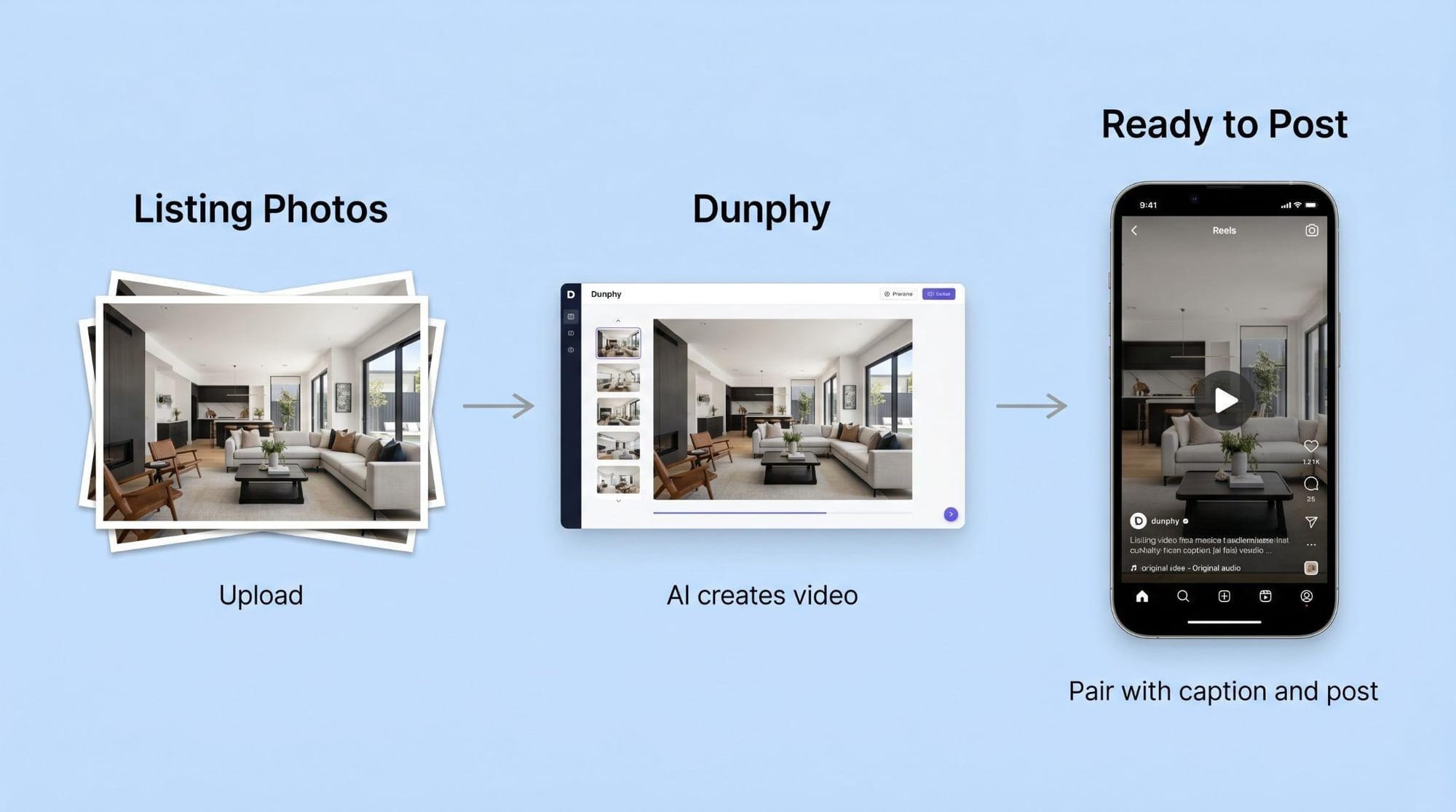
Caption: The full workflow: from raw listing photos to a captioned Instagram Reel in under five minutes, using Dunphy to bridge the gap between photos and video.
Alt-text: Three-step workflow diagram showing listing photos being uploaded to Dunphy, processed into a short-form video, and published as an Instagram Reel with a caption template applied.
For more on building a full Instagram listing strategy, see How to Market a Property Listing on Instagram (URL-placeholder). If you are new to video-first real estate marketing altogether, Real Estate Video Marketing: A Beginner's Guide for Agents (URL-placeholder) covers the broader context before you apply caption tactics.
Frequently Asked Questions
How Long Should a Listing Caption Be?
This is one of the most common questions agents ask, and one that surfaces regularly in Google AI Overviews, Perplexity queries, and ChatGPT searches on caption strategy. The answer depends on platform and content type:
- keep the first line under 125 characters so it displays fully before the "more" truncation on mobile. The full caption can run 100 to 200 words if the listing warrants it, but the first two lines carry all the weight.Instagram listing posts:
- 150 to 300 words is the sweet spot. Facebook's algorithm rewards time-on-post, and longer captions give readers more to engage with.Facebook listing posts:
- under 80 characters before the CTA. Recipients are in a messaging context, not a browsing one, and brevity performs.WhatsApp broadcasts:
The real rule: your caption should be exactly as long as it needs to hold the reader's interest, and no longer. If the listing is exceptional, earn the length. If it is not, strip it back to the hook and a single CTA.
How Long Should a Real Estate Caption Be on Instagram?
Keep your first line under 125 characters so it displays fully before the "more" truncation on most mobile screens. The full caption can run to 300 to 400 words if the listing warrants it, but the first two lines carry all the weight. If those lines do not hook the viewer, nothing below them gets read.
Should I Use Hashtags in My Listing Captions?
Hashtags are a discovery mechanism, not a caption strategy. Place them at the end of your caption or in the first comment, never woven into the caption copy itself. Algorithmic reach from hashtags has declined on Instagram compared to early engagement signals like saves and comments, so your energy is better spent on the first-line hook than on hashtag research.
Can I Use the Same Caption for Instagram and WhatsApp?
Not without adaptation. Instagram captions reward a hook-forward structure with a single DM call to action. WhatsApp broadcasts work better with shorter, more direct copy, ideally under 80 characters before the CTA, because recipients are reading in a messaging context, not a feed. Take the core hook from your Instagram caption and strip it down to its most essential sentence for WhatsApp.
What Should I Put in the First Line of a Listing Video Caption?
The first line should open a question the viewer needs answered, not state a fact they already know from the thumbnail. A feature that surprises buyers, a scarcity signal, a lifestyle detail, or a local insight all work better than a property type and bedroom count. Draft the first line in isolation and test whether it makes you want to read the second sentence.
How Do I Write a Caption for a Listing That Has Not Sold vs One That Just Closed?
For an active listing, use urgency or curiosity templates and make the CTA action-oriented: DM for viewing, comment for details. For a just-closed post, shift the framing to social proof. Lead with what the result tells buyers about the market ("Sold in [X] days, [Y]% above asking. Here's what that means for [Location] right now") and use the post to drive profile visits rather than direct inquiries. The structure is similar; the objective and CTA change entirely.
Make every property listing stand out with video.
Transform static photos into engaging listing videos buyers actually stop for.
Get Early Access: dunphy.typito.com