You've watched the channels. Faceless accounts. No personality intro. No talking head. Just a question on screen, a ticking timer, and somehow, millions of views.
So you decide to start one. You open a blank project. And you freeze.
Not because you lack ideas. Because you don't know which format to build. There are countdown quizzes, multiple-choice rounds, elimination games, score trackers — and zero guidance on what each one actually does to a viewer or which one fits your niche. You end up doing nothing, or posting something generic that gets buried.
That friction is the real problem. Not motivation. Not ideas. Format confusion.
This guide gives you a clear menu of 7 faceless quiz video formats, what each one looks like, why it holds attention, and the exact type of content that works inside it. By the end, you'll know which format to start with today.
At a Glance
- Why Faceless Quiz Videos Work (It's Not What You Think)
- The 7 Faceless Quiz Video Formats
- How to Choose the Right Format for Your Faceless Quiz Channel
- How to Turn Any Quiz Format Into a Faceless Video
- The Best Niches for Faceless Quiz Channels
Why Faceless Quiz Videos Work (It's Not What You Think)
Most creators assume quiz videos perform because people love trivia. That's only half the story.
The real reason is structural. A quiz video creates a participation loop: question → guess → timer → reveal.
That sequence forces a micro-decision. Once a viewer starts guessing, scrolling away feels like giving up. That 3-second mental commitment is what drives completion rates.
Each stage of the loop maps to a platform signal:
- Timer running → watch time climbs
- Answer reveals → replays trigger ("Was I right?")
- "I said B!" comments → engagement rate spikes
The faceless format makes this even more scalable. No camera, no lighting, no reshoots. AI voice + text overlays + motion graphics is the entire production stack, which means one creator can post daily without burning out.
The 7 Faceless Quiz Video Formats
Different formats trigger different viewer behaviors. Knowing which outcome you want- watch time, comments, shares, replays- is how you choose the right one.
1. The Countdown Timer Format
What it looks like: A question appears on screen. A 5–10 second timer counts down visually. The viewer guesses the answer. The timer hits zero. The answer reveals.
Why it holds attention: The timer creates artificial urgency that makes scrolling feel like giving up. Viewers who've already read the question and started guessing have made a micro-commitment. That 3–5 second investment is usually enough to carry them to the reveal, and the reveal is what drives the replay.
Best niche fit: Geography, flags, capitals, landmarks, sports records, pop culture
2. The Multiple Choice Format
What it looks like: A question appears with four labeled answer options (A, B, C, D). A short pause gives viewers time to decide. The correct option highlights or pulses on reveal.
Why it holds attention: Multiple choice removes the blank-page anxiety of open-ended questions. Viewers don't need to know the answer, they just need to pick one. That low barrier to participation is why comment sections on this format flood with "I said B!" and "C, final answer." Those comments are engagement signals the algorithm rewards directly.
Best niche fit: History facts, movie/music trivia, science myths, brand knowledge
3. The True or False Format
What it looks like: A bold claim appears on screen, something that sounds can be true but might be wrong.
Why it holds attention: Binary choices are cognitively faster to process than open questions. This means you can pack more questions per video without losing pacing. The high replay value comes from viewers wanting to "score themselves", they'll rewatch a 10-question True/False video to count how many they got right.
Best niche fit: Science myths, history "fact or fiction," geography claims, sports records, food facts.
4. The Elimination Round Format
What it looks like: Four to six options appear on screen simultaneously. Questions (or clues) eliminate wrong answers one by one. Each round crosses out an option until one remains.
Why it holds attention: Elimination creates a mini-narrative inside a single video. It has a beginning (all options visible), a middle (tension as options disappear), and an end (a winner). Viewers stay because they're tracking which option they mentally picked, and the progressive narrowing makes them feel invested in the outcome. "I got it down to 2" is one of the most common comments on this format, and it's a share trigger.
Best niche fit: Logo rounds, brand history, "which one doesn't belong," music eras, ranking formats
5. The "Guess the Year" Format
What it looks like: An image, a still frame, or a short event description appears on screen. The viewer guesses the year. The reveal shows the actual year, followed by a one-line context sentence.
Why it holds attention: Year-guessing rewards intuition, not memorization. Viewers feel smart when they're close, and genuinely surprised when they're off by a decade. Both emotional responses drive comments. "Wait, that was 1987?!" generates more replies than almost any trivia format because it activates disbelief, not just knowledge.
Best niche fit: Pop culture history, tech evolution, movie nostalgia, historical events, sports moments
6. The Score Challenge Format
What it looks like: Ten questions play back-to-back. Each answer reveal includes a running score tracker in the corner. The final screen shows: "You scored X/10" — with a shareable result message.
Why it holds attention: Scoring turns a passive quiz into a personal challenge. Once viewers see their score, they face a decision: accept it or replay to improve. When the final screen is designed to be screenshot-able ("7/10 — Not bad for a casual fan"), share mechanics activate organically. Friend tags fill the comments. The video becomes a social currency object.
Best niche fit: Niche enthusiast communities, sports fans, movie buffs, geography nerds, music decade fans
Short on time?
Then pick any format above and build it today.
Make your first Faceless Trivia
How to Choose the Right Format for Your Faceless Quiz Channel
The biggest mistake new faceless creators make isn't picking the wrong format; it's rotating formats before mastering one.
Every format above triggers a different viewer behavior. Before you pick, get clear on what you want your channel to be known for. A quiz channel that's known for "insane countdown timers on geography" is more searchable and more shareable; than one that posts a different format every week.
Use this decision framework to pick your starting format:
Once you've chosen, post 20 videos in that one format before changing anything. Not because 20 is a magic number, but because the algorithm needs signal consistency to understand your content, and you need enough data to know whether the format is working or whether your topic selection needs adjusting.
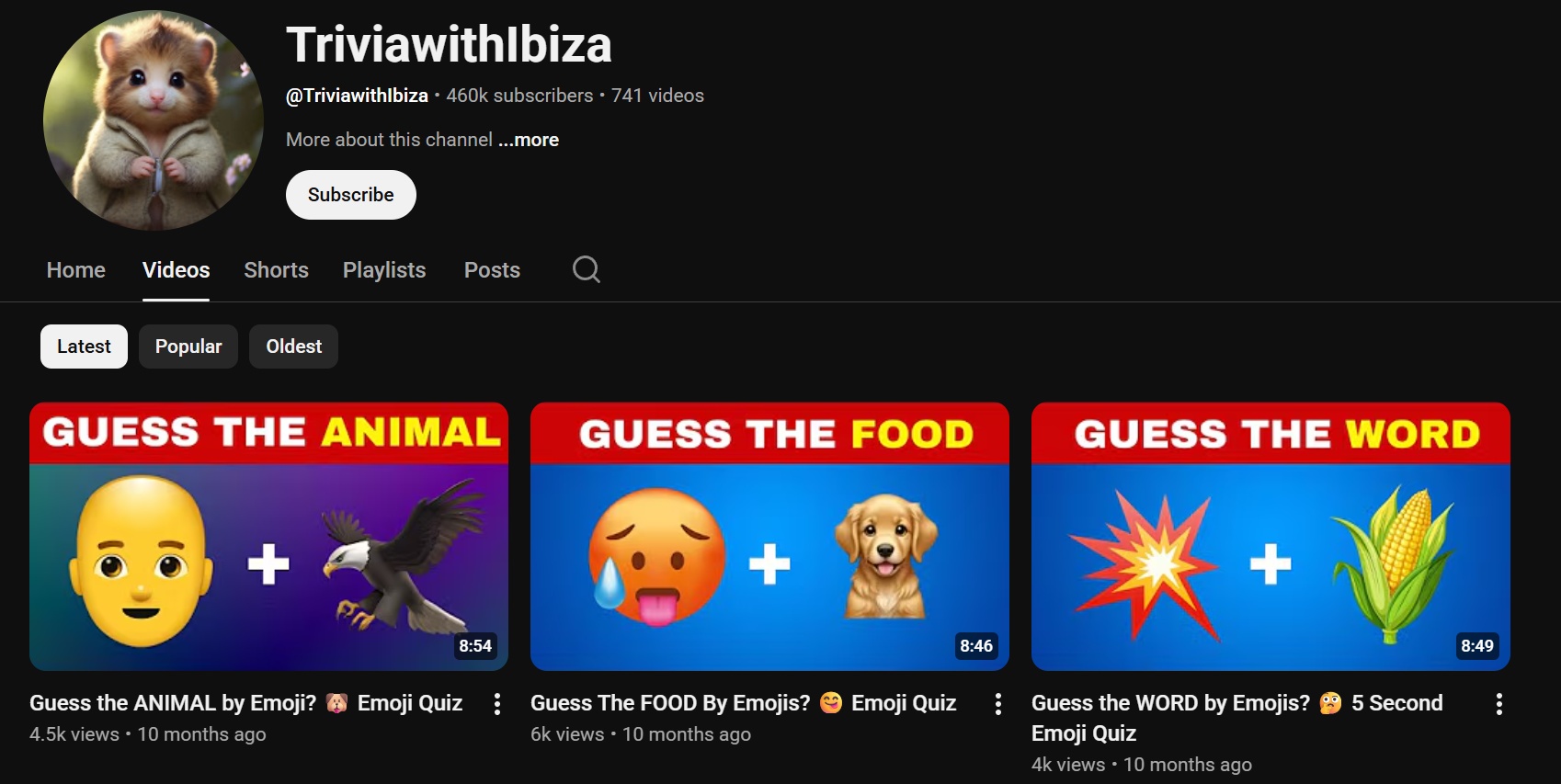
A useful real-world reference here: the Shorts channel TriviawithIbiza built around guess the emoji word (purely graphic-based, no voice, using an audible tick as the timer); their most-viewed video reached 4.6 million views. The format was the brand, not the personality. That's the repeatable content system this guide is describing.
Thinking about how to actually build one of these? Watch how Trivia by Typito turns a question set into a publish-ready quiz video, no editing background needed.
How to Turn Any Quiz Format Into a Faceless Video
The production path is simpler than most creators expect.
1. Pick a recipe, not a blank canvas.
Trivia by Typito starts with ready-made quiz templates: Word Association, True or False, Guess the emoji word. You pick the format that matches your goal, describe your topic in plain English, and the AI builds the full question prompt for you. No brief-writing. No staring at an empty screen.
2. Review, shape the difficulty arc, set the question count.
Before anything generates, you get to review the structure — adjust difficulty progression and number of questions you want. One edit pass here saves three rounds of revisions later.
3. Hit generate. Preview the video.
,The output isn't a question list — it's an actual playable trivia video with your format, timer or reveal mechanic, and AI voiceover already in place. Watch it once as a viewer before you touch anything.
4. Edit only what needs editing.
Audio, question text, voiceover tone, everything is adjustable inline. You're not rebuilding from scratch; you're refining something that's already 90% done.
5. Download and publish.
startsThe export is a publish-ready vertical video file. No format conversion. No compression guesswork. Drop it into Shorts, Reels, or TikTok directly.
Prefer to watch this instead? Here's a step-by-step walkthrough of making a quiz video from scratch.
The Best Niches for Faceless Quiz Channels
Not all quiz topics perform equally. The channels that compound fastest in 2025–2026 are the ones that do niche-specific contentniche specific contents.;
The pattern across all winning niches: the topic creates a community, not just an audience. Someone who watches your "World Cup records" quiz isn't a casual viewer; they're a fan who will follow the channel because it speaks directly to their identity.
Common Questions Creators Ask About Faceless Quiz Videos
1. Can I make quiz videos without recording my own voice?
Answer: Yes. AI voice tools generate natural-sounding narration from text, so you never need a microphone. Most quiz video tools like Trivia by Typito built for short-form platforms include AI voice generation as a built-in feature.
2. How long should a faceless quiz video be?
Answer: For YouTube Shorts, TikTok, and Instagram Reels, 30 to 60 seconds works best — roughly 3 to 5 questions with a timer and reveal. For YouTube long-form, a 10-question format runs 3 to 7 minutes and performs well as a standalone watchable video. Match your format length to the platform.
3. Do I need special editing software to make quiz videos?
Answer: No. Tools like Trivia by Typito handle question layout, timer animation, answer reveal, and AI voiceover inside a single workflow — no timeline editing, no plugin setup. You pick a format, generate the questions based on your topic, and you can even adjust the difficulty level and number of questions you want., and export a publish-ready vertical video file. The whole process takes minutes, not hours.
The channels that grow fastest on Shorts and Reels aren't the ones experimenting with every format; they're the ones that picked one, posted consistently, and let the algorithm learn who to show it to.
You don't need a camera. You don't need a voice. You don't need a complicated editing setup.
You need a question, a format, and a reason for viewers to stay three seconds longer than they planned.
That's the entire mechanic.
Ready to build your first one?
Create a quiz video in Trivia by Typito
Pick a format from this list, add your questions, and publish today.