In this article:
- Why Real Estate Agents Need a Social Media Calendar
- The Four Content Pillars for Your Calendar
- Your 4-Week Real Estate Social Media Calendar
- How Often Should Real Estate Agents Post on Social Media?
- How Do Real Estate Agents Batch Social Media Content?
- What to Stop Doing With Your Content Calendar
- Where Video Fits Without Adding Hours to Your Workflow
- Frequently Asked Questions
Last month, an agent in our network spent her entire Sunday evening scrolling through Canva templates trying to figure out what to post that week. She had 14 active listings. She posted about two of them. The other twelve got a single static photo on the MLS and nothing else.
Her problem was not a lack of ideas. It was the absence of a repeatable system. Every Monday felt like starting from scratch, which meant content only happened when she had the time and energy to spare. Most weeks, she did not.
A real estate social media calendar fixes this at the root, not by adding more to your plate, but by giving every week a predictable shape so posting becomes execution, not invention. This guide walks you through building one that fits around the way you actually work, including where listing videos fit in without requiring you to pick up a camera or learn editing software.
Why Real Estate Agents Need a Social Media Calendar
The standard advice for agents struggling on social media is “post more.” That advice is useless without a structure behind it. Three posts a week with a clear purpose will outperform daily posts that alternate between random market stats and motivational quotes nobody asked for.
What a real estate content calendar actually gives you is decision elimination. Instead of waking up and wondering what to post, you already know: Monday is a listing feature, Wednesday is a neighbourhood spotlight, Friday is a market stat or educational tip. The thinking is done once; the execution repeats.
Buyers and sellers check an agent’s Instagram or Facebook page the way they used to check a business card. If your last post was three weeks ago, that says something about your activity level, fair or not. A calendar keeps your presence current without consuming your evenings.
If you have fewer active listings, the framework still works. You simply weight your evergreen reserve (neighbourhood features, market explainers, practical tips) more heavily than listing-specific posts. The calendar is a structure, not a prescription that only works for high-volume agents.
The Four Content Pillars for Your Calendar
Content pillars are the recurring categories your posts rotate through. They give your feed variety without requiring you to brainstorm a new angle every time. Four is the right number: enough to keep things fresh, few enough to manage.
Here is a framework that works across most residential markets:
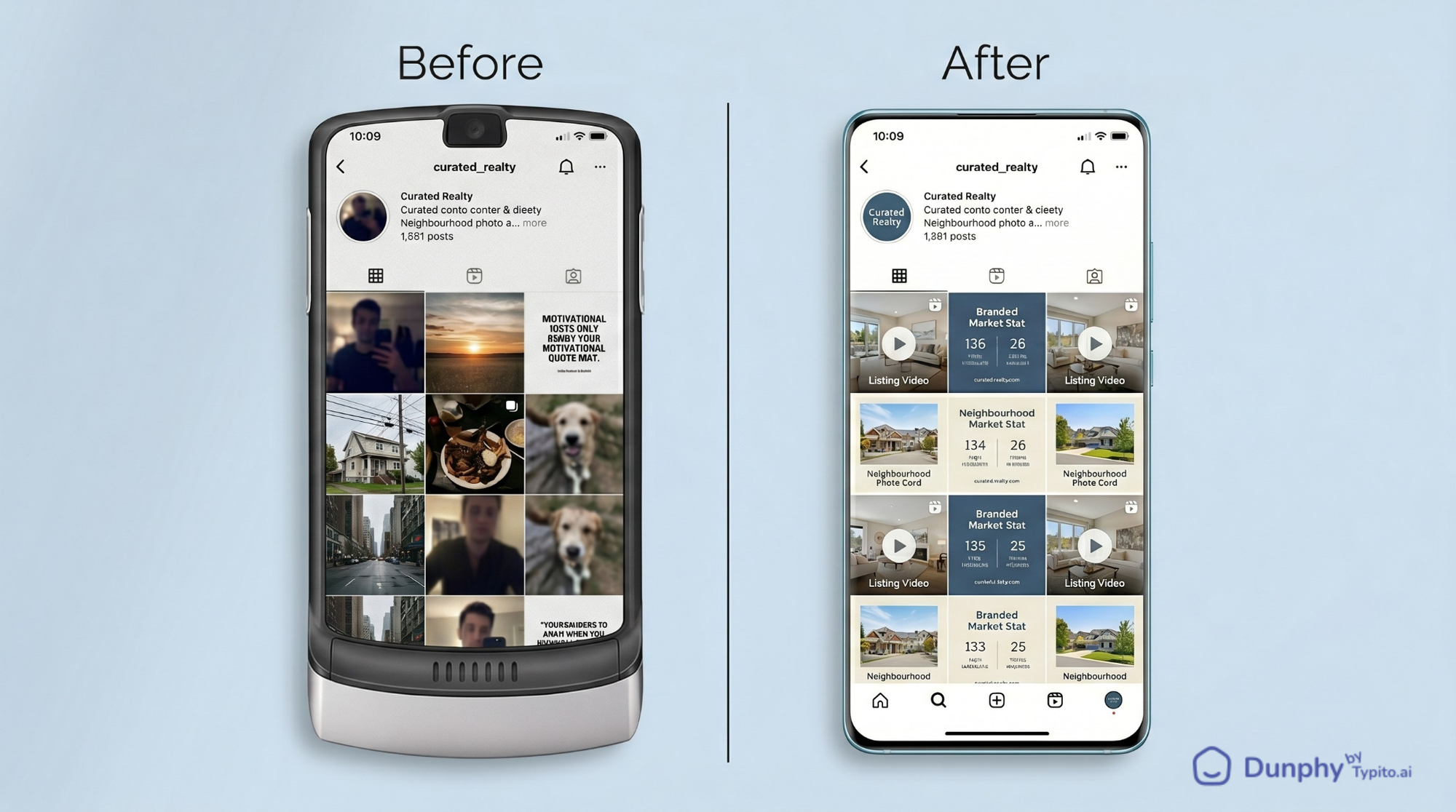
Pillar 1: Listings and results. New listings, just-sold announcements, price drops, open house reminders. This is the content your sphere expects from you. A 15-second listing video produced from your existing photos gets significantly more engagement than a static photo, and you do not need to film anything new to create one. Sold posts in particular build proof of momentum and signal to potential sellers that listings move under your name.
Pillar 2: Local knowledge. Neighbourhood spotlights, school district breakdowns, local business features, weekend event round-ups. This is what positions you as the area expert, not just another agent with access to the MLS. A buyer researching a move to your market will find your area guides through search before they ever find your listings.
Pillar 3: Market context. Monthly stats for your area, interest rate updates in plain language, “what your price range gets you right now” comparisons. Sellers want to see that you understand the numbers. Buyers want to know you are tracking the market on their behalf.
Pillar 4: Practical education. First-time buyer checklists, staging tips with real photos, “5 things that kill a deal after inspection” posts. This serves people who are not ready to transact yet but will remember your name when they are.
Notice what is not on this list: motivational quotes, memes, personal diary posts. Those might occasionally earn a like, but they should not occupy a pillar slot. Keep the pillars focused on content that a prospective buyer or seller would actually find useful.
Your 4-Week Real Estate Social Media Calendar
A content calendar is only useful if it is specific enough to act on. The table below gives you a fully mapped four-week schedule built around three posting days per week. Pick up any active listing, drop it into the listing slot, and your week is planned. The categories repeat on a predictable rhythm so you never have to decide from scratch.
How to read this calendar:
- Monday is always your Listings and Results pillar, the post type your sphere expects most from you. Lead with your strongest listing or most recent sold announcement.
- Wednesday is always Local Knowledge, the content that builds your area expert reputation over time. This slot does not require a new listing; one strong neighbourhood feature per week is enough.
- Friday is always Market Context or Practical Education, the posts that attract buyers and sellers who are still in research mode. A monthly market stat graphic or a “5 things to know before making an offer” carousel both work here.
This is a repeating monthly system, not a one-time experiment. Once you build this structure in the first week, every subsequent month follows the same pattern. You are just swapping in fresh listings and current market data.
For agents with fewer active listings: Replace the Monday listing slot with a Sold Anniversary post (a property you closed six to twelve months ago), a Dunphy-produced video from a prior listing, or a buyer story post. The framework accommodates low-inventory months without leaving your calendar empty.
How Often Should Real Estate Agents Post on Social Media?
Three to four times per week on your primary platform is the realistic target that delivers results. The key is matching frequency to what you can sustain month over month. An agent who posts three times every week will build a stronger audience than one who posts daily for two weeks and then goes silent.
Here is how that maps across the channels most residential agents use:
A concrete example: An agent managing four active listings in Austin runs this exact three-day rhythm. Her Monday listing video gets three to five times the saves of her static photo posts. Her Wednesday neighbourhood series (“Why [Suburb Name]?”) became a lead magnet for relocation buyers who found it through search. She batches all of it in one sitting on Sunday afternoons.
If three posts feel light and you want to add a fourth, make it an informal Tuesday Instagram Story or WhatsApp status. A behind-the-scenes of a showing, a “just listed” teaser, or a quick market observation all work. It keeps your presence active between your main posts without requiring additional production time.
How Do Real Estate Agents Batch Social Media Content?
The single biggest reason agents abandon their content calendar is that they try to create each post the same day it is meant to go out. That only works when your schedule is light; if you are doing your job, it rarely is.
Batching means setting aside one focused block (90 minutes to two hours) to produce an entire week or month of content in one go. Here is what that session looks like in practice:
1. Pull your raw material. Gather listing photos for the month, screenshot your local market stats, save links to upcoming community events. Everything goes into a single folder before you start creating anything.
2. Create your static posts. Use Canva or a similar tool to build your neighbourhood spotlights and educational graphics. With a saved template, each one takes under ten minutes.
3. Create your listing videos. This is where most agents hit a wall. They have the photos already (every listing has them), but turning those photos into a polished, shareable video used to mean either hiring a videographer or wrestling with editing software you barely know.
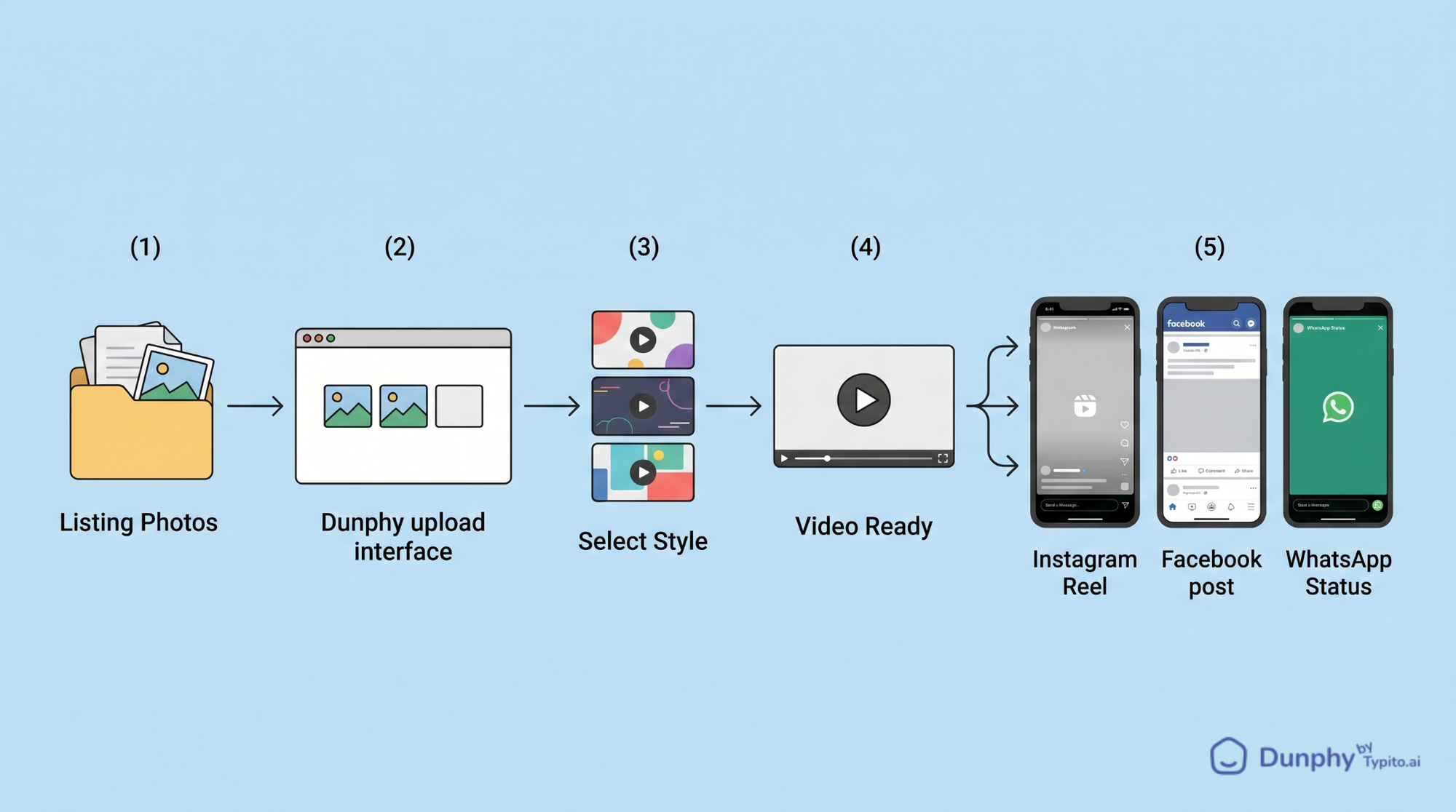
Dunphy removes that friction entirely. It is an AI-powered video creator built specifically for real estate: you upload your listing photos, pick a style, and get a ready-to-post video in under a minute. No editing timeline. No learning curve. No new footage required. For a batching session, that means you can turn six listings into six listing videos in the same time it used to take to produce one in iMovie. Visit dunphy.typito.com to try it.
4. Write your captions. With the visuals done, captions go fast. Use a simple formula: hook line, one or two key details about the property or topic, and a call to action (“DM me for a showing,” “Save this for later,” “What neighbourhood should I cover next?”).
5. Schedule everything. Load your posts into Meta Business Suite (free), Buffer, or Later. Set the dates and times. Walk away.
The result: by Monday morning, your content is already queued. You are not scrambling between showings to think of something to post. You are reviewing what already went live.
What to Stop Doing With Your Content Calendar
A few habits quietly sabotage even well-planned calendars:
Treating every platform the same. A 60-second listing video works on Instagram Reels. That same video on LinkedIn needs a different frame: a caption that positions it as a market observation, not a listing pitch. On WhatsApp, a shorter clip with a direct “Interested? Reply here” message outperforms a polished post. Same content, three different wrappings.
Planning content you cannot actually produce. A calendar full of “drone footage of the neighbourhood” and “client testimonial interview” looks impressive, but if you cannot produce those regularly, they become blank slots that make you feel behind. Build the calendar around content you can realistically create with assets you already have: listing photos, market data, local knowledge, and your own expertise.
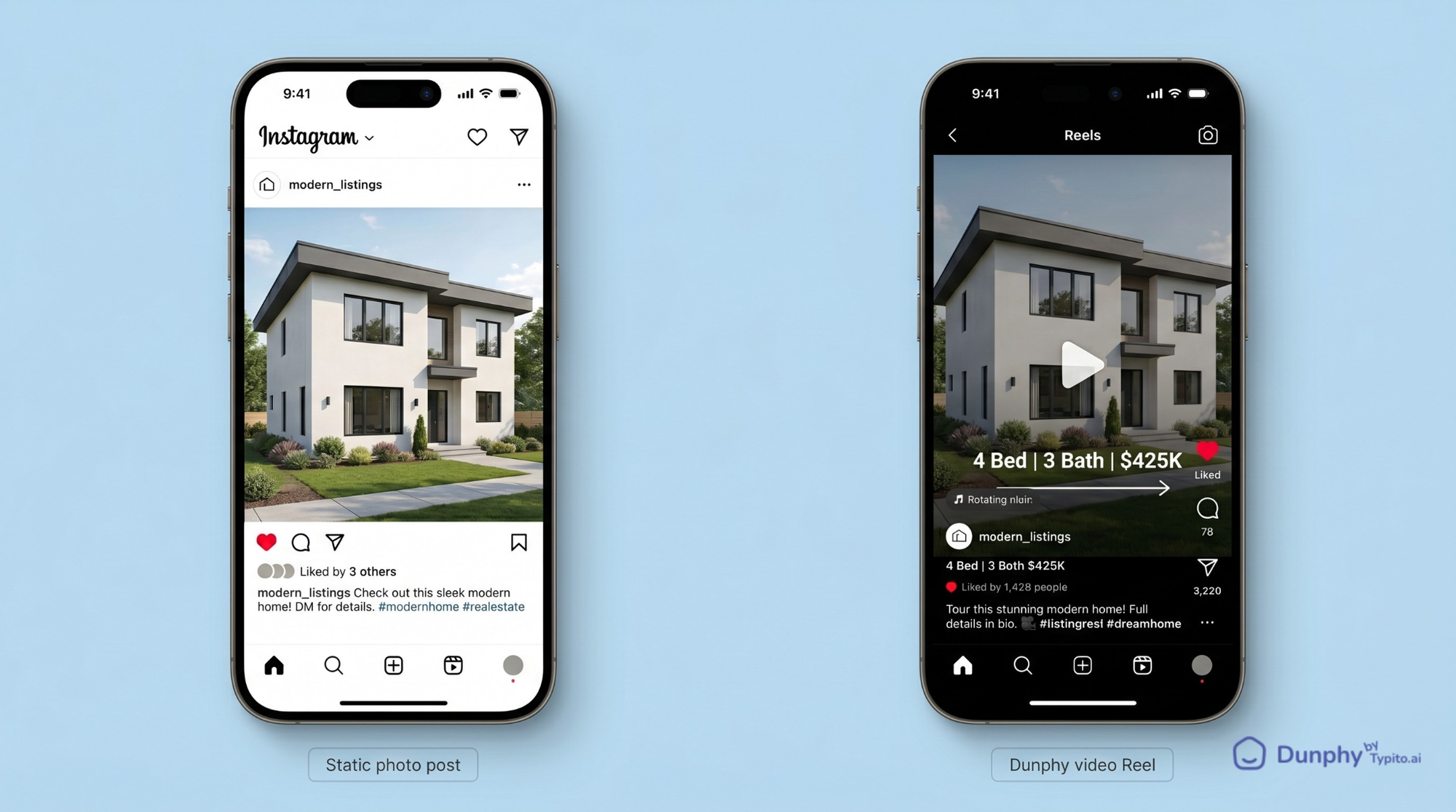
Skipping video because it feels too hard. Static photos still work, but they are increasingly invisible in feed-driven platforms. Instagram favours Reels. Facebook prioritises video. WhatsApp status views are higher for video. The fix is not to start filming walkthroughs with your phone; use the listing photos you already have and turn them into video content with an AI tool like Dunphy.
Never checking what is working. Once a month, spend 15 minutes reviewing your post insights. If neighbourhood spotlights get saved and shared but market stat posts get ignored, shift your pillar weighting. The calendar should evolve based on what your specific audience responds to.
Where Video Fits Without Adding Hours to Your Workflow
Video is not a separate content strategy. It is the format that makes your listing posts perform. The platforms reward it, your audience stops for it, and the agents posting it consistently are doing so from their existing listing photos, not a film crew.
Dunphy was built for exactly this scenario. It is an AI-powered real estate video creator that transforms your existing listing photos into polished, engaging content in under a minute. You can post the output directly to Instagram Reels, Facebook, WhatsApp Status, or embed it in property portal listings. No filming. No editing timeline. No new skills required.
In the context of your content calendar, this means your Monday Listing slot goes from being the hardest one to fill to the easiest. Upload photos, pick a style, download the video, drop it into your scheduler. That is the entire workflow.
For agents managing multiple listings, this scales the way static photos do, but with the engagement lift that video delivers. Check out our real estate marketing templates collection for caption frameworks and video script structures that pair well with this workflow.
Frequently Asked Questions
How often should real estate agents post on social media?
Three to four times per week on your primary platform is a realistic target that delivers results. The key is matching frequency to what you can sustain month over month. An agent who posts three times every week will build a stronger audience than one who posts daily for two weeks and then goes silent for a month.
What should a real estate content calendar include?
At minimum: the day and platform for each post, which content pillar it falls under (listings, local knowledge, market context, education), the format (video, carousel, static image, story), and a caption note or hook line. The calendar should remove the decision of what to create. When you sit down, the slot tells you exactly what is needed.
How do I keep my real estate social media calendar consistent when I have few active listings?
Pre-build an evergreen reserve: five to ten posts that are not time-sensitive, such as neighbourhood features, market explainers, staging tips, and area guides. When listing inventory is low, these fill your listing pillar slots without leaving your calendar empty. Dunphy-produced videos from recently closed listings also work well here; a 60-day-old sold card with a strong caption still drives inbound seller conversations. For a worked example, see How to Create Real Estate Listing Videos from Photos.
How do I create listing videos without filming anything?
Use the listing photos you already have. AI-powered tools like Dunphy are specifically built for this: you upload your property photos, select a style, and get a ready-to-share video in under a minute. No footage, no editing skills, no videographer required. This is how agents add video to their content mix without adding hours to their workload.
What platforms should real estate agents focus on?
Instagram and Facebook cover the widest audience for most residential agents. WhatsApp is increasingly important for direct client communication and status updates, especially in markets with high WhatsApp adoption. LinkedIn works well for agents targeting relocation buyers or commercial referrals. Start with one or two platforms and only expand once those are running smoothly.
How far ahead should I plan my social media content?
One month ahead is the sweet spot. That is long enough to batch efficiently but short enough that your content stays current. Listings change status, market conditions shift, and local events get announced. Build the calendar in the last week of each month and schedule everything before the new month starts.
Can I use the same content across Instagram, Facebook, and WhatsApp?
Yes, with light adaptation. The visual asset (the listing video or graphic) can be the same. The caption should shift slightly: shorter and more direct on WhatsApp, a bit longer with hashtags on Instagram, and more conversational on Facebook. The key difference is the call to action: on WhatsApp, a “Reply here to learn more” works best; on Instagram, a “Link in bio” or “DM me”; on Facebook, a comment invitation.