Quizizz (Now known as Wayground) has earned its reputation as one of the most widely used gamified quiz platforms in education. Teachers and trainers value its self-paced homework mode, extensive question library, and detailed analytics for tracking progress over time.
It is built primarily for structured learning and assessment to help educators measure understanding, assign practice, and monitor performance.
But not every quiz is designed to assess learning. Some are designed to attract views, spark comments, increase watch time, or drive shares across social platforms.
If you are a YouTube creator building a trivia channel, a social media manager producing weekly engagement posts, or a marketer publishing interactive content for feeds and reels, your workflow looks very different from a classroom environment.
Different audiences require different tools. An educator assessing comprehension has different needs than a creator optimizing for retention and distribution.
Below, we break down the best alternatives based on how and where you engage your audience.
How to Choose the Right Quizizz (Now known as Wayground) Alternative
Before comparing specific platforms, here is what actually matters in your decision:
Live vs Async Quizzes
Some tools require everyone to participate simultaneously with a facilitator controlling pacing. Others let participants complete quizzes on their own schedule. The difference determines whether your tool fits classroom sessions or self-paced content consumption.
Audience Size Limits
Free plans typically cap how many participants can join at once. If you are running large webinars or public events, verify these limits before committing, as free tiers often restrict group sizes significantly.
Video Support
Most quiz platforms export data as reports or PDFs. Very few turn quiz content into video assets. If video is your primary distribution channel (TikTok, YouTube Shorts, Instagram Reels), this capability matters significantly.
Replay and Reuse Value
Can you repurpose the same quiz across multiple platforms and formats? Or is it locked to a single session format? Content creators need assets that work across channels without manual reconstruction.
Social Media Compatibility
Does the tool generate content formatted for vertical video platforms? Or do you need to manually adapt everything for social distribution?
Analytics Depth
Basic platforms show completion rates and scores. Advanced tools track response times, identify learning gaps, and provide detailed student-level insights over time.
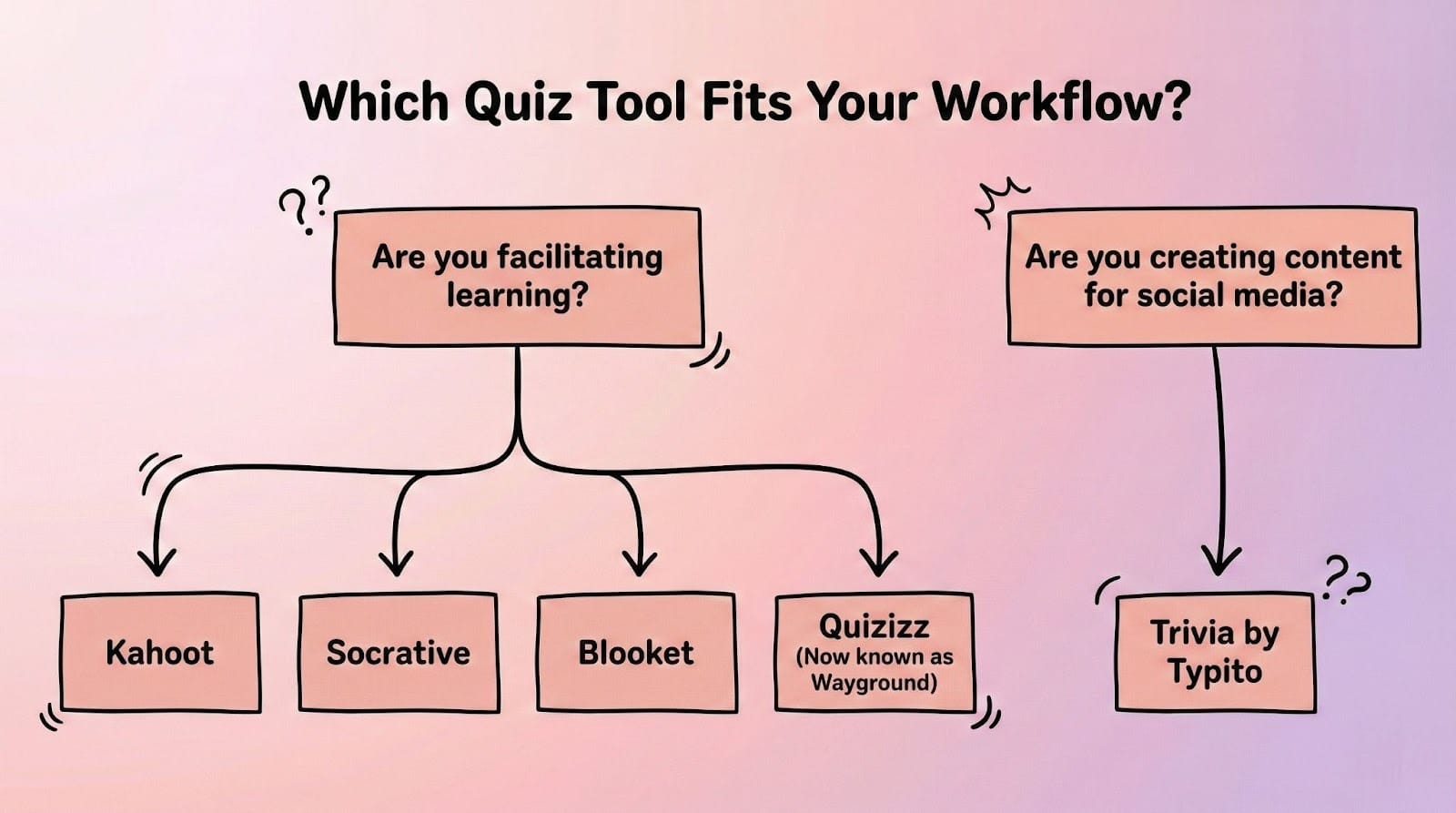
Quick Comparison Table
Best Quizizz (Now known as Wayground) Alternatives by Use Case
Best for Live Classrooms & Training
Kahoot
Kahoot brings game-show energy to learning with synchronized gameplay and visible leaderboards. Students answer simultaneously on their devices while results display on a shared screen, creating competitive momentum that works well for review sessions and team training.
What works: The live energy is difficult to match. The platform offers a large public library of pre-made quizzes and integrates with Google Classroom and Microsoft Teams, saving significant prep time.
The limitation: Free plans cap participation size, and the self-paced mode feels secondary to the live experience. Accessing advanced question types and larger group sizes requires a paid plan.
When it is not a good fit: If you primarily need homework features with detailed individual analytics, or if you regularly exceed the free-tier participation limit without a paid plan.
Socrative
Socrative allows teachers to launch instant polls, exit tickets, or quick knowledge checks mid-lesson in under a minute. The platform excels at formative assessment: those temperature checks that tell you if students are following along.
What works: Speed and simplicity. Teachers can launch a quiz in seconds and the interface is intuitive enough that students navigate it without instruction. The space race feature adds light competition without overwhelming complexity.
The limitation: Analytics are basic. You can see who answered correctly, but you will not get the detailed progress tracking that Quizizz (Now known as Wayground) offers for identifying specific learning gaps or tracking trends over time.
When it is not a good fit: If you need comprehensive reporting, detailed analytics, or want to track student progress across multiple assessments.
Best for Events & Large Audiences
Mentimeter
Mentimeter transforms presentations into interactive experiences by embedding polls, word clouds, and Q&A sessions directly into slide decks. Participants join from their phones and respond in real time, with results appearing instantly as visual charts on the presenter's screen.
What works: The anonymous response option encourages honest participation in corporate settings. The platform handles large group engagement well, making it suitable for conferences, workshops, and town halls where you need to gather input quickly.
The limitation: Mentimeter is built for feedback and discussion, not comprehensive quiz assessment. Question variety and scoring mechanics are limited compared to dedicated quiz platforms.
When it is not a good fit: If structured learning assessment with detailed scoring and progress tracking is your primary requirement.
Best for Async Engagement & Video Content
Blooket
Blooket transforms quizzes into game modes such as tower defense, racing games, and battle royale formats, where students answer quiz questions to power their in-game actions.
What works: The variety of game modes keeps the same content feeling fresh. Students can experience the same quiz through different game experiences, which maintains engagement across multiple sessions. The platform supports a solid number of participants on the free tier, making it practical for full classroom use.
The limitation: The cartoon aesthetic and game mechanics are clearly designed for younger learners. While the functionality works for any age, adult learners and corporate audiences may find the visual style too playful for professional contexts.
When it is not a good fit: Professional training, high school or college courses, or any context where visual presentation affects credibility with adult audiences.
Trivia by Typito AI
Trivia by Typito AI is not designed for classroom facilitation or corporate training assessment. Instead, it is built for creators who need quiz content that exists as video.
The platform generates trivia and quiz videos formatted for TikTok, YouTube Shorts, and Instagram Reels. You enter a topic prompt and AI creates the complete video, handling questions, answers, timing, visuals, and voiceover automatically. The entire process takes minutes rather than hours.
For YouTube creators building trivia channels, social media managers looking to boost engagement metrics, or marketers who need interactive video content at scale, this solves a fundamentally different problem than traditional quiz platforms.
What works: The platform includes templates for emoji quizzes, quote challenges, word association games, and image-based trivia. Content is automatically formatted for vertical video and optimized for short-form platforms.
What it does not do: Real-time facilitation, student progress tracking, or LMS integration. This is a content creation tool, not an assessment platform. You are not grading students; you are creating shareable assets that drive views, comments, and engagement.
When it makes sense: When your audience is scrolling feeds rather than sitting in a classroom, and your success metric is shares and comments rather than test scores.
Tool-by-Tool Breakdown
Kahoot
What it does well
Live engagement with synchronized gameplay creates a game-show atmosphere that students and trainees recognize instantly. The large question library and Google Classroom integration save prep time. Brand recognition means participants already know how the platform works before the session begins.
Who it is best for
Teachers running energetic review sessions, trainers leading workshops, and anyone who needs icebreakers with built-in competitive elements and can work within the free-tier participation limits.
Key limitations
The free plan's participation cap becomes restrictive for larger groups. Accessing advanced question types and meaningful analytics requires a paid subscription. The self-paced mode exists but feels secondary to the live facilitated experience.
When it is not a good fit
If you need robust homework features, detailed individual analytics, or regularly host groups beyond the free-tier limit without budget for a paid subscription.
Blooket
What it does well
Game variety prevents repetition fatigue. Students can experience the same quiz content through multiple different game modes, each with distinct mechanics. The collectible digital avatars add an engagement layer that keeps younger students motivated across sessions.
Who it is best for
Elementary and middle school teachers, after-school programs, and anyone working with younger audiences who respond well to game-based learning. The free tier is generous enough for most classroom sizes.
Key limitations
The aesthetic and game presentation are clearly designed for younger learners. While the quiz functionality works for any age group, the cartoon style and playful mechanics do not translate well to high school, college, or corporate environments.
When it is not a good fit
Professional training, high school or college courses, or any context where the visual presentation style affects credibility with adult learners.
Mentimeter
What it does well
Seamless integration of polls, word clouds, and Q&A into live presentations. Results appear in real time on screen, creating visible momentum during workshops and conferences. The anonymous response option is especially effective in corporate settings where honest input matters.
Who it is best for
Presenters, facilitators, and corporate trainers who need to gather live input from large groups during meetings, all-hands sessions, or conferences. Works well when the primary goal is audience engagement over structured assessment.
Key limitations
Mentimeter is built for feedback and discussion, not deep quiz assessment. Question variety and scoring mechanics are limited compared to dedicated quiz platforms.
When it is not a good fit
If your primary need is measuring learning outcomes, scoring participants, or tracking individual progress across multiple assessments.
Socrative
What it does well
Speed and simplicity. Teachers can launch exit tickets or instant polls quickly with minimal setup. The interface is intuitive enough that students navigate it without instruction. Space race adds light competition without added complexity.
Who it is best for
Teachers who need frequent, low-stakes formative assessment. Anyone who values quick setup and ease of use over feature depth or advanced analytics.
Key limitations
Analytics are basic. You can see correctness and completion data, but you will not get the detailed insights that platforms like Quizizz (Now known as Wayground) provide. There is no ability to track learning trends over time or identify specific skill gaps across sessions.
When it is not a good fit
If you need comprehensive reporting, detailed analytics, or want to track student progress across multiple assessments over an extended period.
Trivia by Typito AI
What it does well
Video quiz creation at scale. The AI generates complete trivia videos from simple prompts, handling questions, visuals, timing, and voiceover automatically. Content is formatted for TikTok, Instagram Reels, and YouTube Shorts without manual editing.
Who it is best for
Content creators building trivia channels, social media managers who need consistent engagement content, marketers creating interactive video assets, and anyone monetizing faceless YouTube channels through quiz videos.
Key limitations
This is a content creation tool, not an assessment or facilitation platform. There is no student tracking, no LMS integration, and no live session management. You cannot grade participants or track learning progress.
When it is not a good fit
If you need to assess learning, track student progress, integrate with school systems, or run live facilitated sessions where participants are being evaluated.
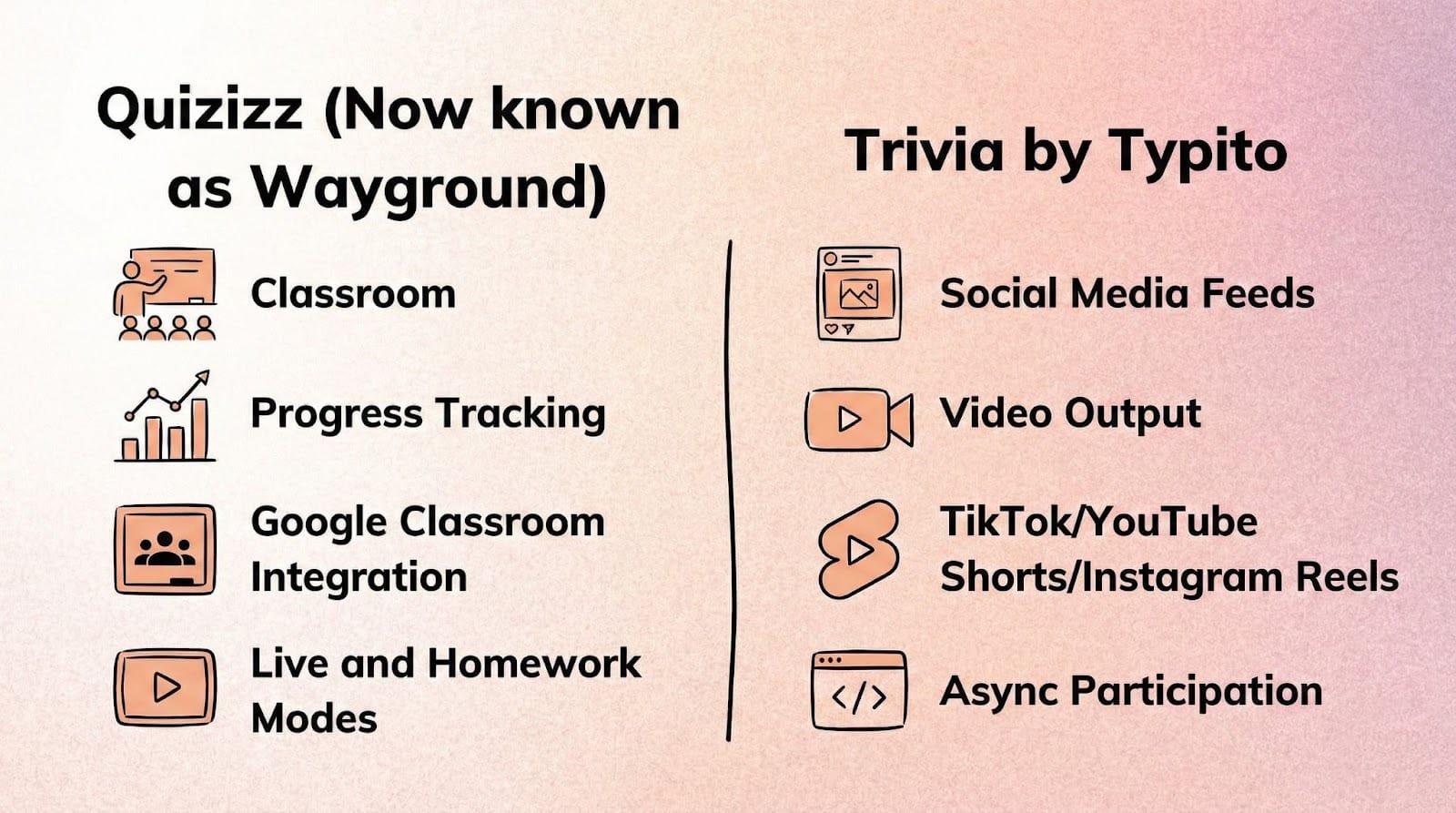
Quizizz (Now known as Wayground) vs Trivia by Typito AI: which tool fits your goal.
Alt Text: Side-by-side comparison graphic showing Quizizz (Now known as Wayground) for classroom assessment versus Trivia by Typito AI for social media video content creation.
Quizizz (Now known as Wayground) vs Trivia by Typito AI: Which Should You Choose?
These tools solve fundamentally different problems, so the decision comes down to your primary goal.
Choose Quizizz (Now known as Wayground) if:
You need to assess learning and track progress. The platform integrates with Google Classroom, tracks detailed student analytics, and offers both live and homework modes. The large library of pre-made quizzes accelerates setup. Your success metrics are learning outcomes and assessment accuracy.
Choose Trivia by Typito AI if:
You are creating quiz content for social media, YouTube, or any platform where video is the primary format. You need content at scale without manual video editing. Your success metrics are engagement (views, comments, shares, watch time) rather than learning assessment.
The clearest divider: Are you facilitating learning, or creating content? Quizizz (Now known as Wayground) is for facilitation and assessment. Trivia by Typito AI is for content creation and distribution.
FAQs
Question: What is the best Quizizz (Now known as Wayground) alternative for creators?
Answer: Trivia by Typito AI if you are creating video content for social platforms. Blooket if you want game-based classroom engagement. Kahoot if live energy matters most and you can work within the free-tier participation limit.
Question: Are there async quiz tools?
Answer: Yes. Quizizz (Now known as Wayground), Blooket, and Socrative all support self-paced modes where participants complete quizzes on their own schedule. Trivia by Typito AI creates async video content that viewers engage with whenever they choose to watch.
Question: Can I reuse quizzes as video content?
Answer: Traditional quiz platforms like Kahoot and Mentimeter do not export to video formats. Trivia by Typito AI is specifically built to turn quiz concepts into video assets formatted for TikTok, YouTube Shorts, and Instagram Reels.
Question: Which quiz tools work for social media?
Answer: Most quiz platforms are designed for classrooms and do not format content for social distribution. Trivia by Typito AI creates quizzes already optimized for vertical video platforms and social sharing, with built-in timers, answer reveals, and platform-specific formatting.
Question: What is the difference between live and async quizzes?
Answer: Live quizzes require participants to join simultaneously, typically with a facilitator controlling question pacing and timing. Async quizzes let participants complete them independently on their own schedule. Knowing which model matches your audience's availability and your facilitation capacity is key to choosing the right tool.
Question: How much do these alternatives cost?
Answer: All of the tools listed here offer a free tier with some limitations. Paid plans vary by tool and are updated regularly, so it is best to check each platform's pricing page directly for current options. Trivia by Typito AI offers a free trial; visit trivia.typito.com for current pricing.
Conclusion
Quizizz (Now known as Wayground) remains a strong choice for structured assessment in educational and training contexts. Its detailed analytics, Google Classroom integration, and comprehensive question library make it reliable for teachers and trainers tracking learning progress.
But when your audience lives on feeds and timelines rather than in classrooms, or when you need quiz content that functions as social media assets rather than assessment tools, traditional quiz platforms were not built for that distribution model.
If your quizzes need to exist as video content driving engagement across platforms, rather than just tracking who answered correctly, video-first quiz tools open up entirely different opportunities for creators and marketers.
If your audience lives on feeds, timelines, and embeds, video-based quiz tools are worth exploring.
Related Resources
Quiz Creation Guides