Bad trivia music kills retention before the answer even lands. The issue isn't volume or quality, it's emotional rhythm. Background music in trivia has one job: to pace the question, build tension through the countdown, and release it on the reveal. Miss any of those, and viewers scroll.
Here's what actually works: the right genres, BPM range, and how to match music to the moment on any platform.
At A Glance
- Why Background Music Matters in Trivia Videos
- The Background Music Format: What to Play When
- Which Music Style Fits Your Trivia Format
- Best Background Music Types for Trivia Videos
- Should You Use Music in Trivia Videos or Not?
- Common Background Music Mistakes in Trivia Videos
- Best Trivia Video Music for TikTok, Reels, and YouTube
- How to Add Background Music to Trivia Video
Why Background Music Matters in Trivia Videos
Pick something, turn it down low, done.
That's the mistake. In a trivia video, music has a job at every stage, and it's a different job each time.
Music does three things that no visual element can:
- Sets the emotional register before the question is even read
- Fills the thinking window without breaking the silence in a way that feels empty
- Signals the shift, question to countdown to reveal, without needing a hard cut
The Background Music Format: what to play when
Not every moment in a trivia video needs the same music. The mistake most creators make is picking one track and running it through everything — question, countdown, reveal, next question.

Music for the Question Phase
A soft loop with no melody keeps the viewer focused on reading without competing for attention. Think the Jeopardy intro — present but invisible.
Best background music for trivia questions: ambient, non-melodic loops under 70 BPM.
Music for the Countdown ("best music for trivia countdown")
This is where tension is built or lost. A ticking pulse with a gradual rise — like the Who Wants to Be a Millionaire bed- signals that time is running out without telling the viewer what to feel. The climb does that automatically.
Best music for trivia countdown: rhythmic pulse tracks with upward builds, 80–110 BPM.
Music for the Reveal ("music for quiz reveal")
The reveal needs a release. A stab, sting, or drop punctuates the moment and gives the viewer a payoff. Without it, the answer lands flat.
Music for quiz reveal: short stabs or drops under 3 seconds, major key for correct answers, minor or dissonant for wrong ones.
The key insight: the music shouldn't be the same across all three moments. Most short-form trivia videos only have one track, so the trick is to find a track that naturally builds, starts understated, rises through the countdown, and peaks at zero.
Which music style fits your Trivia format
The most popular styles for quiz shows break down into four distinct types, each serving a different emotional purpose.
Here's the full menu, pick what fits your format and audience.
The mistake: Mismatch between music and question difficulty breaks immersion.
- Use tension synth when the countdown is the core mechanic
- Use upbeat when trivia is entertainment-first
Best Background Music Types for Trivia Videos
1. Tension Synth: 110–130 BPM
Pulsing synth bass, rising pads, minimal melody. This is the Jeopardy DNA, engineered to create urgency without demanding attention.
Best for: Any social trivia video where the countdown is the centrepiece; TikTok, Reels, YouTube Shorts.
Why it works: The rising pad structure does the emotional heavy lifting automatically. Viewers feel time pressure without being told to.
Avoid when: The round is meant to be light or fun. Tension synth over easy pop-culture questions creates a tonal mismatch.
2. Upbeat Pop Instrumental: 120–140 BPM
Bright, bouncy, feel-good. Works when the vibe is casual and the questions are easy.
Best for: Nostalgia trivia, pop culture rounds, team icebreakers.
Why it works: High energy without stakes. Keeps the mood light and the viewer smiling.
Avoid when: The countdown is the main event. This genre doesn't build tension; it dissolves it.
3. Lofi / Jazz: 60–90 BPM
Chill, slow, contemplative. Gives the audience room to actually think.
Best for: Classroom rounds, newsletter trivia, longer-format YouTube content.
Why it works: The slower pace signals that this is a thinking moment, not a race. Works well when difficulty is the point.
Avoid when: Publishing to social. The tempo kills urgency, the sense of urgency, and viewers scroll past, and viewers scroll before the reveal.
4. Orchestral Sting: Variable
Short dramatic bursts, strings, brass hits, cinematic swells. Built for one moment, not the whole video.
Best for: The reveal only. Especially effective paired with "Wait, really?" closers.
Why it works: Delivers a payoff. The contrast between countdown music and a cinematic sting makes the answer feel like an event.
Avoid when: Used throughout. Running orchestral stings for the full video feels like a movie trailer, not a quiz.
5. Trending Audio: Variable
Platform-native sounds that the algorithm already favours. On TikTok, this beats everything else for reach.
Best for: TikTok discovery plays, Reels, algorithm-first publishing.
Why it works: The platform boosts content using popular audio. Reach comes before mood here.
Avoid when: Tension is the goal. Trending audio rarely builds suspense; layer trivia text over it rather than relying on it for atmosphere.
6. Silence: No BPM
Not the absence of a decision. A deliberate one.
Best for: LinkedIn posts, mute-first environments, captions-only formats.
Why it works: In scroll environments where 80%+ watch on mute, the wrong music is worse than none. Strong on-screen text, bold captions, and a visible countdown timer carry more weight than a track nobody hears.
Avoid when: The platform has a sound-on culture. On TikTok or YouTube, silence reads as unfinished.
Should You Use Music in Trivia Videos or Not
Call out: Use music for tension, silence for emphasis.
Well-designed sound effects or background music in a film can positively influence audience engagement, but the same research found that the presence of music matters more than the specific tempo. Which means silence is also a choice, and often the right one.
When silence works better than music:
- The reveal itself. A well-timed moment of silence before the answer lands hits harder than music throughout the whole thing. Think of it as the pause before the punchline.
- Very short clips (under 8 seconds). The music doesn't have time to establish anything; it just appears and disappears.
- Mute-first feeds like LinkedIn. Most viewers won't hear it anyway. Design for silence and let the visuals carry the format.
When music is non-negotiable:
- Any countdown window. Silence during a timer feels awkward, like something is missing. Even a subtle pad gives the brain something to hold onto.
- Long-form and live events. A host voice without any underscore sounds like a phone call, not a quiz show.
- Looping short-form feeds. Music helps the video feel complete even when it replays.
Common Background Music Mistakes in Trivia Videos
Most trivia videos fail because the music fights the format.
❌ Music too loud. If the track competes with the question text for attention, viewers either read or listen, not both. Music should be felt, not heard.
❌ Same music, same volume, all the way through. No emotional signal on the reveal. The music says nothing changed, so to the viewer, nothing did. The reveal needs a shift, even a subtle one.
❌High-energy music on hard questions. Upbeat, busy music while a viewer is trying to recall a specific answer creates cognitive friction. Match the music energy to the question difficulty; harder questions need slower, simpler, quieter tracks.
❌ Using copyrighted music on commercial content. Using a recognizable song without a license gets your video muted or taken down, and there's no algorithm boost from trending audio if you're not posting natively. Use royalty-free or platform-native audio.
Best Trivia Video Music for TikTok, Reels, and YouTube
Each platform has different audio defaults, algorithm preferences, and audience expectations. The same music setup that works on Reels can actively hurt your reach on TikTok.
How to Add Background Music to Trivia Videos (Fastest Way)
Getting music right used to mean sourcing a track, cutting it to length, ducking the volume at the right moment, and syncing it to the countdown. If you're doing it manually, that's still the process.
One faster route is Trivia by Typito AI, which handles the sync automatically. Here's how that flow works.
1. Enter your topic and select the generated prompt
Go to Trivia by Typito AI → type your topic → pick the prompt it generates, adjust difficulty and question count → hit Generate. The video comes out with background music already synced to the countdown and reveal.
What gets included automatically: background music matched to quiz tempo, a countdown timer per question, voiceover on the reveal, question and answer text, and animated transitions. All synced, no manual audio editing.
2. Go to the Music section in the left panel
Open the left panel and find the Music section. You'll see multiple styles to preview and swap, tension synth, upbeat, cinematic, lo-fi, and more.
Tension synth is the default for most social trivia. Upbeat works for nostalgia or fun-facts rounds. Cinematic fits "Wait, really?" closers and dramatic reveals.
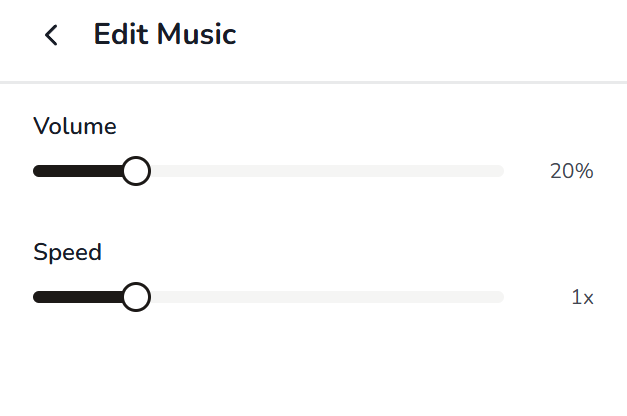
3. Hit Edit: set volume and speed
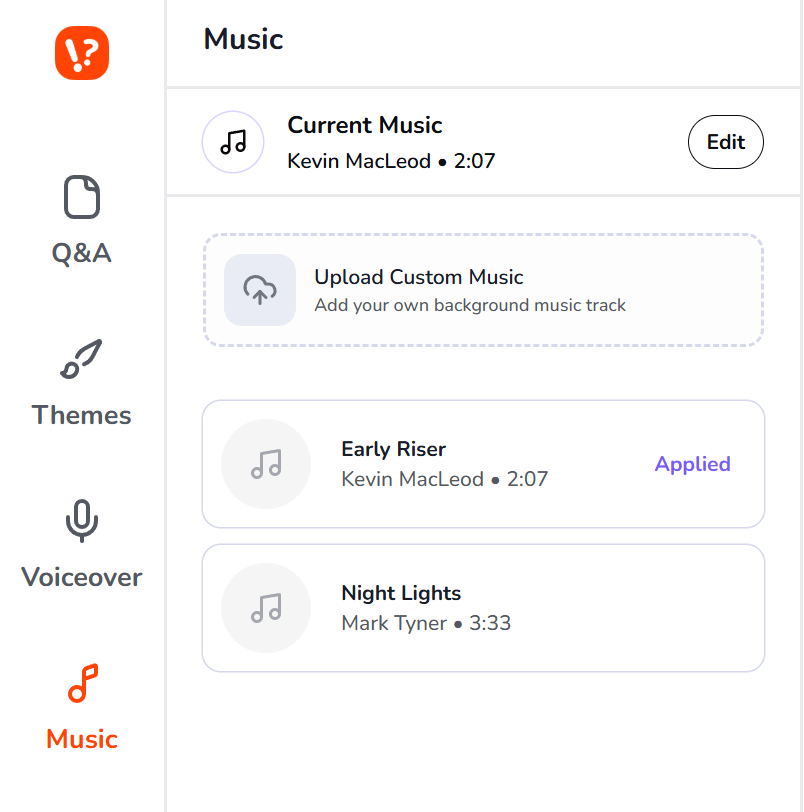
Two things matter here.
Volume: keep the music clearly below the voiceover. If you can't easily separate the voice from the track, the music is too loud.
Speed: slow it down for a more deliberate reveal, speed it up for fast-paced social formats.
4. Do the headphones-off test before downloading
Play the video through your phone speaker pointed away from you. Does the reveal still feel like a moment? Does the music build tension without grabbing attention? If both answers are yes, download and post.
FAQS
Q1. What if I want no music at all?
Answer: That can work — but only if your visual design is strong enough to carry the tension on its own. A clear question, a visible timer, and a punchy reveal with a sound effect can replace a music track entirely.
Q2. What is the best background music for trivia videos?
Answer: Tension synth at 110–130 BPM is the most reliable choice for social trivia video. It creates urgency during the countdown without demanding attention, so viewers can focus on the question while the music builds pressure. For the reveal, either a music dip or a short orchestral sting adds the emotional shift that makes the answer feel like a payoff.
Q3.What BPM works best for trivia countdown music?
Answer: 110–130 BPM is the sweet spot for social trivia formats. It's fast enough to create urgency without feeling frantic, and it matches the natural pace of a 7–10 second countdown. For easier or lighter-hearted rounds, 90–110 BPM works well. Anything below 80 BPM removes urgency; anything above 140 BPM can feel overwhelming.
Stop guessing what music works. Generate trivia videos with synced countdown music in seconds.