At a glance: 5 tools evaluated so you can pick the right one for your audience and workflow.
Kahoot changed how people think about quizzes. It made live sessions feel like game shows fast, competitive, and high-energy. If you're running a classroom or leading a team workshop, it still does that job well.
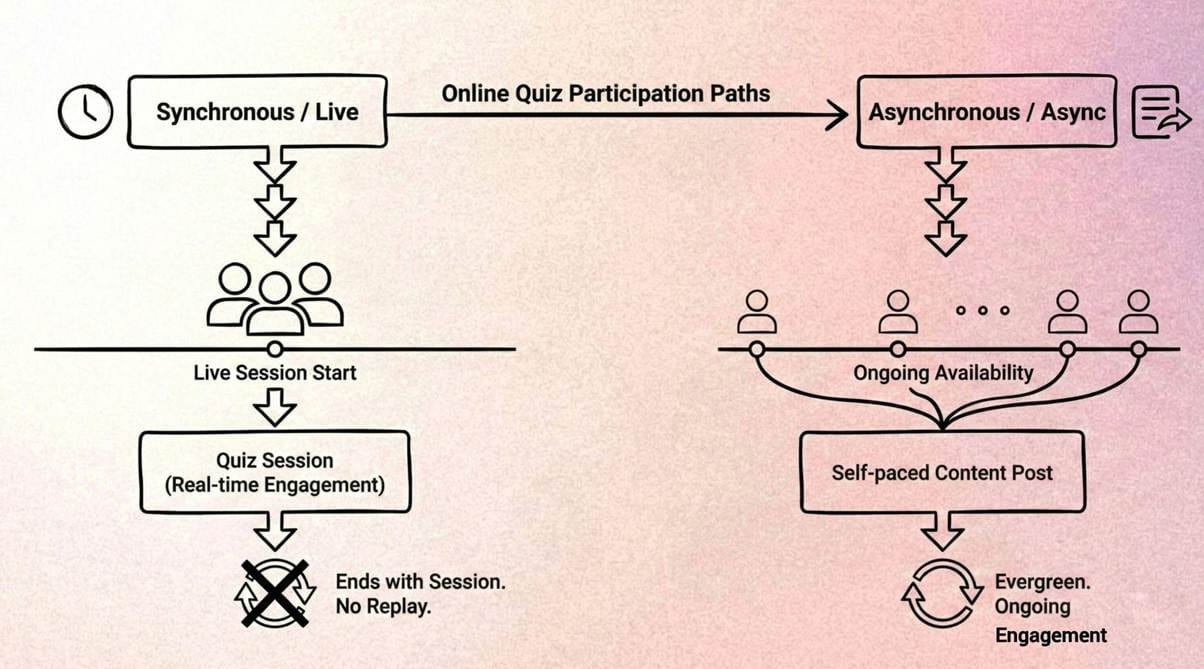
But most creators aren’t hosting scheduled rooms. They’re publishing to feeds, embedding content in newsletters, and reaching audiences who engage on their own time. Kahoot was built for synchronous, facilitator-led sessions. Once the session ends, so does the interaction which can feel limiting if your audience discovers content asynchronously.
So the real question isn’t whether Kahoot works. It’s whether its delivery model fits how you create and distribute content.
Below, we break down the best Kahoot alternatives based on where and how your audience engages.
Jump to a section:
1. How to choose the right Kahoot alternative
3. What Is the Best Kahoot Alternative for Async Video Engagement?
5. Kahoot vs. Trivia by Typito: which should you choose
6. FAQs
How to Choose the Right Kahoot Alternative
Before swapping tools, audit your workflow. A live classroom tool used for social media will frustrate your audience. An async tool used for a live session will feel flat. Use this checklist to find your fit:
Live vs. Async - Do participants need to answer simultaneously, or can they answer on their own schedule? If your audience is global or spread across time zones, synchronous tools immediately cut your potential reach. Forcing people to show up at a set time is a participation tax - and most won't pay it.
Audience Size Limits - Kahoot's free tier caps at 10 participants. At scale, costs escalate quickly. Check where each tool's pricing jumps before committing - some alternatives offer far more generous free tiers that scale with your audience without a credit card.
Video Support - Questions built around video clips drive higher completion rates than text-only formats, especially on mobile. If your audience primarily engages on social feeds, video-native quiz formats dramatically outperform static text questions - because the video itself is part of the hook.
Replay & Reuse Value - A quiz that dies after one session is a single-use asset. Tools that let quizzes live as embeddable, shareable content turn a one-time activity into evergreen content. For creators, this is often the most valuable axis - your effort compounds instead of expiring.
Social Media Compatibility - Extra steps kill participation. PIN codes, second screens, and separate app downloads create friction that dramatically reduces completion rates on social feeds. Native embeds keep people inside the experience where engagement actually happens.
Analytics Depth - Knowing who won is different from knowing where people dropped off. If you're using quizzes for marketing or lead generation, drop-off data by question tells you exactly where interest fades - and that's the information worth optimizing. After a certain number of questions, mobile drop-off increases sharply; analytics depth helps you find that threshold for your audience.
Quick Comparison Table
Use this table to quickly match a tool to your primary use case. This is designed to surface the right fit fast - not to rank tools against each other.
Tool Name |
Best For |
Live / Async |
Video Support |
Standout Limitation |
Free Tier Available? |
Trivia by Typito |
Social media & video creators |
Async |
High (Video-First) |
Not for live classrooms |
Yes |
Quizizz |
Classrooms & remote training |
Both |
Moderate |
UI can feel juvenile for corporate use |
Yes |
Mentimeter |
Professional presentations |
Live |
Moderate |
Restrictive free tier |
Limited |
Slido |
Large events & conferences |
Live |
Low |
Minimal visual customization |
Limited |
Typeform |
Lead generation & research |
Async |
Moderate |
No competitive or social element |
Limited |
What Is the Best Kahoot Alternative for Async Video Engagement?
These recommendations are grouped by workflow intent. The most popular tool isn't always the right one - the right tool is the one built for your specific environment and audience.
Best for Live Classrooms & Training
Winner: Quizizz
Quizizz replicates Kahoot's competitive energy while adding flexibility that teachers and trainers actually need. Its 'Instructor-paced' mode gives you Kahoot-style control over question timing, while 'Student-paced' mode lets participants work through material independently - useful for homework, post-session review, or async follow-up.
The gamification layer - memes, power-ups, leaderboards - keeps competitive energy high without requiring the facilitator to carry the room. For K-12 educators and corporate trainers who want live competition with a built-in async fallback, Quizizz is the most direct Kahoot replacement.
Best for Events & Large Audiences
Winner: Slido
When your audience numbers in the hundreds or thousands, Slido is the industry standard. It integrates directly into PowerPoint and Google Slides, so participants never leave your presentation to participate. Its Q&A upvoting feature is particularly strong for town halls - it surfaces the most-asked questions automatically, cutting through noise in large groups without manual moderation.
The trade-off is honest: Slido prioritizes function over visual excitement. It's text-heavy and visually minimal, which makes it less effective for audiences who expect an engaging visual experience. For enterprise events where professionalism matters more than entertainment, that's the right call.
Best for Async Engagement & Video Content
Winner: Trivia by Typito
Traditional quiz tools assume you have a scheduled audience. Trivia by Typito assumes you don't - and that's the design intent, not a limitation.
Built for the creator economy, it lets you transform existing video content into interactive quizzes that audiences can engage with whenever they encounter your post. Instead of asking your audience to show up at a specific time, you meet them where they already scroll.
See quiz video ideas for creators for format inspiration across Reels, Shorts, and TikTok.
The workflow fits naturally into creator and social media strategies:
- Video-first quizzes: Embed your existing clips into questions directly - your content does the engaging, not just the question text.
- Async participation: Followers engage when they see your content, on their own schedule, generating interaction signals that feed platform algorithms.
- Social & embed workflows: Designed to stop the scroll on Instagram, LinkedIn, and TikTok without requiring users to leave the platform or enter a PIN.
- Creator use cases: Works well for 'Guess the ending,' 'Spot the difference,' educational recaps, and product knowledge content - formats that perform in short-form video environments.
The practical result: a quiz that functions as a content asset. It keeps generating engagement long after you publish - which is something live-only tools can't offer.
Tool-by-Tool Breakdown
Here's an honest look at each platform. The weaknesses listed here are real - credibility matters more than a clean pitch.
1. Trivia by Typito
A video-first engagement tool for creators who want interaction without scheduling live sessions.
What it does well: It turns passive viewers into active participants by layering interactive elements directly onto video content. Once someone answers the first question, they're invested - they want the payoff. The workflow is built for social: create once, distribute everywhere, and let the format do the engagement work.
Who it's best for: Social media managers, video creators, and content marketers who measure success in engagement rates, replays, and click-throughs - not session attendance numbers.
Key limitation: It's not designed for synchronous, facilitator-controlled classroom competition. Real-time pacing of questions for a live group isn't what this tool is built for. Not designed for complex branching logic or long-form assessment workflows.
When it's not a good fit: Live classroom or corporate training environments where simultaneous participation and real-time control are non-negotiable requirements.
Try it: Trivia by Typito - create your first video quiz for free.
2. Quizizz
The closest direct Kahoot alternative, with live and self-paced modes that give educators genuine flexibility.
What it does well: Gamification that actually works - memes, power-ups, and leaderboards maintain competitive energy without requiring the facilitator to keep performing. The dual-mode approach (instructor-paced and student-paced) solves the problem Kahoot doesn't address: what happens to engagement after the live session ends.
Who it's best for: K-12 teachers, corporate trainers, and remote team leads who want the competitive energy of Kahoot with more format flexibility and a built-in async fallback.
Key limitation: The interface can feel chaotic for professional or executive-level contexts. The meme-heavy design that works in a classroom can undercut credibility in a boardroom.
When it's not a good fit: Brand-sensitive or high-stakes environments where visual polish and a clean, professional aesthetic are expected.
3. Mentimeter
A presentation tool that builds interactive quizzes directly into slide decks, designed for professional facilitation.
What it does well: Real-time visualizations. As participants vote, word clouds and live charts populate on screen - creating a collaborative, data-visible feel that's far more professional than a leaderboard. It rewards reflection over speed, which is the right dynamic for workshops and strategy sessions.
Who it's best for: Public speakers, workshop facilitators, and business professionals who want to add interactivity to a presentation without disrupting its tone or flow.
Key limitation: The free plan restricts both participant numbers and question types. Anything beyond basic use requires a paid tier - which isn't always obvious until you're mid-setup.
When it's not a good fit: If you want high energy and competition. Mentimeter is intentionally slower and more reflective - that's a design choice, not a flaw, but it's the wrong choice for game-show energy.
4. Slido
The enterprise standard for large-scale live events, Q&A sessions, and audience polling.
What it does well: Managing audience scale. Its Q&A upvoting system is the best in its class for filtering signals from noise in rooms with hundreds of participants - the most-asked questions surface automatically, reducing manual moderation. The PowerPoint and Google Slides integration removes friction completely.
Who it's best for: Event organizers and internal communications managers at large enterprises running town halls, all-hands meetings, or professional conferences.
Key limitation: Minimal visual customization. If your audience expects a visually engaging experience, Slido's text-first interface will feel like a step backward. It's built for utility, not excitement.
When it's not a good fit: Audiences that expect entertainment, creative content, or a social-feeling experience. Slido is professional and functional - and intentionally so.
5. Typeform
The standard for conversational, asynchronous forms and quizzes that feel like a one-on-one dialogue.
What it does well: Design and conditional logic. Typeform's branching (if a user answers A, skip to question 5) is powerful for lead qualification and customer segmentation. On mobile, it presents one question at a time - making it feel like a conversation rather than a form, which meaningfully improves completion rates for longer flows.
Who it's best for: Marketers running lead generation or audience segmentation. Each answer qualifies the lead further, so follow-up content and offers can be personalized without manual sorting.
Key limitation: No social or competitive element. Participants don't see how others answered, there's no leaderboard, and it doesn't create a shared experience - it's a tool for individual qualification, not community engagement. Additionally, embed flexibility is limited compared to purpose-built quiz tools; there's no competitive gamification to drive engagement; and it's not designed for short-form video ecosystems like Reels, Shorts, or TikTok.
When it's not a good fit: Any context where the communal 'everyone playing together' element is part of the value. Typeform is solo by design.
Looking to use quizzes for lead capture? Read: How to Create a Quiz Lead Magnet That Converts.
Kahoot vs. Trivia by Typito: Which Should You Choose?
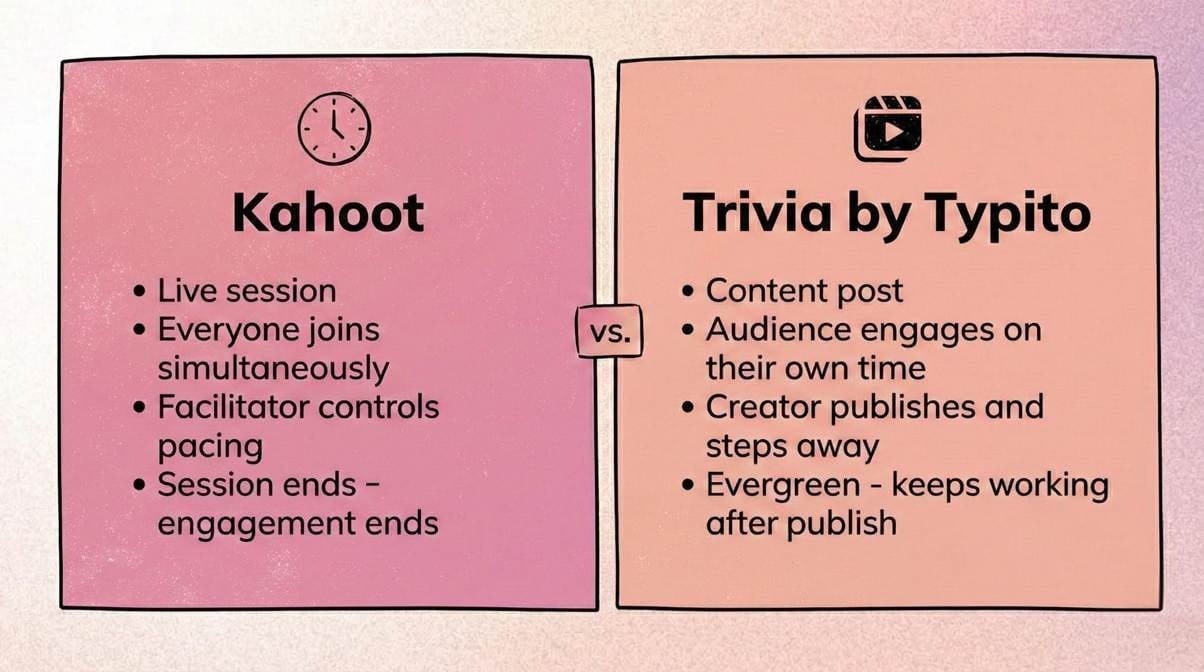
This isn't a feature comparison - it's a delivery model decision. Both tools work. They're just built for fundamentally different engagement environments.
Choose Kahoot if:
- You're hosting a live session - virtual or in-person - and everyone joins at the same time.
- You need structured assessment reporting for a live group.
- The energy of a game show is part of the experience you're trying to create.
- You need to control exactly when each question appears and how long participants have to answer.
- Your audience is physically or virtually in the same place at the same moment.
The vibe: Facilitator-led, synchronous, high-energy - and over the moment the session ends.
Choose Trivia by Typito if:
- You're creating content for people to discover and engage with on their own time.
- You want to use video quiz formats built from content you've already produced.
- You're optimizing for engagement metrics on social feeds, embedded content, or newsletters.
- You need the quiz to keep generating interaction after you hit publish, not just during a scheduled window.
The vibe: Creator-led, asynchronous, evergreen - built to perform on a feed, not in a scheduled room.
FAQs About Kahoot Alternatives
Q1: What is the best Kahoot alternative for creators?
Answer: For video and social media creators, Trivia by Typito is the strongest fit - it's built for async engagement and video-first formats. For live-streaming creators who want the game-show atmosphere, Quizizz is the closest equivalent with the most flexible free tier.
Q2: Are there async quiz tools that don't require scheduling a session?
Answer: Yes. Trivia by Typito and Typeform both support async participation. Quizizz also offers a 'Homework' mode that allows self-paced engagement outside of live sessions - useful for remote teams and course creators.
Q3: Can I reuse my quizzes as video content?
Answer: Traditional tools like Kahoot and Slido aren't designed for content reuse. Trivia by Typito is purpose-built for this - quizzes are created as video-first assets intended to be shared across Instagram, LinkedIn, TikTok, and embedded on websites with no extra editing required. See quiz video ideas for creators for format examples.
Q4: Which quiz tools work natively on social media?
Answer: Trivia by Typito is the strongest native option – it’s designed to run inline on social feeds without PIN codes or redirects. More broadly, tools requiring PIN codes or separate platform logins create friction that sharply reduces participation on social feeds. Video-based or embed-friendly tools that run inline - without redirecting users to another tab - perform significantly better for social distribution.
Q5: Is there a free Kahoot alternative for large groups?
Answer: Quizizz generally offers more generous free-tier participant limits than Kahoot. Slido has a free tier but limits the number of polls per event. You can also make a free trivia game online with Trivia by Typito - no participant caps for async content. Always verify current pricing pages as limits change frequently.
Q6: Is Quizizz better than Kahoot?
Answer: It depends on your use case. Kahoot excels in facilitator-led live sessions with game-show energy – it’s purpose-built for that environment. Quizizz is generally more flexible: it supports both live and self-paced modes, has a more generous free tier, and doesn’t require a facilitator to control the pacing. For classrooms that need both live competition and async follow-up, Quizizz offers more utility. For a pure live game-show experience, Kahoot remains the gold standard.
Q7: Can Kahoot be used asynchronously?
Answer: Kahoot does offer a ‘Challenge’ mode that allows players to complete a quiz independently on their own schedule, rather than in a live session. However, this is a secondary feature – Kahoot’s core design is synchronous and facilitator-led. The async experience is more limited compared to tools purpose-built for it, like Trivia by Typito or Quizizz’s Homework mode, which are designed from the ground up for self-paced engagement.
Conclusion
The right tool comes down to one question: are you controlling a room, or releasing content into a feed?
If you're running a live classroom or synchronous training session, Kahoot and Quizizz remain strong choices. They're built for the energy and pacing of a real-time group experience - and for that specific environment, they're hard to beat.
But if your audience discovers content on their own schedule - across feeds, replays, and embeds - live-only tools create an engagement ceiling. You can't reach people who weren't in the room when the session ran.
If your audience lives on feeds, timelines, and embeds, video-based quiz tools are worth exploring. The shift isn't just about format - it's about building content that keeps working after you hit publish.
Explore more quiz tool comparisons: Top Trivia Tools in 2025 - Featuring All Online Quiz Formats.