If you’ve ever tried creating trivia for an audience beyond your local region, you know the struggle is real. Writing fun, culturally neutral, and grammatically correct questions in multiple languages can be incredibly time-consuming, and intimidating.
But multilingual trivia quizzes are worth it.
They make your content inclusive, help you connect with diverse communities, and dramatically boost engagement. Whether you’re a creator, teacher, marketer, HR facilitator, or community manager, delivering quizzes in your audience’s native language increases participation and confidence.
The good news? You don’t need to be a translator or a professional quiz writer. With the right approach (and the right tools), you can create multilingual trivia quizzes in minutes.
What can you expect?
- Why do we need trivia quizzes in multiple languages?
- How to Create Trivia Quizzes with Typito in minutes?
- Things to remember when making a multilingual quiz
- Frequently asked questions
Why Multilingual Trivia Quizzes Are So Effective?
- Reach a global audience and boost engagement : Not everyone is comfortable with English or a single common language. Multilingual quizzes break that barrier. People click, share, and respond more when the content feels tailored to them.
- Increase accessibility and reach diverse groups: When people understand questions instantly, they participate more and finish more quizzes. Perfect for classrooms, multinational teams, virtual events, and community campaigns.
- Create familiarity and trust: Local-language content feels personal and culturally aware.
- Enhance learning and understanding: If the quiz is educational, clarity matters; especially across languages.
The Real Challenge: Why Multilingual Trivia Is Hard to Create
People often assume translation is the only hard part. But multilingual trivia has deeper challenges:
- AI translations can sound robotic or overly literal
- Cultural references don’t always translate naturally
- Clues that rely on wordplay or idioms often break
- Tone differs by language (formal vs informal)
- Formatting needs to adapt to different language lengths
- Trivia pacing must stay consistent across versions
- Maintaining accuracy across languages is tedious
This is exactly where structured workflows and smart tools help.
How to Create Multilingual Trivia Quizzes (in 5 steps)
Tools like Trivia by Typito automate the hardest parts: question writing, translation accuracy, formatting, and video creation. All while giving you enough control to refine tone and details.
Here’s how you can do it.
Step 1: Signing up or logging in to Trivia For Free
In Trivia, multilingual quizzes can be generated without logging in. You can always choose to sign in and create an account (or log in if you have an account already) if you want to manage your content efficiently.
Step 2: Choosing your template and generating the quiz
a) Picking a recipe
- When you click on the Pick a recipe tile, you will see numerous options of trivia quizzes for you to choose from. Like the one below -
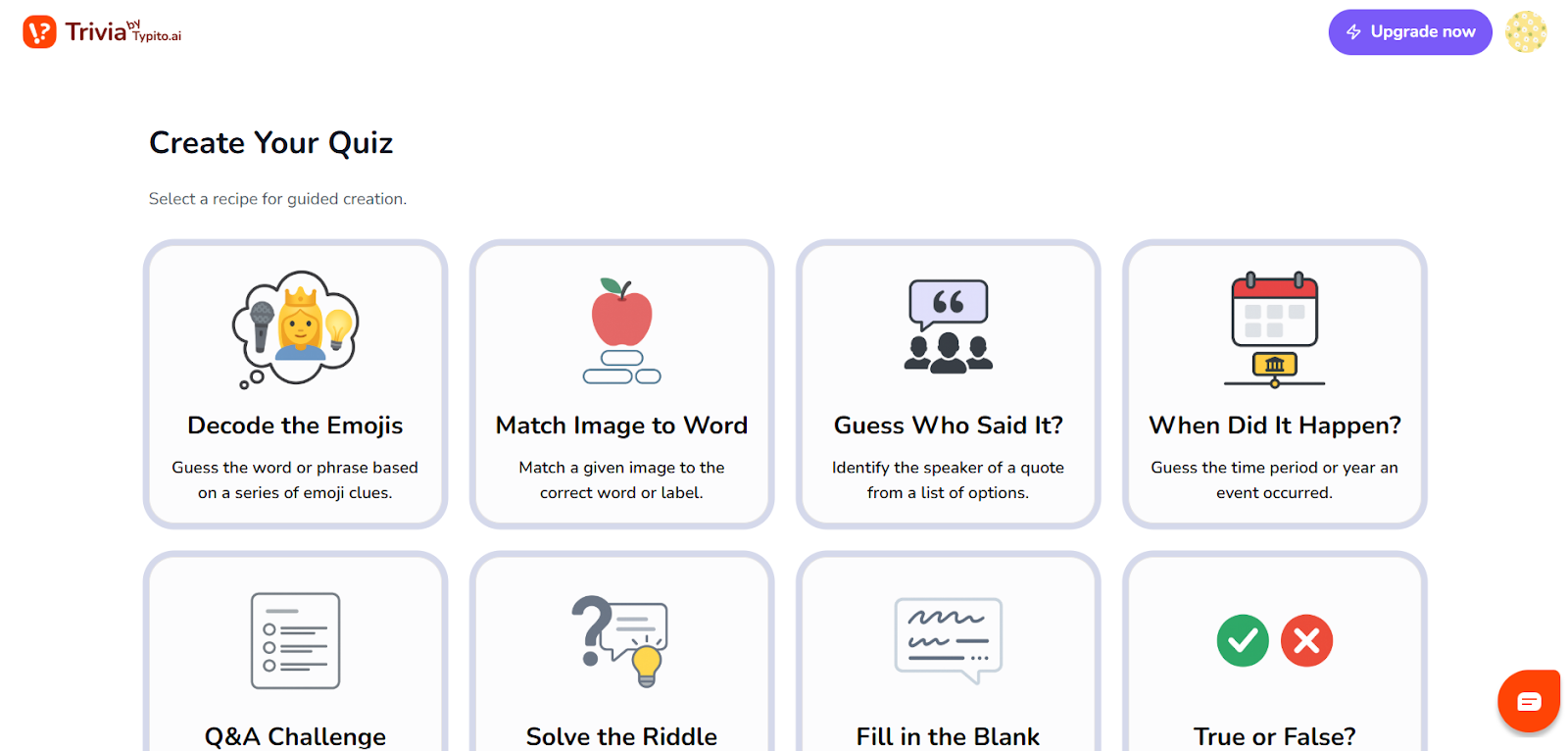
- Pick one, and describe your topic clearly.
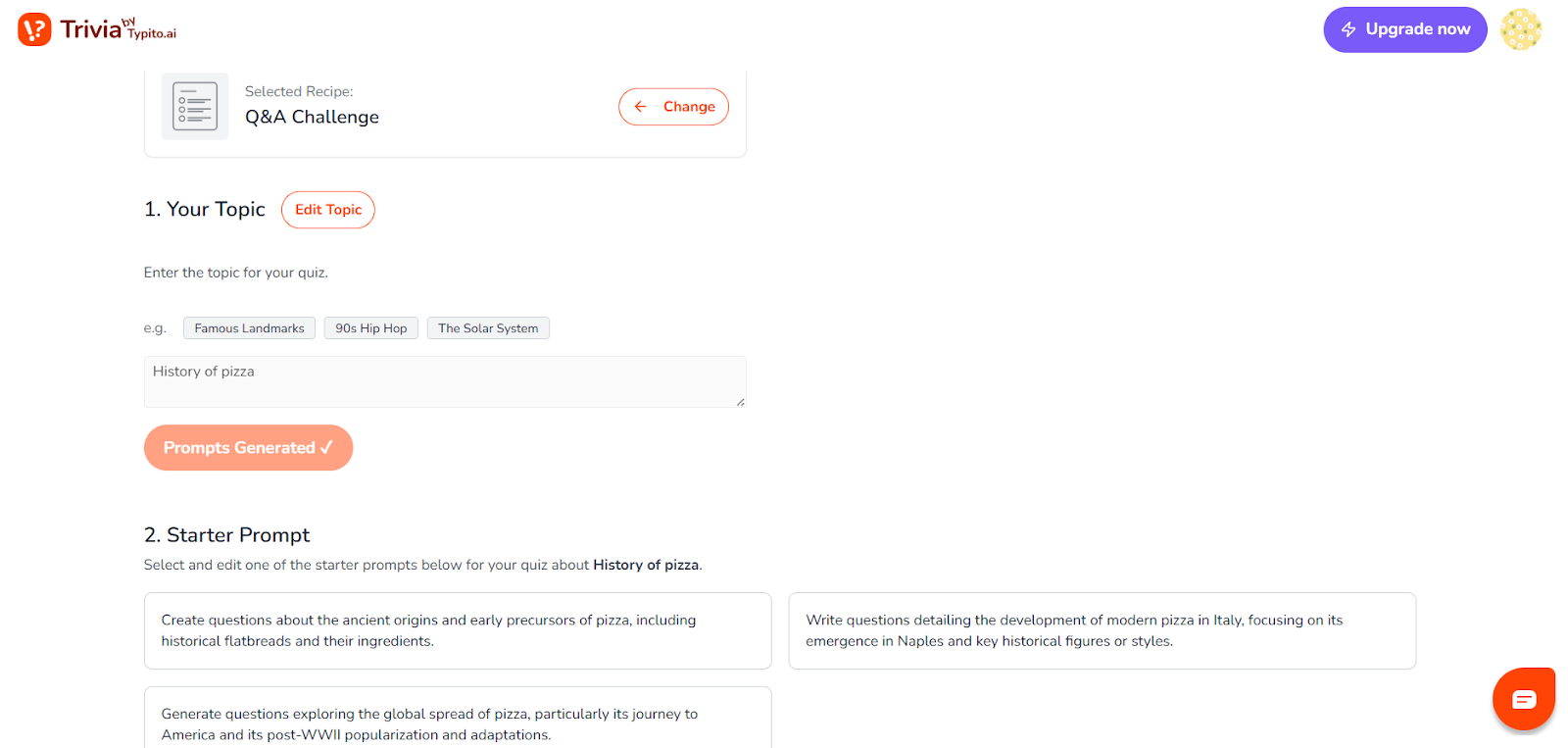
- Go through the different prompts and choose one.
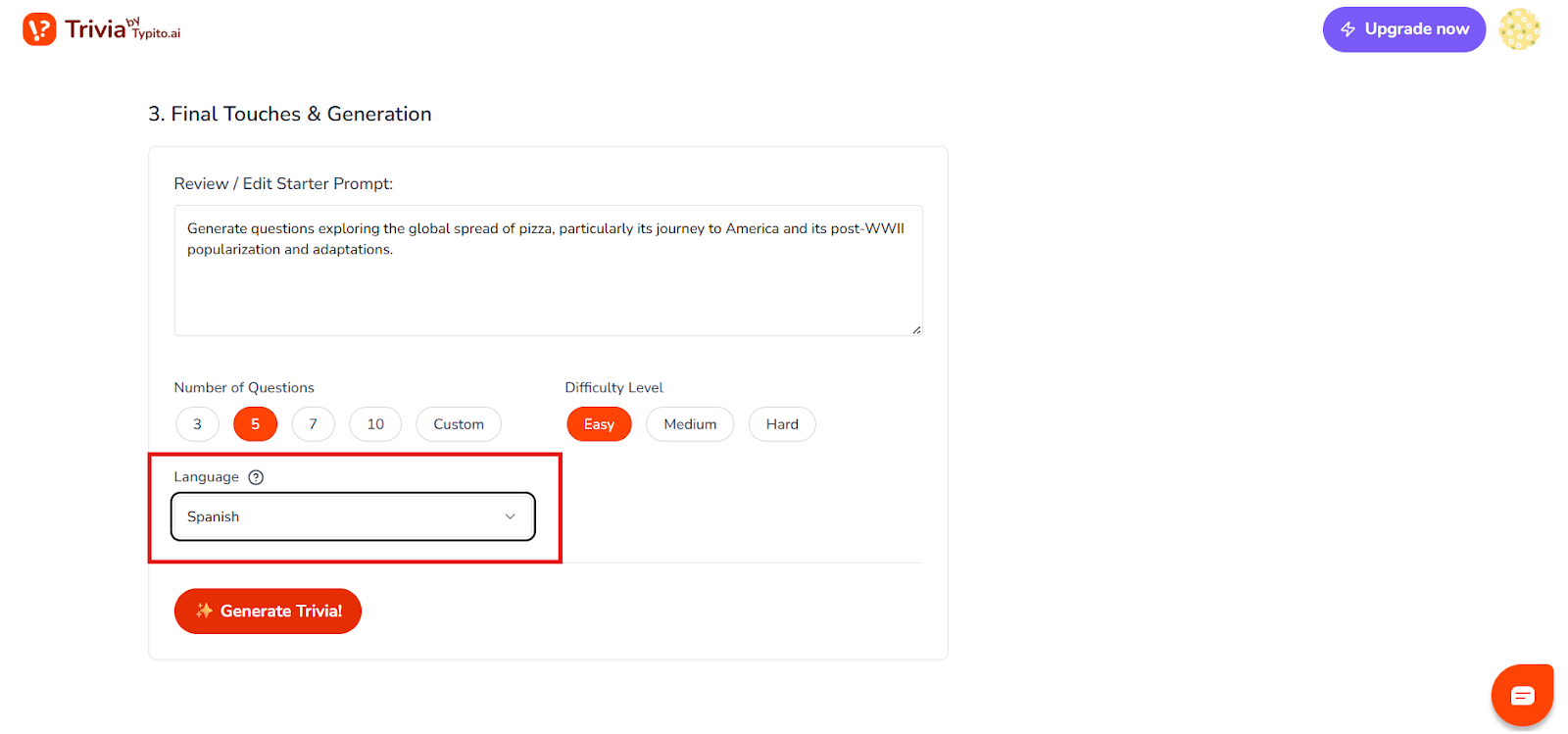
- Review the final prompt, choose the number of questions, difficulty level and your preferred language from the list of options.
- Trivia by Typito supports 10 languages, including English, French, Spanish, Hindi, Dutch, Indonesian, Filipino, Polish, Ukrainian, and Hungarian.. Once done, click on generate trivia.
- The trivia video is now generated, and you can go ahead and make changes to the questions, themes, and the voice from the left panel.
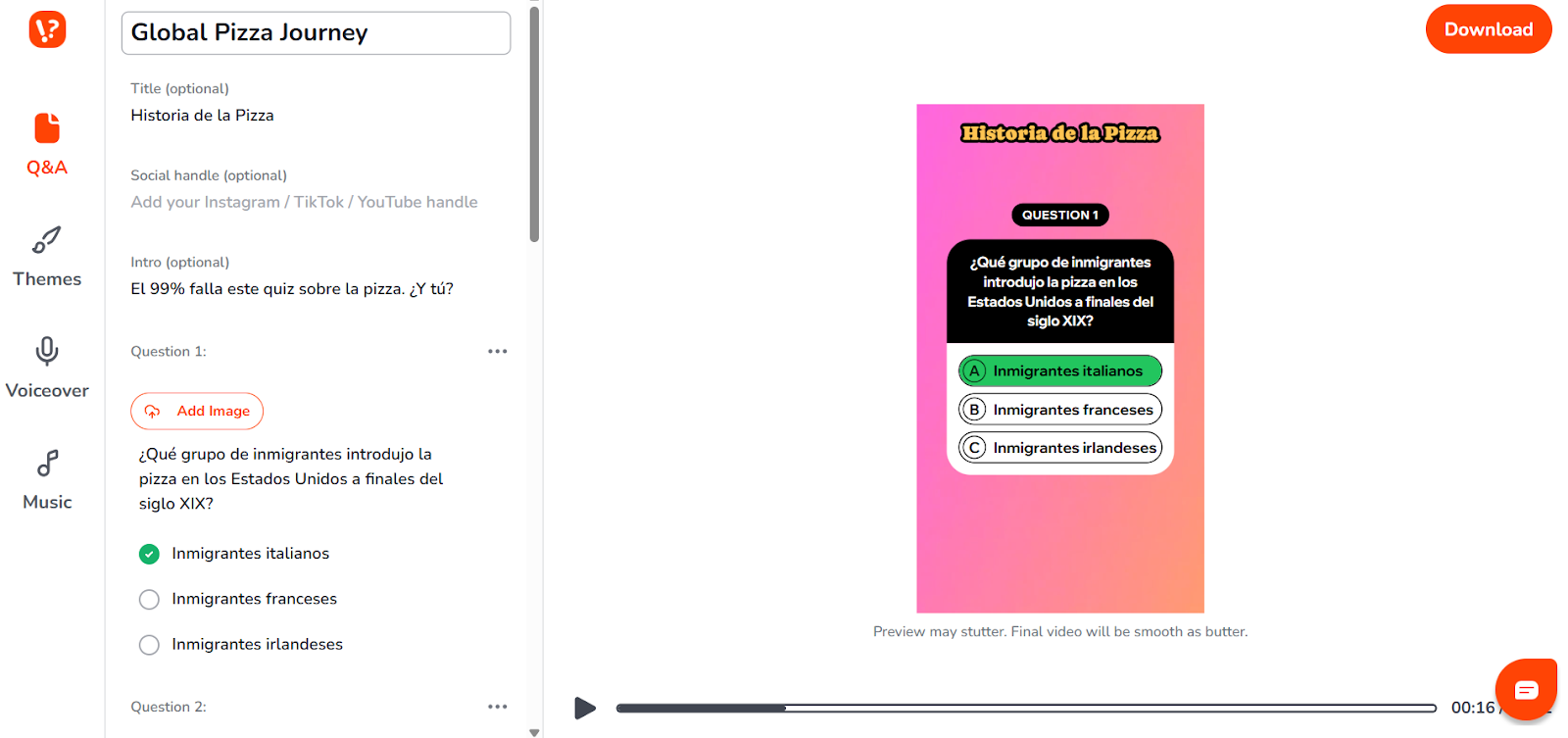
- Once done, you are ready for the next step.
b) Starting from scratch
Here, “scratch” essentially means you get more control; AI does all the work for you if you are clear with what you want.
- Simply click on the custom template tile and enter your detailed prompt — include the topic, quiz type, number of questions, and difficulty level. Mainly, the language that you want the quiz to be in.
- Here’s an example - “I want to generate a trivia quiz video on the History of pizza in Italian. I want 10 questions. I want 7 easy questions and 3 medium questions. Use a colourful and fun theme suited for a classroom.”
- Click Generate Trivia, wait a few seconds, and watch Typito work its magic!
- You have your trivia quiz in Italian without breaking a sweat.
- Use the left panel controls to tweak anything — edit questions, change themes, or adjust the voice.
- Review your video, hit download, and you are done!
Step 3: Download + share
Preview to ensure pacing and clarity, then download. Your multilingual trivia video is now ready to be published anywhere. Here’s what a trivia video in a different language looks like once done.
Multi lingual quiz video generated with Trivia BY Typito
Step 4: Test your Trivia Game
Before publishing, preview your trivia quiz. Play through it once to check the pacing and flow, ensuring the transitions feel smooth and the timer (if used) matches the length and difficulty of each question.
Best Practices for Creating Multilingual Trivia
Things to remember when making a multilingual quiz. Even with AI, great trivia still needs thoughtful design.
1. Avoid cultural traps
Skip slang, idioms, and region-specific jokes unless you are localizing intentionally. Example:
❌ “Piece of cake”
✔ “Very easy task”
2. Keep questions short and direct
Shorter questions translate more cleanly.
3. Use concepts understood across cultures
Universal topics (food, travel, history, science, entertainment) work better than regional ones.
4. Be mindful of tone
Some languages default to formal tone (e.g., French, Japanese). Adapt where needed to sound natural.
5. Test thoroughly
Play through your quiz once in each language to ensure:
- No line breaks look awkward
- No mistranslations slipped in
- Pacing remains consistent
Frequently asked questions
1. How do I choose which languages to include?
Start with the languages spoken by your primary audience or region. For global events, pick widely understood ones (Spanish, Hindi, French, Indonesian).
2. Do I need a native speaker to review?
It helps, but Typito’s AI gives high-quality translations you can refine manually. A native check is ideal but not mandatory.
3. How many languages does Trivia by Typito support?
10 languages: English, French, Spanish, Hindi, Indonesian, Filipino, Polish, Dutch, Ukrainian, and Hungarian.
4. Can I customize tone or difficulty across languages?
Yes! Edit questions individually even after they’re generated.
Create Your First Multilingual Trivia in Minutes
If you want to experiment, try generating a trivia quiz in a language you’ve never written in. You’ll be surprised how quick and fun it is.
👉 Try creating your first multilingual trivia quiz with Typito now. A few clicks. Zero translation effort.