Your audience scrolls past 300 feet of content every day. They've learned to ignore ads, skip intros, and close tabs within 3 seconds. So, how do the brands that do capture attention actually do it?
The answer isn't louder. It isn't flashier. It's interactive.
Welcome to the era where passive consumption is dead, and participation is the new currency of engagement. AI-powered quiz videos aren't just a trend; they're a fundamental shift in how audiences process, remember, and act on content. While traditional videos ask viewers to watch, quiz videos ask them to play. And when people play, they stay.
In this deep dive, we'll unpack why AI quiz videos are outperforming static content across every funnel stage, how top brands are leveraging them for ROI using AI quiz video tools, and exactly how you can start building your own.
Glossary
- Why AI Quiz Videos Drive Higher Engagement
- How AI Optimization Pushes Quiz Reels to the Top of the Feed
- Real-World Use Cases of Quiz Reels
- How to Get Started with AI Quiz Video Tools
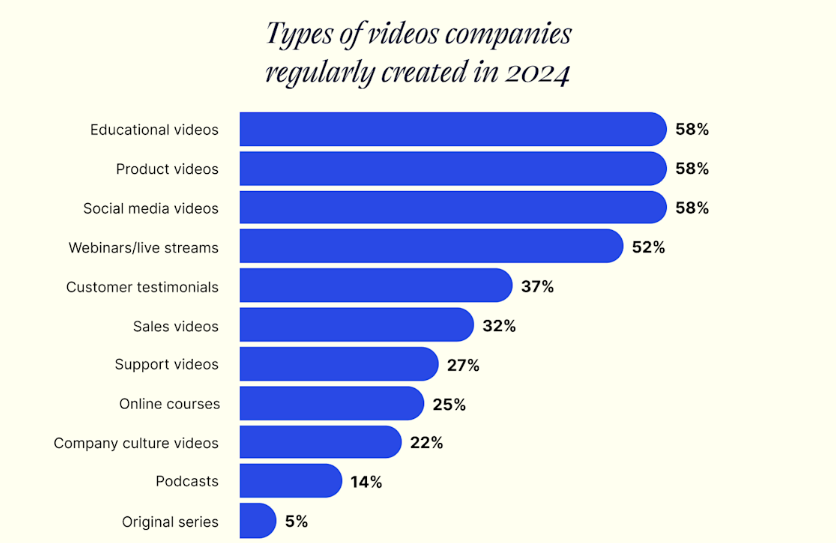
- The Data Behind the Shift: What 2026 Marketing Trends Tell Us
- A Simple First Step
- People Also Ask
Why AI Quiz Videos Drive Higher Engagement
We are living in an era of "participation-first" content.
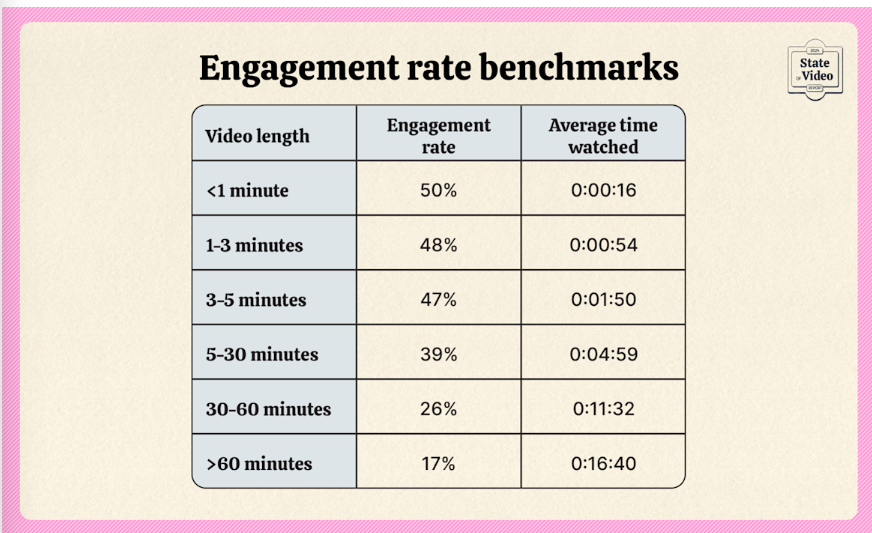
According to research from Wistia, videos under one minute have the highest completion rates, but interactive elements like quizzes can produce 3x higher session times compared to static visuals.
Why does this happen? It’s rooted in how our brains process information:
- Active vs. Passive Learning: When a viewer has to answer a question, they move from a "passive observer" to an "active participant." This shift activates the brain’s reward system, often referred to as dopamine loops, keeping them hooked until the reveal.
- The Completion Bias: Wistia 2025 Reports states Videos under one minute average ~50% engagement rate. Wistia 2025 Reports
Why it works: Humans hate leaving things unfinished. Once someone answers your first quiz question, they're psychologically wired to see their final score.
What to do: Add a visible progress tracker ("Question 3 of 5"). Tease the result throughout ("Stay till the end to see if you're right!").
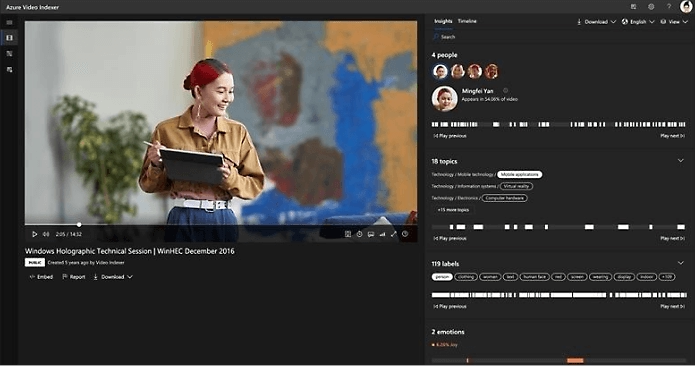
- Optimized Retention Curves:AI tools like Azure AI Video Indexer track exactly where viewers drop off—watch time, replays, skips.
Why it works: These tools don't guess. They know the exact second most people bail. Quiz elements placed at drop-off points act as "pattern interrupts" that reset attention.
What to do: Use AI analytics on your existing videos. Find your drop-off points. In your next video, drop a quiz question right before that moment.
When people can participate, not just consume, they stay longer, engage deeper, and remember more.
Interactive formats don't just perform better. They fundamentally change how attention works.
How Quiz Videos Influence the Customer Journey
Video doesn't follow a linear funnel anymore. It influences decisions across scroll, search, and share—often simultaneously.
According to a study by Google, among respondents who reported that digital video played a role in their path to purchase:
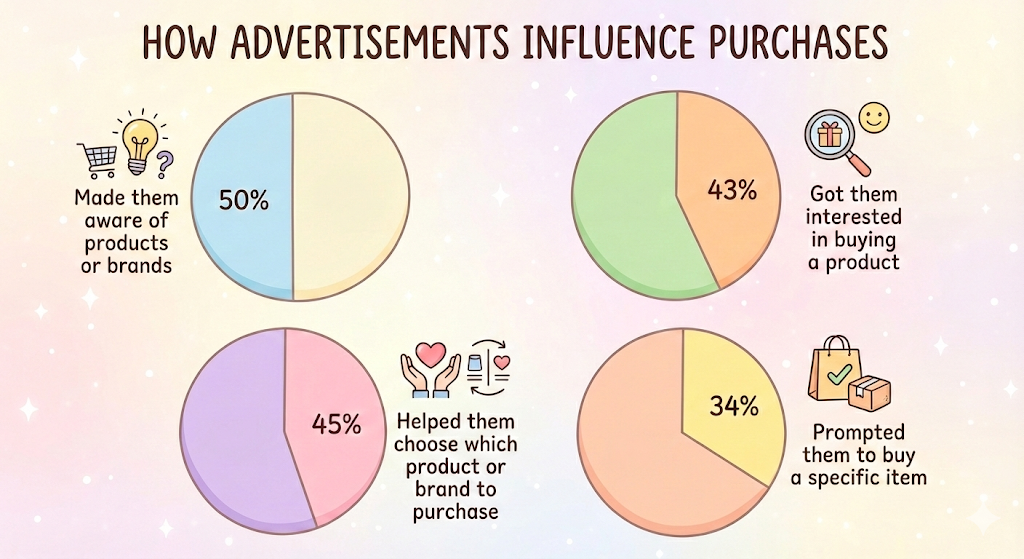
Here's how quiz videos specifically drive each stage:
1. Scroll (Discovery):
- Quiz format = instant curiosity hook ("Can you guess...?")
- Viewers stop mid-scroll because the question challenges them
- Interactive = higher save rates (people bookmark to try later or share with friends)
2. Search (Consideration):
- Quiz videos generate comments asking for answers or debating results
- More comments = stronger engagement signals = better algorithmic reach
- Longer watch time boosts SEO rankings on YouTube and Google search results
3. Share (Decision):
- People tag friends in quiz results ("You're definitely Type B!")
- Quiz outcomes become conversation starters, driving organic shares
- Shared videos build social proof: "If my friend watched this, it must be worth my time."
Map your quiz videos to customer intent, not just awareness. Create "Which [product] fits your needs?" quizzes for the consideration stage. Use "Test your knowledge about [feature]" for the decision stage.
The brands winning attention understand this: it's not about buying impressions. It's about making impressions that stick, spread, and sell.
How AI Optimization Pushes Quiz Reels to the Top of the Feed
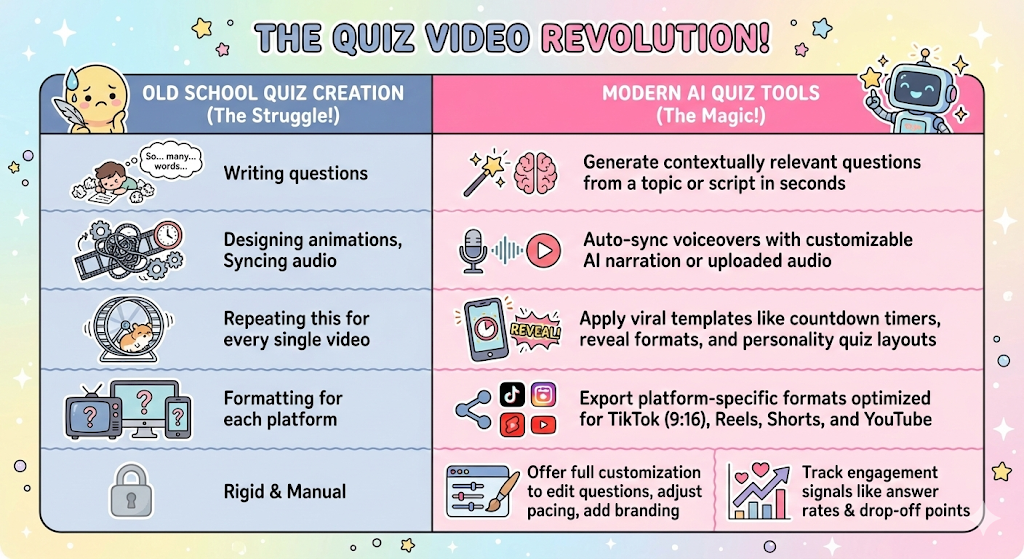
It's not just automation.
It's intelligence that adapts to platform dynamics, audience behavior, and content trends.
Real-World Use Cases of Quiz Reels
While "Quiz Reels" are famous on Instagram and TikTok, they're driving results across education, marketing, and content creator channels.
1. Education and training
A study published in ResearchGate found that in professional learning contexts, 48.8% of learners completed at least one quiz when embedded in training videos, leading to higher knowledge retention than passive watching
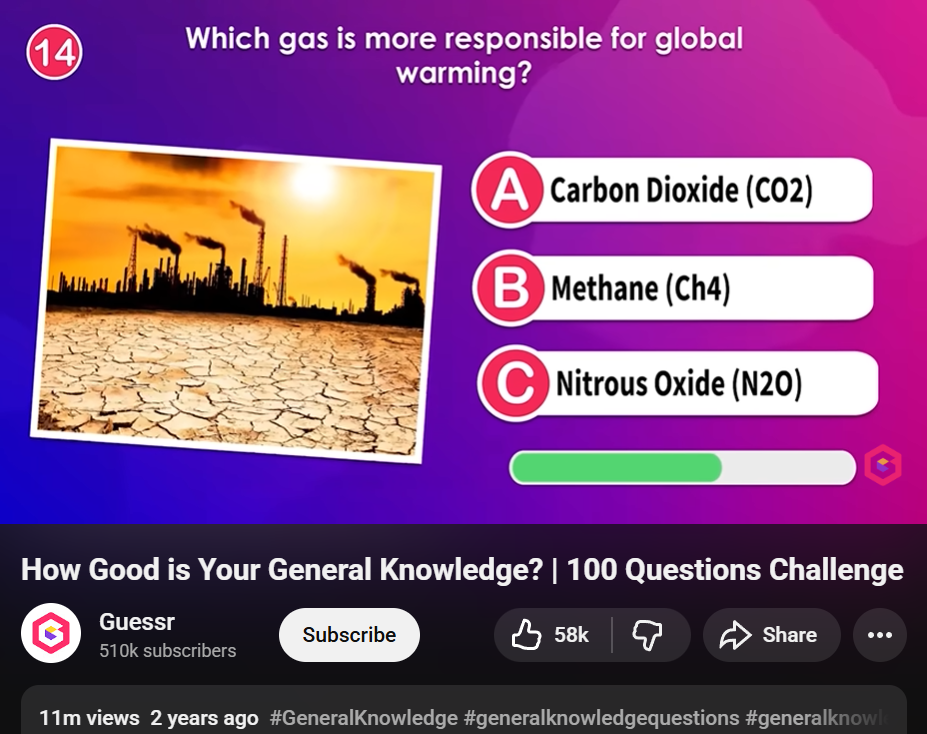
Example: Guessr (YouTube)
Format: "How Good is Your General Knowledge? | 100 Questions Challenge."
Results: 11M+ views, 58k+ likes
Why it worked: Questions are rapid-fire with immediate answers. Viewers can jump in at any point and still participate.
Takeaway: Use timed reveals (3-5 seconds per question). Don't drag it out. Keep the momentum high so viewers binge through all the questions.
Pro Tip:
If you're creating training or educational content, replace 10-minute lectures with 60-second knowledge checks. Embed one quiz every 2-3 minutes in longer videos.
2. Marketing & Lead Generation
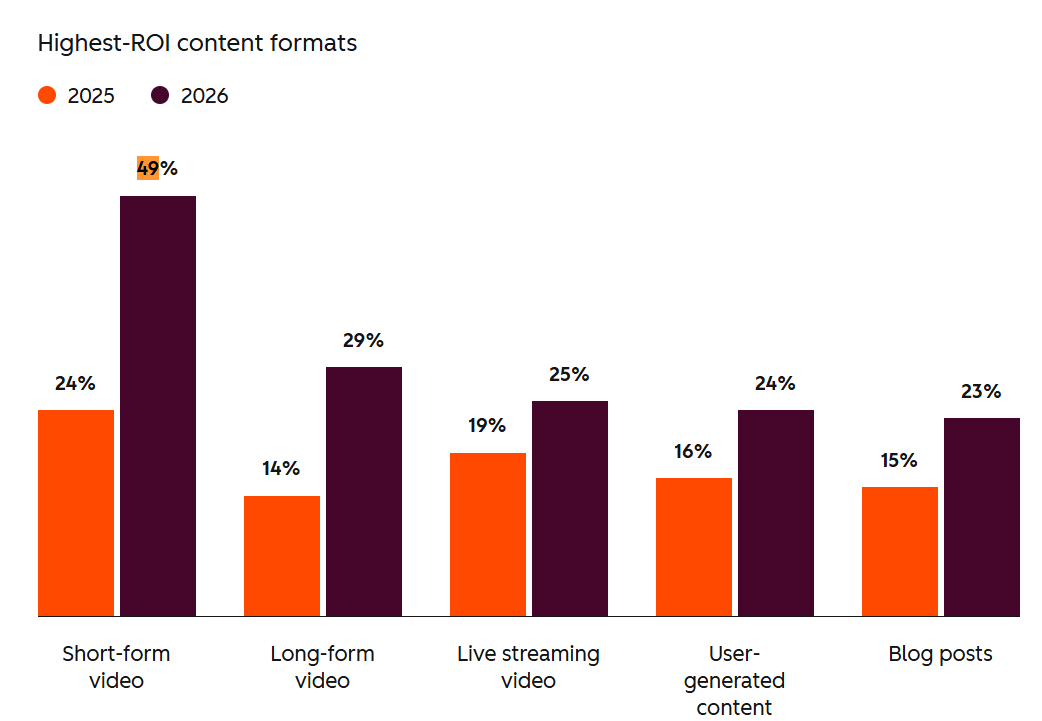
HubSpot research indicates that short-form video delivers the highest ROI for marketers today. By using an AI quiz, you aren't just showing a product; you’re asking the audience a question about their needs.
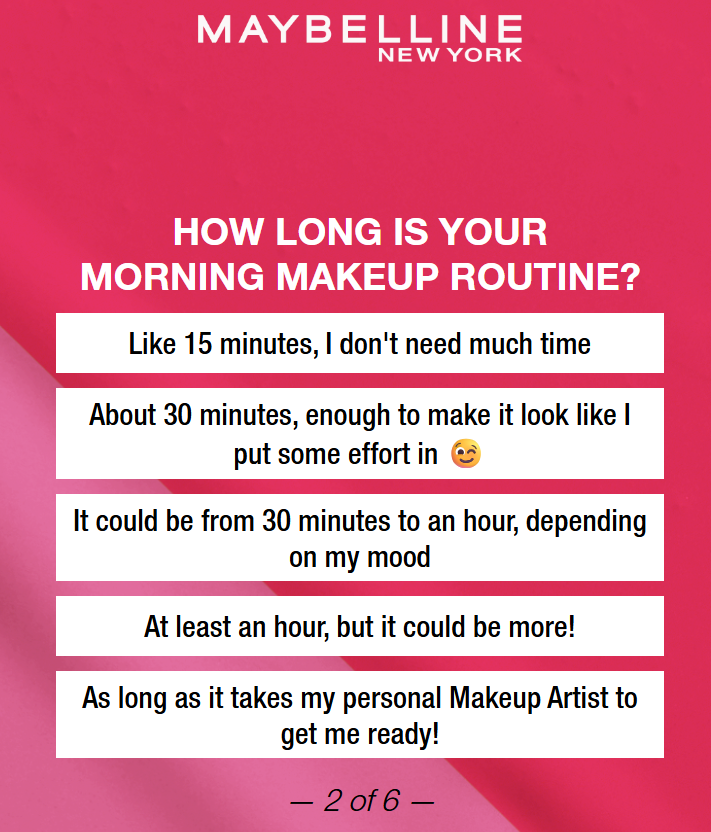
Example: Maybelline New York (Instagram + Website)
Format: "WHAT TYPE OF BEAUTY BABELLINE ARE YOU?" personality quiz
Results: 60% reach of Gen Z on YouTube, 69% on TikTok, 80% increase in sales
Why it worked: Each answer gave instant value (personalized beauty profile) while capturing zero-party data for product recommendations.
Takeaway: Gate the quiz results with email capture. Offer personalized outcomes ("You're a Bold Glam type—here are your perfect products").
Pro Tip:
Create a "Find Your [Product Type]" quiz. Segment your audience by their answers, then serve tailored recommendations at the end. This turns entertainment into conversion.
4. Social media growth
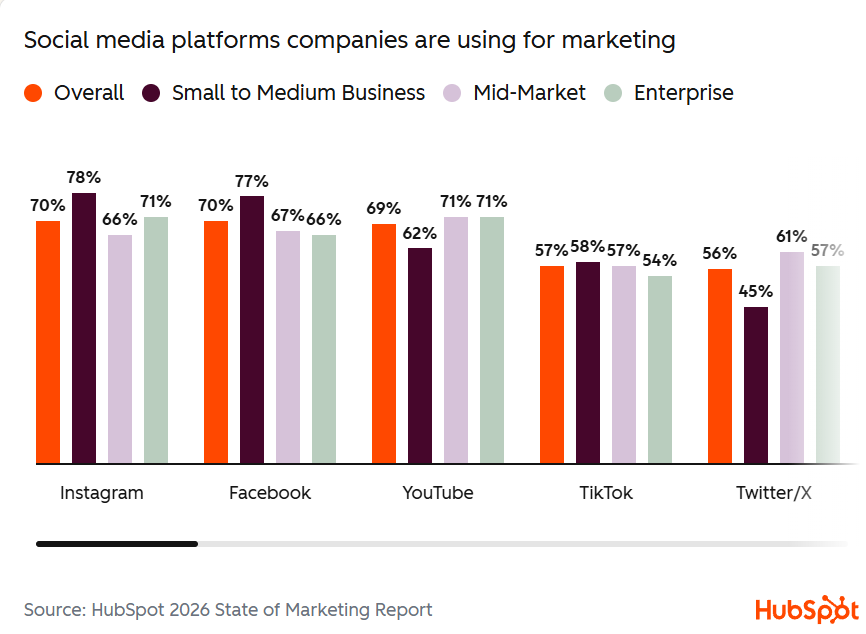
Quiz reels drive comments, shares, and replies by inviting participation instead of broadcasting. Instagram is one of the top social platforms for ROI, engagement, and lead generation when sharing marketing videos, thus many of the companies prefer the platform for marketing
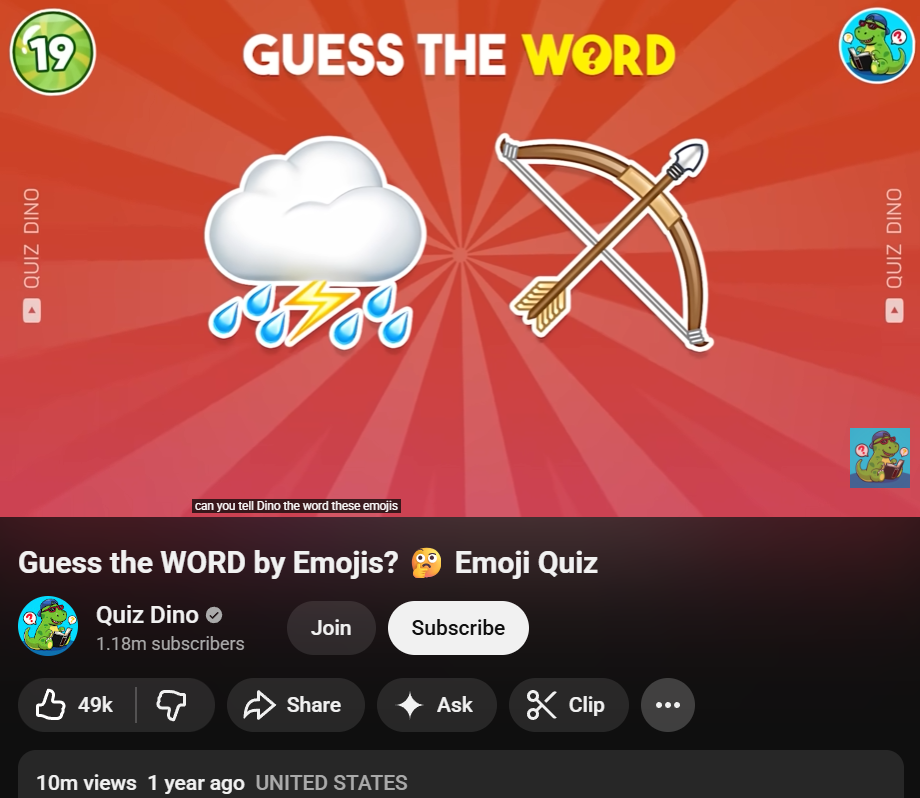
Example: Quiz Dino (YouTube Shorts + TikTok)
Format: Emoji-based guessing games ("Guess the WORD by Emojis?")
Results: 10M+ views on a single video
Why it worked: One simple visual puzzle. 3-second delay before the reveal. Viewers comment their guesses, driving engagement signals that boost reach.
Takeaway: Ask one question. Pause 3-5 seconds before revealing the answer. Pin the first comment asking "Drop your guess below 👇" to trigger the conversation.
Pro Tip:
Analyze your top-performing static posts from the last 90 days. Convert the top 3 into quiz format. A/B test engagement rates and double down on what works.
For further examples, check this out
How to Get Started with AI Quiz Video Tools
You don't need a production team. You need a system.
If you're not a designer (and honestly, who has time for that?), Trivia by Typito AI handles the heavy lifting—questions, visuals, voiceovers, timers. You just bring the topic.
Here's the 5-step workflow:
1. Pick a proven quiz format
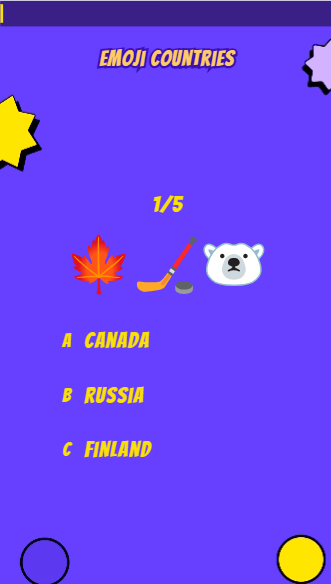
Start with what's already working. Browse formats that are getting millions of views—emoji quizzes, "Guess the..." challenges, trivia countdowns.
Not sure what works? Check out some of our popular quizzes here to see what's trending and pick a format you can spin for your niche.
2. Generate questions with AI
Type your topic into Trivia by Typito AI—anything from "90s Pop Culture Trivia" to "Soccer World Cup Winners." The AI generates questions, visuals, and voiceover automatically. No scripting. No sourcing images. Done in seconds.
3. Add a human twist
This is where you make it yours. Tweak the questions for accuracy. Adjust difficulty so it's not too easy or impossible. Change pacing if needed. Customize colors and animations to match your brand vibe.
The AI gets you 80% there. You add the 20% that makes people remember you.
4. Export for Reels
Download videos pre-optimized for TikTok, Instagram Reels, or YouTube Shorts. No manual reformatting. No aspect ratio headaches. Just grab and go.
5. Post → observe → iterate
Upload and watch what happens. Which quiz topics get the most comments? Which formats get saved and shared? Double down on what works. Kill what doesn't.
Need a step-by-step walkthrough? We've got a full guide here and a checklist to keep you on track.
The Data Behind the Shift: What 2026 Marketing Trends Tell Us
Theme 1: Short-Form Video + AI = The New Baseline
The numbers:
- 60%+ of companies now use short-form video—more than blogs or long-form content
- 94% of marketers are using AI in content creation
- 49% use AI specifically for personalization, and 91% say it improves engagement
What to do next month:
If you're still writing 2,000-word blog posts without video, flip your budget. Allocate 30% to short-form quiz videos. Use AI to personalize outcomes—not one generic result, but 5-8 variations based on viewer answers. This turns one video into a personalized experience at scale.
Theme 2: Multi-Platform Distribution is Non-Negotiable
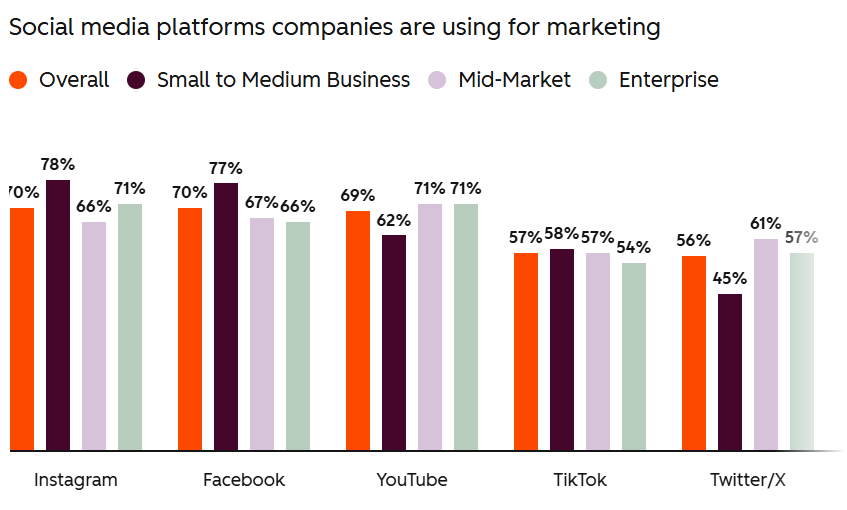
The numbers:
- Instagram remains top for engagement and lead gen
- 35% of marketers actively repurpose content across channels to increase reach
What to do next month:
Stop creating platform-specific content from scratch. Build one quiz video concept, then repurpose it across:
- Instagram Reels (broad reach)
- TikTok (viral potential)
- YouTube Shorts (long-term discoverability)
- Email newsletters (embedded video)
- Blog posts (SEO boost)
AI tools can automate 80% of the reformatting. You just adapt the hook for each platform's culture.
Theme 3: Nail the 30-90 Second Window
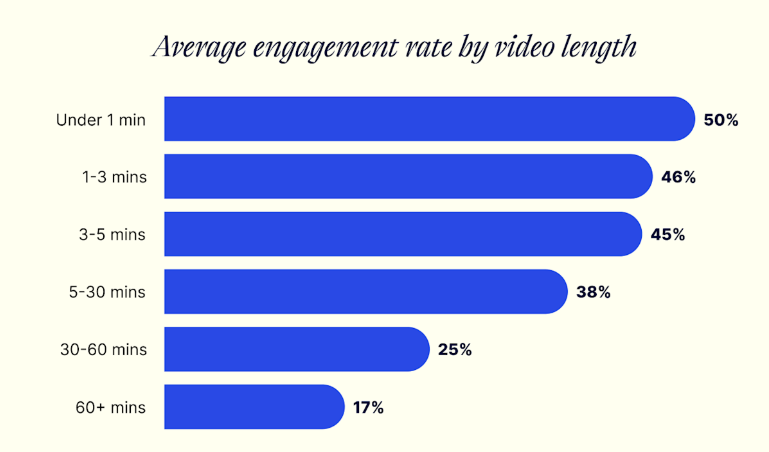
The numbers:
- Videos under 1 minute have ~50% engagement rates
- Videos between 30-60 minutes convert best, but short-form drives top-of-funnel discovery
What to do next month:
Keep quiz videos between 30-90 seconds. Structure them like this:
- 0-3 seconds: Hook ("Can you guess...?")
- 3-60 seconds: 3-5 rapid-fire questions with timed reveals
- 60-90 seconds: Shareable result + CTA
If you need more depth, break it into a series ("Part 1 of 3"). Don't stretch one video past 90 seconds—you'll lose them.
For additional facts, refer to this report.
The winners in 2026 aren't creating more content. They're creating smarter content—short, personalized, multi-platform, and built with AI. Quiz videos check every box.
A Simple First Step
You don’t need to overhaul your entire content strategy today.
Try turning one of your existing posts into a simple trivia question, like a ‘True or False trivia’, and see how people respond. It’s often the fastest way to test whether interactive content fits your audience.
Turn ideas into reality with Trivia by Typito AI
You’ll likely find that when you stop talking at your audience and start talking with them, the results speak for themselves.
People Also Ask
Q1. Which platforms work best for quiz videos?
Answer: They perform best on mobile-first platforms like Instagram Reels, TikTok, and even internal messaging apps like Slack or Microsoft Teams.
Q2.How long does it take to create an AI quiz video?
Answer: Most tools generate a complete quiz video in minutes once you input your topic or script. With Trivia by Typito, you can create a fully-produced trivia video in less than 5 minutes. Customization adds a few more minutes depending on how much you personalize.
Q3. Do quiz Reels get more comments than regular Reels?
Answer: Yes. Quiz Reels drive 2-3x more comments because they invite participation. Viewers drop guesses, debate answers, and tag friends.
Q4. How many questions should a quiz Reel have?
Answer: 3-5 questions max for 30-90 second videos. More questions = lower completion rates. Keep it snackable.
Q5. Should answers go in comments or captions?
Answer: In the video itself. Reveal answers after 3-5 second pauses. Use comments to encourage guesses before the reveal.