
Someone always says it halfway through a game night:
“We should do some trivia.”
What follows usually falls into one of two categories - an unforgettable night full of laughs, rivalries, and loud “NO WAY” moments… OR a confusing quiz that fizzles out before halftime.
Sports trivia works because people already care. They remember the goals, the buzzer-beaters, the heartbreak losses, and the legendary comebacks. The trick isn’t finding questions, it’s turning that shared sports obsession into an experience people actually enjoy.

In this guide, we’ll show you how to host a sports trivia night that feels fun, fast-paced, and memorable. So the next time you’re entertaining friends at home, running a bar quiz, planning a team event, or creating trivia content for Instagram, you’ll host a sports trivia like a PRO. No overcomplicated rules. No awkward silences. Just trivia that hits.
What’s ahead?
- Occasions That Deserve an Epic Sports Trivia Night
- How to Host a Sports Trivia Night Like a Pro
- How to do a sports trivia with Typito in three easy steps
- Do’s and Don’ts of Creating Sports Trivia
Occasions when you can plan your next epic sports trivia night
1. Tournament Season: Next tournament season, be it the La Liga, the NBA Finals or the Indian Premier League, invite your friends, colleagues, put out a bunch of merchandise, have a spread of snacks and drinks and throw a banger of sports trivia party.
2. Post/Pre/Halftime Screening of a Match: Planning a match viewing party? Throw in a short but spunky sports trivia before kickoff or during halftime to keep the energy buzzing.
3. Themed Birthday Parties: If you're throwing a birthday party for someone who is a sports nerd, put together a bunch of easy-to-medium questions, keep a scoreboard - you are all set.
4. Club or Bar Quiz Nights: Bars and clubs are a great place to host sports trivia night. Keep the questions hard, with confusing multiple-choice - the night is going to be a nail-biting, edge-of-the-seat thriller.
How to Host a Sports Trivia Night Like a Pro
A great sports trivia night doesn’t come from having the hardest questions. It comes from good pacing, clear rules, and questions that make people feel smart. Here’s how experienced hosts get it right every time.
1. Choose the Right Sport, Date, and Timing
Start with the obvious question: Who’s coming, and what do they actually care about?
If you’re hosting in the U.S., basketball, football, baseball, and soccer are safe bets - especially during playoffs or tournament season. The closer your trivia night is to a real event (NBA Finals, Super Bowl week, March Madness), the more invested people already are.
Timing matters more than you think:
- Avoid clashing with live games people care about
- Trivia works best before kickoff, during halftime, or as a standalone event
- Weeknights: 60–75 minutes max
- Weekends: You can stretch closer to 90 minutes
Pro tip: If people keep checking scores on their phones, you picked the wrong time.
2. Build Questions That Feel Fun (Not Frustrating)
The fastest way to kill a trivia night is by making it feel like an exam.
A solid rule of thumb:
- 40% easy (confidence builders)
- 40% medium (real thinking required)
- 20% tough (for bragging rights)
Cover a mix of:
- Iconic players and teams
- Memorable moments
- Records people almost remember
- Pop-culture crossover moments (commercials, celebrations, controversies)
Avoid ultra-niche stats unless you know your audience is hardcore. Most players want to say “Ohhh, I remember that!” feeling, not silent panic.
3. Structure the Game Before You Start
Nothing derails a trivia night faster than confusion halfway through.
Before the first question:
- Explain how many rounds there are
- Set time limits per question
- Decide phone rules upfront
- Clarify scoring and tie-breakers
A simple structure that works well:
- 4–5 rounds
- 5–7 questions per round
- One bonus or double-points round near the end
Pro tip: Save your most exciting round for last.
4. Run the Room, Not Just the Quiz
Hosting is half performance, half logistics.
Keep things moving. React to answers. Tease upcoming questions. Read the room. If energy dips, speed up. If debates start, let them breathe for a moment (that’s part of the fun).
You don’t need to be loud or flashy, just confident and clear.
And always, always celebrate the winners. Even small prizes or bragging rights go a long way.
Want to Skip the Heavy Lifting? Turn It Into a Trivia Video
If creating questions, slides, and pacing feels like too much, especially when you’re short on time, video trivia simplifies everything.
A sports trivia video removes the two biggest problems with traditional trivia: explaining rules and keeping energy up. With timers, visuals, and voiceovers built in, players don’t need instructions — they just watch, think, and play.
Instead of juggling decks, timers, and scoreboards, you can:
- Generate questions instantly
- Keep visuals consistent
- Run trivia on screens, social media, or even Instagram Stories
This is especially useful if you want your trivia night to be repeatable, shareable, or online-friendly.
Here’s how to create a polished sports trivia video using a video trivia maker, without turning it into a production project.
How to make a video Sports Trivia with timers and voiceovers
Instead of building everything from scratch, begin with a ready-made trivia template that already includes:
- On-screen timers
- Clear question layouts
- Answer reveal moments
- Built-in pacing between questions
1. Start With a Video-First Trivia Template
Every strong sports trivia video starts with structure and pacing.
Using a video trivia maker like Trivia by Typito, begin with a template designed specifically for trivia videos. These templates already include:
- Built-in countdown timers
- Clear question and answer layouts
- Smooth transitions between questions
- Space for voiceovers and sound cues
Once logged in, you can either start from scratch or choose a ready-made trivia recipe. Pick a theme and font style that feels bold and readable, sports trivia works best when everything is instantly clear on screen.
This step defines how to choose the template for the video
2. Generate Sports Trivia Questions
Now comes the creative part.
Enter your sports trivia idea in the topic box — this could be:
- A specific sport (NBA, NFL, baseball)
- A season or year
- A tournament or rivalry theme
Generate prompts, select the one that best fits your idea, and choose:
- Number of questions
- Difficulty level
- Timer length per question
Once generated, you’ll see a fully playable trivia video — questions, timers, and transitions included. From here, fine-tune the experience:
- Adjust wording for clarity
- Tweak visuals and pacing
- Swap questions to balance difficulty
Think like a viewer: Would I stay till the last question?
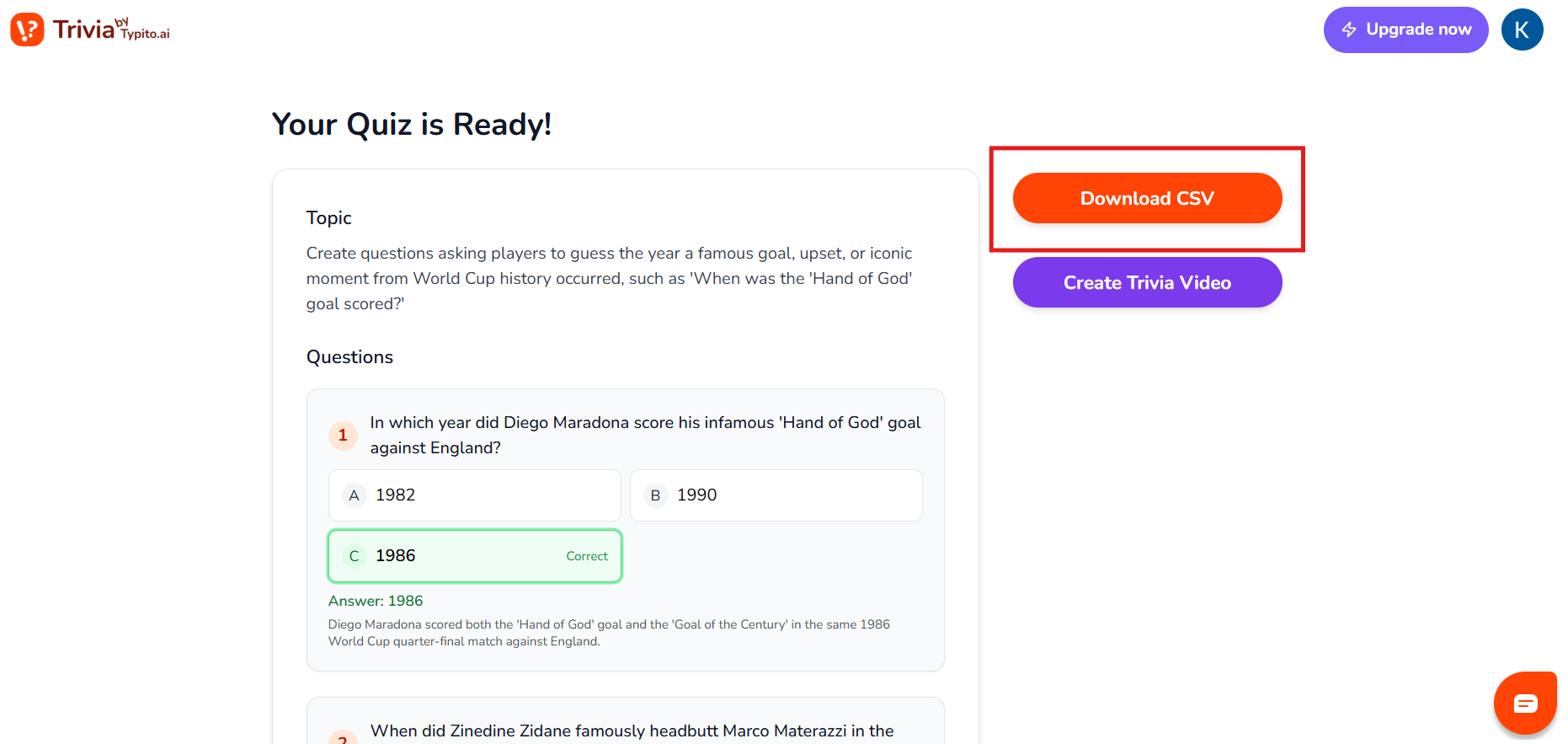
This step defines how to generate the questions and the trivia video.
Note: You can also download the questions as a CSV file. Editing the questions is so much easier this way. Try it for yourself by clicking this button.
3. Review and make those final touches
A clear, energetic voice cueing players through questions and countdowns makes the video feel guided — not static. Review the full video carefully:
Check question accuracy
Ensure timers feel fair (not rushed)
Confirm answers are clearly revealed
Small tweaks here go a long way in keeping engagement high.
This step define how you can preview the video and download it.
4. Download and Share Anywhere
Once you’re happy with the final cut, export the video and share it wherever your audience is:
- Instagram Reels or Stories
- Watch parties and events
- Office screens or bar nights
- Group chats and community channels
Because the trivia is already timed and voiced, viewers don’t need instructions; they just jump in and play.
A finished video sports trivia feels less like a quiz and more like a mini game show, with questions on screen, a ticking clock, smooth transitions, and satisfying answer reveals.
Here’s what the final trivia video will look like.
This is how the final trivia video will look like.
Why Video Trivia Outperforms Static Trivia
Static trivia (slides, paper quizzes, text posts) depends heavily on the host. If the host stumbles, the energy drops.
Video trivia, on the other hand:
- Keeps pacing consistent with built-in timers
- Reduces confusion with on-screen instructions
- Feels more like a game show than a quiz
- Works equally well in-person and online
- Is instantly shareable across platforms
For creators and hosts alike, video trivia scales better — you build it once and reuse it anywhere.
Do’s and Don’ts of Creating Sports Trivia
- Keep a mix of questions Blend easy, medium, and tough ones so everyone feels included — from casual fans to die-hard followers.
- Make sure questions are accurate and verified Sports fans will debate anything that feels off, so double-check facts, dates, and records to avoid arguments mid-game.
- Add bonus rounds or double-point moments Unexpected scoring twists keep the excitement high and give trailing teams a chance to catch up.
- Use varied question types Mix things up with picture clues, audio clips, “guess the player from hints,” rapid fire, true/false, and buzzer rounds to keep players on their toes.
- Avoid overly technical or niche stats Super-specific data can frustrate most players; aim for questions that are challenging but still enjoyable.
- Keep language simple and clear Write questions in a quick, clean way so players focus on thinking — not trying to decode what the question means.
With this handbook, you are ready to host a trivia night for the ages. Scan a sports calendar and start preparations right now. Click below to create your first sports trivia video with Typito.
Answering your FAQs About Sports Trivia Nights
1. How long should a sports trivia night be?
A sports trivia night should ideally last 60 to 90 minutes. For casual gatherings, 60–75 minutes keeps energy high. Larger events or bar trivia can run closer to 90 minutes with breaks between rounds
2. How many questions are best for a sports trivia night?
Most successful trivia nights include 25–35 questions, split across 4–5 rounds. This keeps the game engaging without overwhelming players.
3. What makes a good sports trivia question?
A good sports trivia question is clear, accurate, and memory-driven. The best questions spark recognition (and not confusion) and don’t rely on overly technical or obscure statistics.
4. Can I host a sports trivia night online or on Instagram?
Yes. Many hosts now run sports trivia nights online or through Instagram Stories, Reels, or live sessions. Video-based trivia works especially well for remote teams, creator audiences, and social media engagement.
5. Do I need prizes for a sports trivia night?
Prizes aren’t required, but they help (who doesn’t love getting a gift). Even small rewards, gift cards, merch, or bragging rights (like a cool t-shirt or a photo on the wall-of-fame) increase competitiveness and participation.
6. Are free sports trivia templates available?
Yes. Many platforms offer free sports trivia templates that include pre-built questions, formats, and visuals, making it easier to host without starting from scratch. We’ve built one for you here, it's our free sports trivia make for you.