At a glance: A practical, creator-first guide to building quiz lead magnets that turn scrolls into segmented leads, without PDFs or complex funnels.
Jump to a section:
- What is a quiz lead magnet?
- Why quiz lead magnets outperform traditional downloads
- Types of quiz lead magnets that convert
- Step-by-step: How to create a quiz lead magnet
- Real Quiz Lead Magnet Examples by Industry
- How to turn your quiz lead magnet into a video
- Distribution strategies for quiz lead magnets
- Common mistakes to avoid
- Quiz Lead Magnet FAQs
You spent weeks writing the perfect e-book. You designed a beautiful cover. You set up the landing page.
Then, you waited. And the download numbers were… underwhelming.
The problem isn't your content; it's the friction. In a world of infinite scroll, asking someone to download, open, and read a 20-page PDF is a big ask.
Marketing has shifted. Passive consumption is out; active participation is in.
To capture attention today, you need to offer immediate value and personalization. That's exactly why smart marketers are pivoting to interactive lead magnets, and specifically, quiz-based ones.
Here's how to create a quiz lead magnet that people actually want to finish.
What Is a Quiz Lead Magnet?
A quiz lead magnet is an interactive piece of content that trades personalized answers or entertainment for contact information.
Unlike a static checklist or whitepaper, a quiz requires the user to participate. They answer questions about their preferences, knowledge, or personality.
In exchange, you provide them with a customized result, and you get a qualified lead with data points you can use for segmentation later in your quiz funnel.
What makes a quiz a good lead magnet?
A quiz works as a lead magnet because it leverages curiosity and ego. People naturally want to learn more about themselves or test their knowledge. By offering a personalized outcome, quizzes provide instant gratification, resulting in higher opt-in rates than generic, one-size-fits-all downloads.
Why Quiz Lead Magnets Outperform Traditional Downloads
Traditional lead magnets are transactional: "Give me your email, I'll give you this file."
Quiz lead magnets are conversational. They start a dialogue before you ever send the first email.
Multiple industry studies and creator case studies consistently show quizzes outperform PDFs on completion and engagement, particularly on mobile.
Higher Completion Rates
Clicking "download" is easy, but reading is hard. Quizzes hook users immediately. Once a user answers the first question, the "sunk cost" bias kicks in, they want to finish to see their results.
Built-in Shareability
Nobody shares a PDF invoice. People share results that make them look smart, funny, or self-aware.
When a user gets a result like "You're a Strategic Visionary," they're likely to post that on social media. This turns your lead generation quiz into a viral loop.
Personalized Value
A PDF gives the same advice to everyone. A quiz says, "Based on your answers, here's exactly what you need."
This perceived value is massive. It positions you not just as a content creator, but as a consultant giving tailored advice.
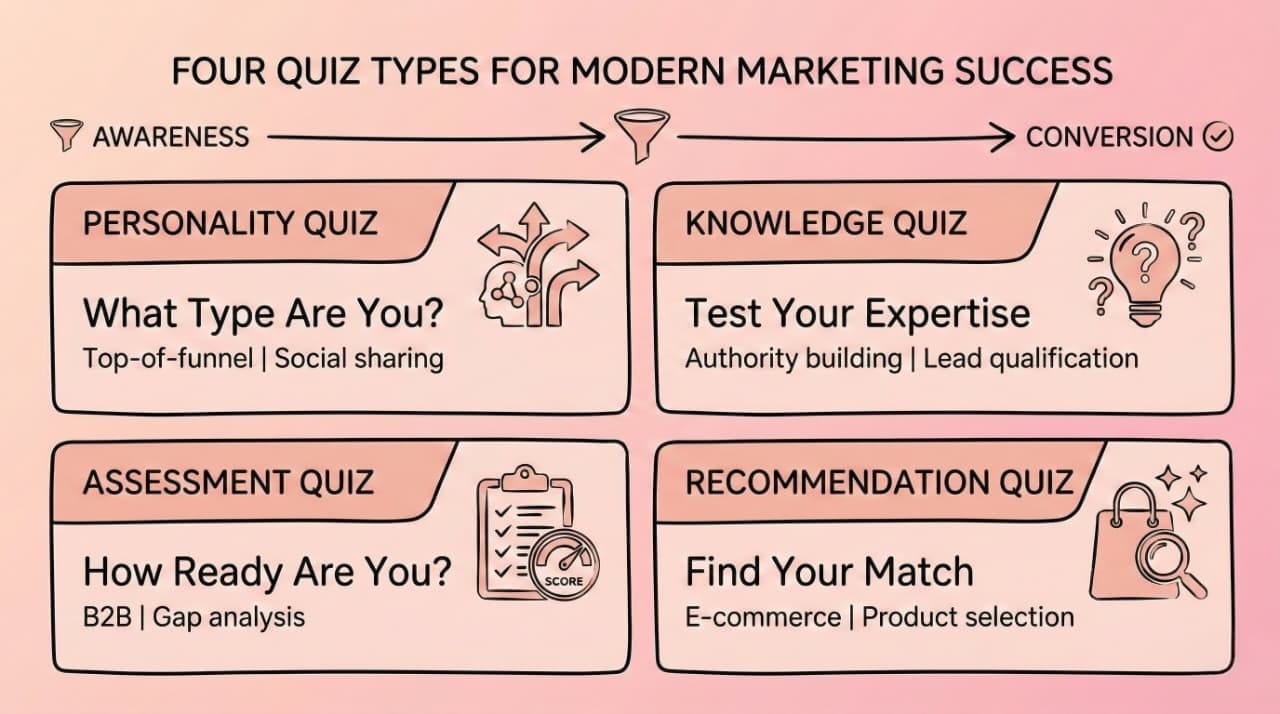
4 Types of Quiz Lead Magnets That Convert
Before you build, you must choose the right engine for your goal.
1. Personality Quizzes ("What Type of X Are You?")
Best for: Top-of-funnel awareness and social sharing.
Concept: Categorize users based on their traits.
Example: "Which 'Friends' Character Is Your Brand Voice?" or BuzzFeed's "What City Should You Actually Live In?"
Why it works: Pure ego bait. It's fun, low-stakes, and highly shareable.
2. Knowledge/Trivia Quizzes
Best for: Establishing authority and qualifying expertise.
Concept: Test how much the user knows about a specific topic.
Example: "How Much Do You Actually Know About SEO?" or HubSpot's "How Much Do You Know About Inbound Marketing?"
Why it works: Challenges the user. If they score low, your product is the solution. (Check out these video trivia post ideas for inspiration on how to visualize this.)
3. Assessment Quizzes ("How Ready Are You?")
Best for: B2B and high-ticket consulting.
Concept: Diagnose a problem and offer a score.
Example: "Is Your Business Ready to Scale to 7 Figures?" Similar to how Marie Forleo uses business readiness assessments.
Why it works: It acts as a diagnostic tool. The result usually highlights a gap that your service fills.
4. Outcome/Recommendation Quizzes
Best for: E-commerce and product selection.
Concept: Act as a personal shopper.
Example: "Which Skincare Routine Fits Your Morning Schedule?" or Function of Beauty's "Hair Profile Quiz"
Why it works: It removes decision paralysis by narrowing down choices.
Step-by-Step: How to Create a Quiz Lead Magnet
You don't need complex coding skills to build this. You just need a strategy.
1. Define Your Goal & Audience Segment
Don't just say "I want leads." Be specific.
- Are you segmenting buyers from browsers?
- Are you trying to sell a specific course?
- Action: Write down the one specific problem your quiz solves for one specific persona.
2. Choose the Right Quiz Format
Refer to the section above. If you're selling skincare, do a Recommendation Quiz. If you're selling sales training, do an Assessment Quiz.
3. Write Compelling Questions (Quality > Quantity)
Keep it short. 5 to 7 questions is the sweet spot.
- The Hook: The first question should be easy to answer (e.g., "Male or Female?", "Beginner or Pro?").
- The Meat: Ask questions that help you diagnose their problem.
- The Voice: Keep it conversational. Avoid corporate jargon.
4. Design Valuable Results/Outcomes
This is the most critical step. The "Result" page is what they "paid" for with their email address.
- Don't: Just give a score (e.g., "You got 5/10").
- Do: Give context and a next step (e.g., "You're a Rookie! You have potential, but you need to master the basics. Start with this free guide...").
5. Set Up Your Lead Capture Strategy
Decide when to ask for the email.
● Option A (Gate the Results): Users must enter email to see the answer. (Higher conversion, lower quality leads).
● Option B (Optional Opt-in): Show results, but offer a detailed report via email. (Lower conversion, higher quality leads).
For creators selling higher-ticket offers, Option B almost always performs better because it filters out curiosity-only leads.
6. Optimize the Post-Quiz Experience
The quiz is just the handshake. What happens next in your quiz funnel?
Each result should map to one clear next action, not five links and a wall of text.
● Redirect them to a relevant offer page.
● Trigger an automated email sequence based on their specific result bucket.
Real Quiz Lead Magnet Examples by Industry
Here's exactly how different creators and businesses use quizzes to drive leads and how you can replicate it.
E-commerce & DTC Brands
Concept: The "Personal Stylist"
Quiz: "Find Your Perfect Running Shoe in 3 Minutes"
Why it converts: The quiz replaces endless product scrolling with guided selection. Users feel understood, not sold to—which increases conversion and lowers returns.
How creators can use this as a video: Turn each question into a short Reel ("Road running or trail?") with a timer and CTA linking to the full quiz in bio.
Coaches & Consultants
Concept: The "Gap Analysis"
Quiz: "What's Your Leadership Style?"
Why it works: It validates the user's strengths while subtly pointing out weaknesses that coaching can resolve.
SaaS & B2B
Concept: The "Maturity Model"
Quiz: "Grade Your Cyber Security Stack"
Why it works: It scares the user slightly by showing vulnerabilities, making the software solution feel urgent.
Content Creators & Educators
Concept: The "Curiosity Gap"
Quiz: "What Movie Character Matches Your Vibe?"
Why it works: Highly visual and fun. Creators can use quiz video formats to engage audiences on Instagram before pitching a film course.
How to Turn Your Quiz Lead Magnet Into a Video
Static quizzes on a website are great. But video quizzes on social media are explosive.
Video platforms like TikTok, Reels, and YouTube Shorts are prioritizing interactive content. By turning your lead generation quiz into a video, you stop the scroll and reach users where they already hang out.
Why Video Quizzes Perform Better
● Visual Retention: The brain processes visual information significantly faster than text, making video quizzes more engaging and memorable.
● Algorithm Love: High retention (people watching to the end to see the answer) signals quality to social algorithms.
● Mobile Native: Vertical video is the default consumption mode for your audience.
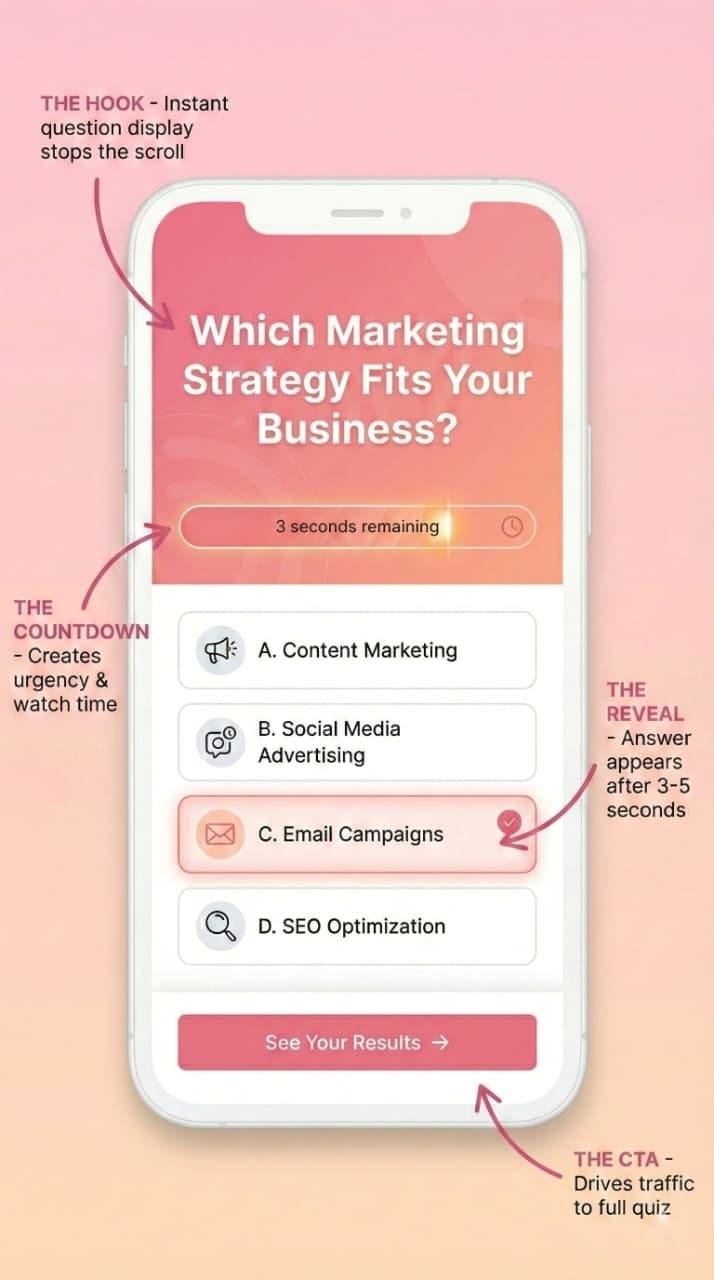
How to Structure a Video Quiz
- The Hook: Display the question on screen immediately (e.g., "Guess the Logo").
- The Countdown: Use a visual timer bar to create urgency.
- The Reveal: Show the answer after 3-5 seconds.
- The CTA: Tell them to click the link in your bio for the full quiz.
You don't need to be a video editor to do this. Tools like Typito's online video maker let you create engaging quiz videos in minutes using customizable templates. For even faster creation, Trivia by Typito AI can generate fully-formed quiz lead magnet examples from a single prompt, questions, animations, music, and voiceover included.
[See this example of a Trivia video in action]
This allows you to test different hooks quickly without hours of editing, making it perfect for marketers and creators who want to scale their interactive lead magnets efficiently.
Distribution Strategies for Quiz Lead Magnets
Building the quiz is half the battle. Now you need traffic. Distribution is where quizzes outperform static lead magnets, segmentation is the differentiator.
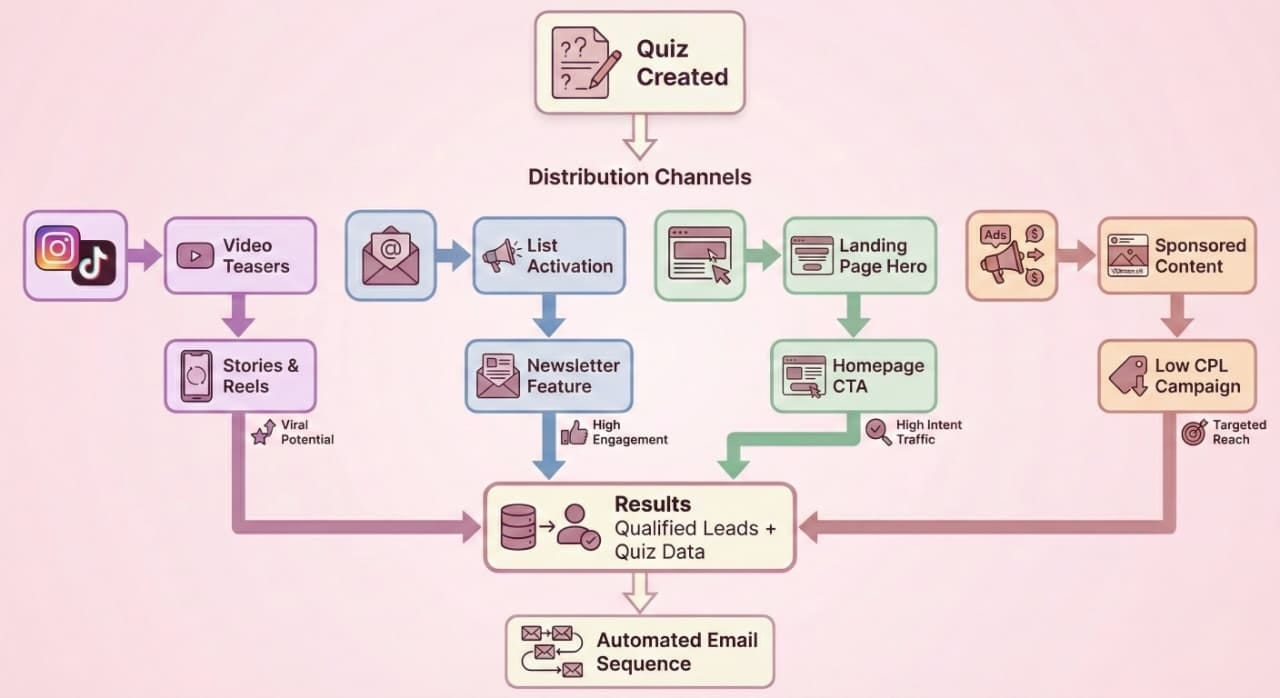
A successful quiz funnel leverages multiple touchpoints: social media teases curiosity, email revives dormant lists, and paid ads scale what's already working.
Alt Text
"Quiz distribution funnel diagram showing four parallel channels (social media, email, website, and paid ads) all feeding into lead generation and automated email sequences, with each channel marked by distinct colors and icons"
Social Media Posts & Stories
Don't just post "Take my quiz." Post a teaser.
- Stories: Use the "Poll" sticker to ask the first question of your quiz. Then link to the full quiz for the results.
- Reels/TikTok: Create a 15-second video version of one question (see above). Use Typito's vertical video editor to optimize for mobile formats.
- Look for inspiration: Check out interactive video examples to see how brands are driving engagement.
Email Campaigns
Revive your dead list. Send an email with the subject line:
"I bet you can't get 10/10 on this."
Link to a knowledge quiz relevant to your niche. The key advantage: segment respondents based on their quiz results to send highly targeted follow-up sequences that speak directly to their needs.
Landing Pages
Make the quiz the hero of your homepage. "Don't know where to start? Take the 2-minute assessment."
Paid Ads
Quizzes often lower Cost Per Lead (CPL) significantly because they look like content, not ads. "What's your skin type?" gets a cheaper click than "Buy our cream."
For video ads, you can resize your quiz videos to fit different ad formats across platforms, all in one click.
Common Mistakes to Avoid When Creating Quiz Lead Magnets
Even the best concept fails if the execution is clunky.
- Too Many Questions: If it takes more than 2 minutes, you'll lose them. Keep it under 7 questions.
- Generic Results: If everyone gets the same "Good job!" message, they'll feel cheated. Customize the copy based on their answers.
- Weak Value Proposition: "Sign up for our newsletter" is not a result. The result must give them insight into themselves.
- Poor Mobile Experience: 80% of users will take this on a phone. If they have to pinch and zoom, they're gone. When creating video versions, ensure they're optimized for mobile-first viewing using tools that support multiple aspect ratios.
Quiz Lead Magnet FAQs
Q1: How many questions should a quiz lead magnet have?
Answer: Aim for 5 to 7 questions. This gathers meaningful data and keeps users invested without causing drop-off before the lead capture form.
Q2: Do quiz lead magnets work for B2B?
Answer: Yes. B2B buyers love Assessment or Maturity quizzes that benchmark their company against industry standards. Keep the tone professional and insights actionable.
Q3: Should I gate the quiz or just the results?
Answer: Let users take the quiz first, then ask for email to see results. This leverages sunk cost fallacy, they've invested effort and want the payoff.
Q4: How do I create video versions of my quiz for social media?
Answer: Use tools like Typito for templates optimized for TikTok, Reels, and Shorts. Trivia by Typit AI generates complete quiz videos from a single prompt.
Q5: What's the best way to repurpose quiz content?
Answer: Turn top questions into standalone video snippets with timers and answer reveals. These perform exceptionally well as teaser content driving traffic to your full quiz.
Ready to Create Your Quiz Lead Magnet?
When you create a quiz lead magnet, you're not just collecting emails, you're starting conversations, gathering valuable data, and providing genuine value to your audience.
The key to success is combining strategic question design with the right distribution channels. And in 2025, video is non-negotiable. Whether you're creating static web quizzes or dynamic video content for social media, the principles remain the same: make it engaging, make it valuable, and make it shareable.
Start with one quiz. Test it. Refine it. Then scale it across your quiz funnel to turn those passive scrollers into your most engaged leads yet.