At a glance: 15+ formats to drive active student participation
You spend hours building the perfect review quiz. You present it to the class, and what happens? Half the room zones out.
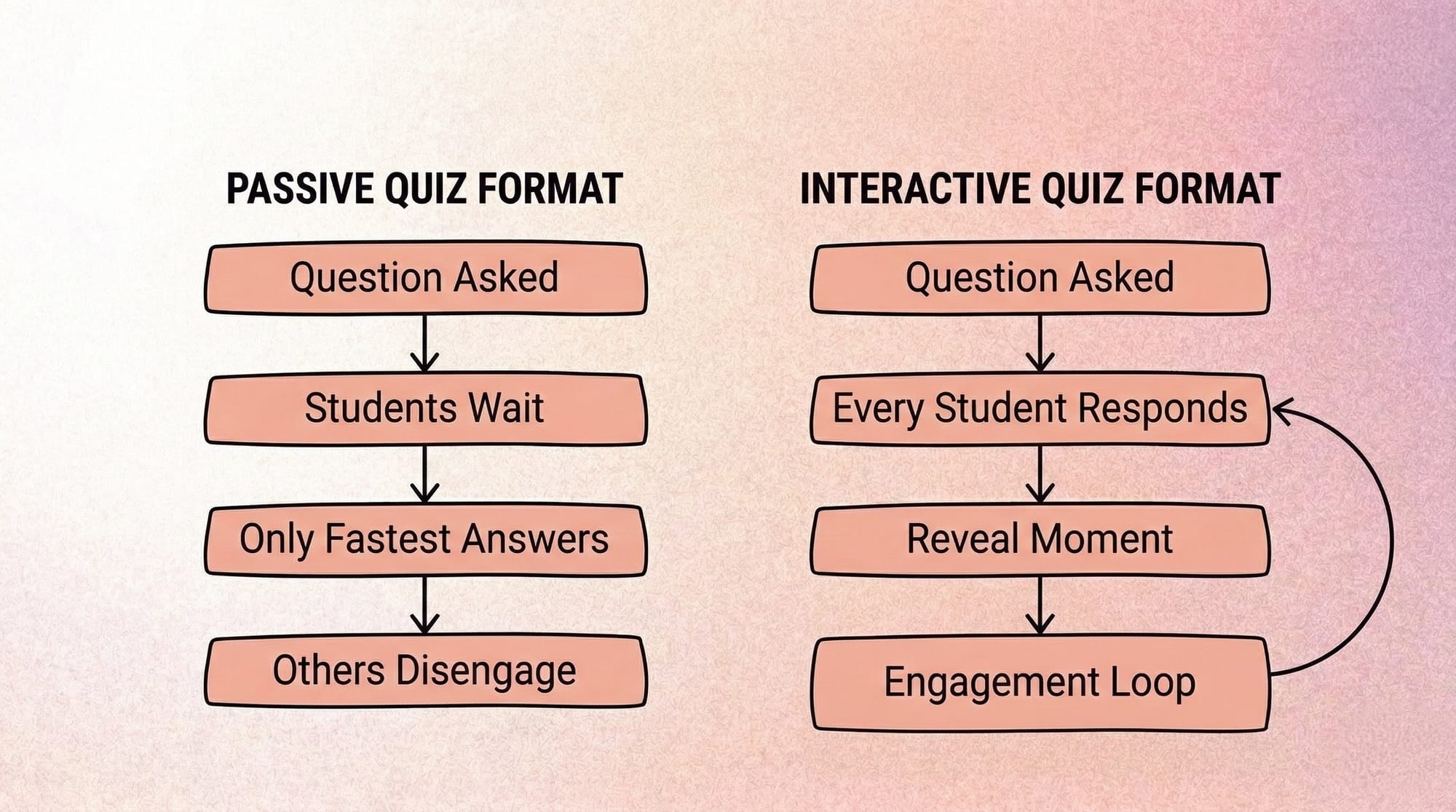
Most teachers already run quizzes. The problem is not your effort. It is the format. In most classrooms, passive quiz formats only require the fastest student to respond everyone else can sit quietly and wait.
Format is the actual lever for participation, not the content itself. When you adapt your material into fun quiz formats for teachers, engagement follows naturally.
Below are 15+ quiz formats (no-tech, low-tech, game-show, collaborative, async/video) plus a simple framework to pick the right one in seconds.
Each format below is organized by energy, prep time, and tech access so you can pick the right one in seconds.
Jump to a section:
- Why interactive classroom quizzes increase participation
- Quick comparison: interactive quiz formats (prep, tech, participation)
- 15+ interactive classroom quiz ideas (low-prep + tech options)
- How to choose a classroom quiz format (time, energy, devices)
- FAQs about interactive classroom quizzes
Why interactive classroom quizzes increase participation
Passive quizzes often fail in real classrooms because only a few students do the work out loud. Interactive formats create a participation loop: everyone commits to an answer, then the reveal moment creates attention and discussion.
When you ask a question to a silent room, students can opt out. When you require physical movement or peer collaboration, opting out becomes much harder.
The best interactive learning activities do not require rewriting your curriculum. They just require changing how the student interacts with the question.
Audit your current quizzes against this participation checklist:
- Does it require a decision, not just a recall?
- Does every student respond, not just the fastest?
- Is there a reveal moment or social hook?
- Can it be reused or adapted?
- Is it safe to be wrong? Participation dies when wrong answers feel risky.
Quick comparison: interactive quiz formats (prep, tech, participation)
15+ interactive classroom quiz ideas (low-prep + tech options)
You don't need a new app to get participation. Start with formats that force a visible commitment movement, written answers, or team consensus.
No-Tech Quiz Ideas (Works Anywhere)
You do not need WiFi to capture attention. These low-prep classroom activities work in any room, any day.
1. Four Corners
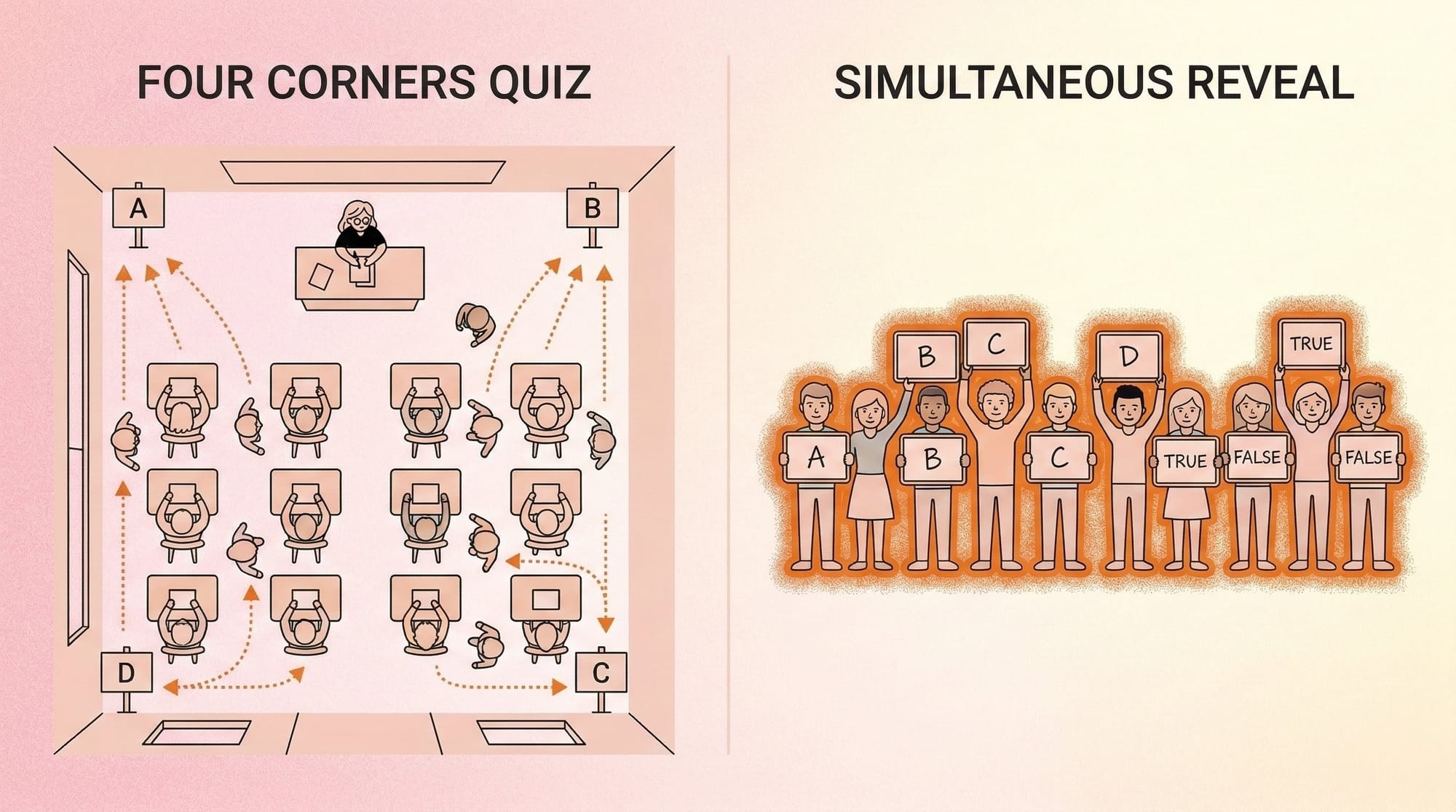
Assign A, B, C, and D to different corners of the room. Read a question, and students must physically walk to the corner representing their answer.
- What you need: 4 corner signs
- Best for: High energy levels / Full class
- Time: 3–6 minutes
2. Whiteboards Around the Room
Give every student a mini-whiteboard. Read the prompt, give them 10 seconds to write, and have everyone reveal their answers simultaneously.
- What you need: Mini-whiteboards, markers
- Best for: Quiet focus / Immediate assessment
- Time: 5–8 minutes
3. Pass the Question (Snowball)
Write questions on paper, crumple them up, and have students toss them around the room. Whoever catches the snowball reads and answers the prompt.
- What you need: Scrap paper
- Best for: Friday afternoons / Small groups
- Time: 4–7 minutes
- Tip: Set a 10-second throw window, then stop and reset. This keeps energy focused and prevents chaos.
4. Quiz Relay
Line teams up in front of the board. The first student writes an answer, passes the marker like a baton, and heads to the back of the line.
- What you need: Whiteboard markers
- Best for: Vocabulary review / High energy
- Time: 5–10 minutes
Low-Tech Quiz Ideas (One Device or Slides)
Turn a basic slide deck into a participation magnet without rebuilding everything from scratch.
5. This or That Slides
Show two opposing options on a slide. Have students point left or right, stand or sit, or hold up a colored card to vote for their choice.
- What you need: Basic slide deck
- Best for: Quick pulse checks / Large lectures
6. Progressive Image Reveal (Zoom-Out Guessing)
Display a zoomed-in image on your projector. Slowly zoom out slide by slide until a student correctly identifies the concept. Also known as a progressive reveal or zoom-out reveal a format with strong visual search intent.
- What you need: Slide deck with cropped images
- Best for: Visual subjects / Concept identification
7. Countdown Reveal
Display a question with a visible 10-second timer. Teams must lock in their written answers before the timer hits zero to earn points. Have students commit answers on whiteboards, paper slips, or by holding up fingers any method that makes responses visible before the reveal.
- What you need: Slide with an embedded timer
- Best for: Pacing slow classes / Mid-energy
8. Before/After Reveal
Show a historical event, scientific process, or math equation. Ask students to predict the outcome before clicking to the next slide to reveal the result.
- What you need: Two-part slide transitions
- Best for: Sequential learning / Concept introduction
Competitive and Game-Show Quiz Formats
Healthy competition drives focus. These classroom quiz games add stakes without making low-performers feel excluded.
9. Desk Buzzer Rounds
Divide the room into teams. Give each team a squeaky toy or assign a desk-tapping sound to act as their buzzer to answer first.
- What you need: Makeshift buzzers
- Best for: Fast recall / Review days
10. Jeopardy-Style Boards
Create a grid of categories and point values. Let teams strategize and choose which questions to tackle together.
- What you need: Grid template on the board or screen
- Best for: Comprehensive unit reviews
11. Team Elimination
Ask progressively harder questions. If a team gets it wrong, they are frozen for one round but can still help other teams for partial points.
- What you need: List of tiered questions
- Best for: Building resilience / High stakes
12. Lightning Rounds
Put 60 seconds on the clock. Fire off as many rapid-fire questions as possible to a single team while the rest of the class fact-checks.
- What you need: Stopwatch, list of short questions
- Best for: End of class wrap-ups / High energy
Collaborative and Discussion-Based Quiz Formats
Sometimes the best interactive classroom quiz ideas require conversation, not just a correct answer.
13. Think-Pair-Share Trivia
Give students 30 seconds to think alone, 60 seconds to debate with a partner, and then have the pair submit a final, unified answer.
- What you need: Complex questions
- Best for: Deep critical thinking / Introverted students
14. Group Consensus Quiz
Provide a short quiz to a table of four. The catch: they can only submit one paper, and every person at the table must agree on the final answers.
- What you need: Printed quizzes
- Best for: Team building / Process-focused assessment
- Grading note: Grade the process, not just correctness. Reward evidence of discussion and reasoning.
15. Debate-the-Answer
Present a question where two answers could technically be correct. Force students to debate and defend why their choice is the most accurate.
- What you need: Ambiguous or advanced prompts
- Best for: Advanced placement / Discussion-heavy classes
- Use sparingly: Set clear debate rules upfront time limits per speaker and structured turn-taking to keep the discussion productive.
Async and Video-Based Quiz Formats
Learning does not stop when the bell rings. Video formats make quizzes accessible for students who missed class or learn better at their own pace.
16. The Shareable Video Quiz (Reels or LMS)
Turn your quiz into a short, vertical video. Post it to your classroom LMS for students to answer in a discussion thread, or share to a classroom social account if your school policy allows it.
- What you need: A video maker, smartphone
- Best for (LMS): Homework extensions / Async review
- Best for (Social): Gen Z students / Mobile-first engagement
17. Flipped Classroom Trivia Video
Record a video-first quiz format students can watch and respond to on their own time before introducing a new unit in class.
- What you need: Video platform, screen recording
- Best for: Homework extensions / Previewing concepts
18. Interactive Video Platforms (Pause-and-Answer)
Use interactive video platforms that pause a video automatically and require a student to answer a multiple-choice prompt before the video continues playing.
- What you need: Interactive video platform (pause-and-answer style)
- Best for: Deep async learning / Checking for understanding
If you're using video quizzes, keep them clean: one prompt on screen, a short timer, then a clear reveal. Save heavier explanations for after the reveal, not before.
If you want a repeatable workflow, using a video quiz template (timer + options + reveal) makes it easy to reuse the format across units. Tools like Trivia by Typito AI are one option for turning a question set into a ready-to-share quiz video asset.
How to choose a classroom quiz format (time, energy, devices)
Not every format fits every lesson. To keep trivia for students effective, match the quiz style to the room's current dynamic.
FAQs about interactive classroom quizzes
Q1: What are the best interactive quiz ideas for low-prep teachers?
Answer: The best low-prep interactive quizzes require zero technology. Formats like Whiteboards Around the Room, Four Corners, and Pass the Question take under five minutes to prepare. You only need a list of questions and basic classroom supplies to get started immediately.
Q2: How do I make a quiz more engaging without technology?
Answer: Make quizzes physical and collaborative. Require students to stand up, move to different sides of the room, or debate answers with a partner. Adding movement, strict time limits, and peer discussion instantly transforms a boring paper quiz into a highly engaging classroom activity.
Q3: What quiz formats work for remote or hybrid classrooms?
Answer: Async video quizzes, shared slide decks, and digital countdown reveals work well for hybrid environments. Video-based trivia is especially effective because remote students can participate on their own time while still feeling connected to the classroom experience.
Q4: Can classroom quizzes be turned into shareable content?
Answer: Yes. Many educators adapt their classroom quizzes into vertical video formats like Reels or Shorts. By using video templates, you can easily turn multiple-choice questions into engaging, shareable content that students interact with directly on their phones.
Q5: What is the difference between a quiz game and interactive trivia?
Answer: A quiz game usually focuses on competitive scoring and fast recall in a classroom setting. Interactive trivia often incorporates rich media, async participation, and social sharing, allowing students to engage with the material at their own pace through video or digital platforms.
Q6: What are some quick formative assessment strategies?
Answer: Whiteboards Around the Room, Four Corners, Think-Pair-Share, and Countdown Reveal are all strong formative assessment tools. They give you instant visibility into class understanding without the prep overhead of a formal quiz. Aim for formats where every student responds at the same time that's your clearest signal of where the class actually is.
Simple Formats or Video-First: How to Know Which Fits Your Class
The best quiz format isn't the fanciest it's the one that gets every student to commit to an answer. Start with no-tech formats when you need instant participation (whiteboards, Four Corners, think-pair-share). Use slides when you want structure without extra tools.
If you want to learn to travel beyond class time, experiment with a simple timed video quiz students can replay and respond to on their own schedule. Try one format this week, keep what works, and rotate the rest.